Install
openclaw skills install @hith3sh/mailerlite-email-marketingManage MailerLite email marketing campaigns, automations, subscribers, and e-commerce stores. Create campaigns, manage groups and segments, handle subscribers, and track e-commerce activity.
openclaw skills install @hith3sh/mailerlite-email-marketing
Manage MailerLite email marketing operations. Create campaigns and automations, manage subscribers and groups, handle e-commerce stores, and track performance with analytics.
This skill uses ClawLink for hosted connection flows and credentials so you do not need to configure MailerLite API access yourself.
| Step 1: Install | Step 2: Pair Account | Step 3: Connect MailerLite |
|---|---|---|
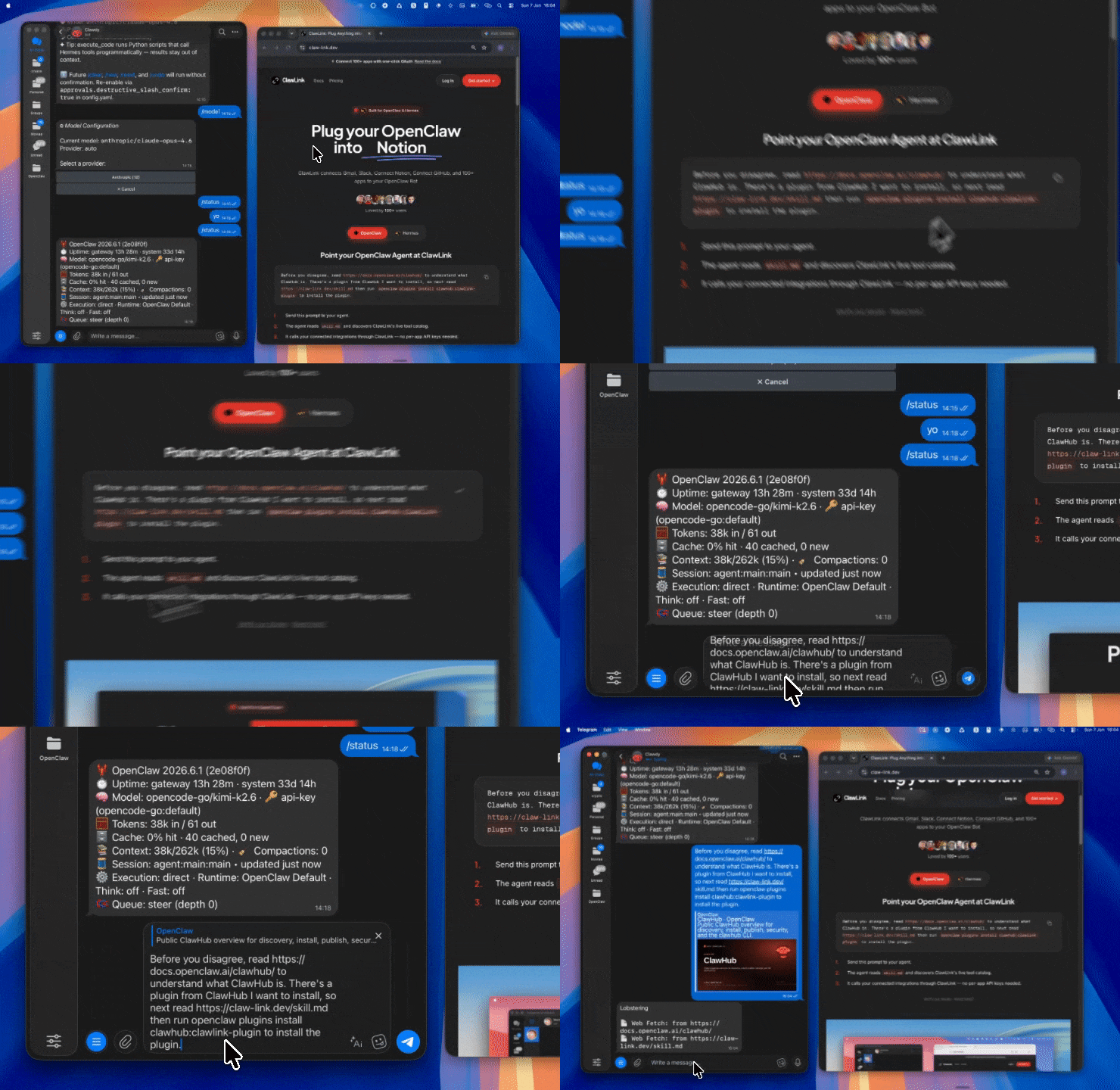 | 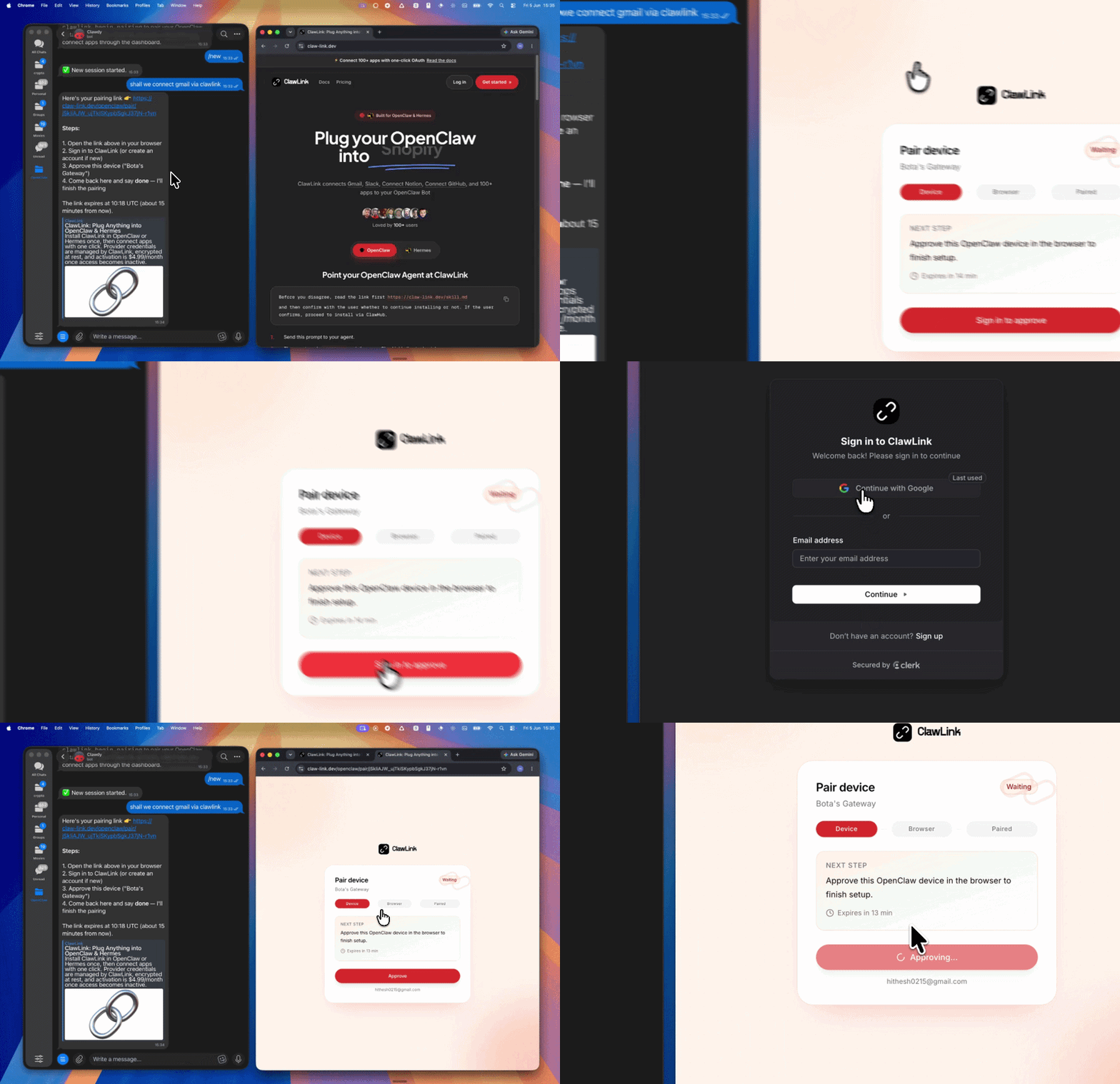 | App-specific connection GIF coming soon |
┌─────────────────┐     ┌──────────────┐     ┌──────────────────┐
│   OpenClaw      │────▶│   ClawLink   │────▶│ MailerLite API   │
│   (User Chat)   │     │   (OAuth)    │     │   (v2)          │
└─────────────────┘     └──────────────┘     └──────────────────┘
         │                       │                       │
         │  1. Install Plugin  │                       │
         │  2. Pair Device   │                       │
         │  3. Connect MailerLite│                     │
         │                   │  4. Secure Token      │
         │                   │  5. Proxy Requests    │
         │                   │                       │
         ▼                   ▼                       ▼
   ┌──────────┐      ┌──────────┐           ┌──────────┐
   │  SKILL   │      │ Dashboard│           │MailerLite│
   │  File    │      │ Auth     │           │ Marketing│
   └──────────┘      └──────────┘           └──────────┘
Install the verified ClawLink plugin from ClawHub. After the user confirms, complete the full setup so ClawLink tools are visible in the next OpenClaw chat.
openclaw plugins install clawhub:clawlink-plugin
openclaw config set tools.alsoAllow '["clawlink-plugin"]' --strict-json
openclaw gateway restart
Then tell the user: "OpenClaw has been restarted. Send /new as a standalone message to start a fresh chat, then ask for MailerLite again."
# Get account info
clawlink_call_tool --tool "mailerlite_get_account_info" --params '{}'

# List subscribers
clawlink_call_tool --tool "mailerlite_get_subscribers" --params '{}'

# List campaigns
clawlink_call_tool --tool "mailerlite_get_campaigns" --params '{}'
All MailerLite tool calls are authenticated automatically by ClawLink using the user's connected MailerLite account.
No API key is required in chat. ClawLink stores the OAuth token securely and injects it into every MailerLite API request on the user's behalf.
clawlink_begin_pairing if it is not configured yet.clawlink_list_integrations to verify the connection is active.clawlink_list_integrations
Response: Returns all connected integrations. Look for mailerlite in the list.
clawlink_list_tools --integration mailerlite
Response: Returns the live tool catalog for MailerLite.
If MailerLite tools are missing or the connection shows an error:
clawlink_list_integrations to verifyclawlink_list_tools --integration mailerlite| Tool | Description | Mode |
|---|---|---|
mailerlite_get_account_info | Get basic MailerLite account details and metadata | Read |
| Tool | Description | Mode |
|---|---|---|
mailerlite_get_subscribers | List subscribers with pagination | Read |
mailerlite_get_subscriber | Get subscriber details by ID | Read |
mailerlite_create_subscriber | Create or update (upsert) subscriber by email | Write |
mailerlite_update_subscriber | Update existing subscriber details | Write |
mailerlite_delete_subscriber | Permanently delete subscriber by ID | Write |
mailerlite_forget_subscriber | GDPR-compliant deletion (erases all data within 30 days) | Write |
| Tool | Description | Mode |
|---|---|---|
mailerlite_get_groups | List all subscriber groups | Read |
mailerlite_get_group | Get group details by ID | Read |
mailerlite_create_group | Create a new subscriber group | Write |
mailerlite_update_group | Update group name or settings | Write |
mailerlite_delete_group | Permanently delete a group and its associations | Write |
mailerlite_add_subscriber_to_group | Add subscriber to a group | Write |
mailerlite_remove_subscriber_from_group | Remove subscriber from a group | Write |
mailerlite_get_segments | List all subscriber segments | Read |
mailerlite_get_segment | Get segment details by ID | Read |
mailerlite_create_segment | Create a new segment with criteria | Write |
mailerlite_update_segment | Update segment configuration | Write |
mailerlite_delete_segment | Permanently delete a segment | Write |
| Tool | Description | Mode |
|---|---|---|
mailerlite_get_fields | List all custom fields | Read |
mailerlite_get_field | Get custom field details by ID | Read |
mailerlite_create_field | Create a new custom field | Write |
mailerlite_update_field | Update custom field properties | Write |
mailerlite_delete_field | Permanently delete a custom field | Write |
| Tool | Description | Mode |
|---|---|---|
mailerlite_get_campaigns | List all campaigns with pagination | Read |
mailerlite_get_campaign | Get campaign details by ID | Read |
mailerlite_create_campaign | Create a new email campaign draft | Write |
mailerlite_update_campaign | Update campaign settings and content | Write |
mailerlite_delete_campaign | Permanently delete a campaign | Write |
mailerlite_schedule_campaign | Schedule campaign for future sending | Write |
mailerlite_unschedule_campaign | Remove campaign from schedule | Write |
mailerlite_pause_campaign | Pause a sending campaign | Write |
mailerlite_resume_campaign | Resume a paused campaign | Write |
mailerlite_send_campaign | Send campaign immediately | Write |
mailerlite_clone_campaign | Clone an existing campaign | Write |
| Tool | Description | Mode |
|---|---|---|
mailerlite_get_automations | List all automations | Read |
mailerlite_get_automation | Get automation details by ID | Read |
mailerlite_create_automation | Create a new automation workflow | Write |
mailerlite_update_automation | Update automation settings | Write |
mailerlite_delete_automation | Permanently delete an automation | Write |
mailerlite_start_automation | Start an automation | Write |
mailerlite_stop_automation | Stop a running automation | Write |
| Tool | Description | Mode |
|---|---|---|
mailerlite_get_ecommerce_shops | List all connected e-commerce shops | Read |
mailerlite_get_ecommerce_shop | Get shop details by ID | Read |
mailerlite_create_ecommerce_shop | Connect a new e-commerce shop | Write |
mailerlite_delete_ecommerce_shop | Disconnect an e-commerce shop | Write |
mailerlite_get_ecommerce_customers | List customers in a shop | Read |
mailerlite_create_ecommerce_customer | Create or update customer | Write |
mailerlite_delete_ecommerce_customer | Delete customer from shop | Write |
mailerlite_get_ecommerce_products | List products in a shop | Read |
mailerlite_create_ecommerce_product | Add a new product | Write |
mailerlite_update_ecommerce_product | Update product details | Write |
mailerlite_delete_ecommerce_product | Delete product from shop | Write |
mailerlite_get_ecommerce_categories | List product categories | Read |
mailerlite_create_ecommerce_category | Create a product category | Write |
mailerlite_delete_ecommerce_category | Delete category from shop | Write |
mailerlite_add_product_to_category | Assign product to a category | Write |
mailerlite_get_ecommerce_orders | List orders in a shop | Read |
mailerlite_create_ecommerce_order | Create a new order | Write |
mailerlite_update_ecommerce_order | Update order status | Write |
mailerlite_delete_ecommerce_order | Delete order from shop | Write |
mailerlite_get_ecommerce_carts | List active carts | Read |
mailerlite_create_ecommerce_cart_item | Add item to cart (creates cart if needed) | Write |
mailerlite_delete_ecommerce_cart_item | Remove item from cart | Write |
| Tool | Description | Mode |
|---|---|---|
mailerlite_get_webhooks | List all webhooks | Read |
mailerlite_get_webhook | Get webhook details by ID | Read |
mailerlite_create_webhook | Register a new webhook URL | Write |
mailerlite_update_webhook | Update webhook settings | Write |
mailerlite_delete_webhook | Permanently delete a webhook | Write |
| Tool | Description | Mode |
|---|---|---|
mailerlite_execute_batch_request | Execute multiple API requests in one call (max 50) | Write |
clawlink_call_tool --tool "mailerlite_get_account_info" \
  --params '{}'
clawlink_call_tool --tool "mailerlite_get_subscribers" \
  --params '{"limit": 25}'
clawlink_call_tool --tool "mailerlite_create_subscriber" \
  --params '{"email": "newsubscriber@example.com", "name": "John Doe"}'
clawlink_call_tool --tool "mailerlite_create_campaign" \
  --params '{"subject": "Our Newsletter", "from_name": "My Company", "reply_to": "noreply@example.com"}'
clawlink_call_tool --tool "mailerlite_schedule_campaign" \
  --params '{"campaign_id": "CAMPAIGN_ID", "schedule_time": "2024-12-15T10:00:00+00:00"}'
clawlink_list_integrations to confirm MailerLite is connected.clawlink_list_tools --integration mailerlite to see the live catalog.clawlink_search_tools with a short query and integration mailerlite.┌─────────────────────────────────────────────────────────────┐
│ READ OPERATIONS (Safe) │
│ list → get → search → describe → call │
│ │
│ Example: List subscribers → Get details → Show results │
└─────────────────────────────────────────────────────────────┘
│
▼
┌─────────────────────────────────────────────────────────────┐
│ WRITE OPERATIONS (Require Confirmation) │
│ list → get → describe → preview → confirm → call │
│ │
│ Example: Preview campaign send → User approves → Send │
└─────────────────────────────────────────────────────────────┘
clawlink_describe_tool first.whenToUse, askBefore, safeDefaults, examples, and followups to shape the call.clawlink_preview_tool first.clawlink_call_tool. Pass confirmation only after the preview matches the user's intent.can_be_scheduled based on plan capabilities.can_be_scheduled=false on draft.forget_subscriber permanently deletes all data within 30 days.| Status / Error | Meaning |
|---|---|
| Tool not found | The tool name does not exist in the current catalog. Verify with clawlink_list_tools --integration mailerlite. |
| Missing connection | MailerLite is not connected. Direct the user to https://claw-link.dev/dashboard?add=mailerlite. |
| Permission error | The account lacks permission for this operation. |
| Subscriber not found | The subscriber ID or email does not exist. |
| Campaign not found | The campaign ID does not exist. Verify with mailerlite_get_campaigns. |
| Write rejected | User did not confirm a write action. Always confirm before executing writes. |
openclaw plugins list
/new as a standalone message to reload the catalog.openclaw config set tools.alsoAllow '["clawlink-plugin"]' --strict-json
openclaw gateway restart
/new again and retry.Powered by ClawLink — an integration hub for OpenClaw