Install
openclaw skills install @hith3sh/instantly-campaignsRun scalable cold email campaigns via Instantly.ai. Manage email accounts, build lead lists, create and activate multi-step outreach sequences, track analytics, and automate follow-ups with condition-based branching.
openclaw skills install @hith3sh/instantly-campaigns
Scale cold email outreach with Instantly.ai. Manage email accounts, build targeted lead lists, create multi-step sequences with condition-based branching, and monitor campaign performance with detailed analytics.
This skill uses ClawLink for hosted connection flows and credentials so you do not need to configure Instantly API access yourself.
| Step 1: Install | Step 2: Pair Account | Step 3: Connect Instantly |
|---|---|---|
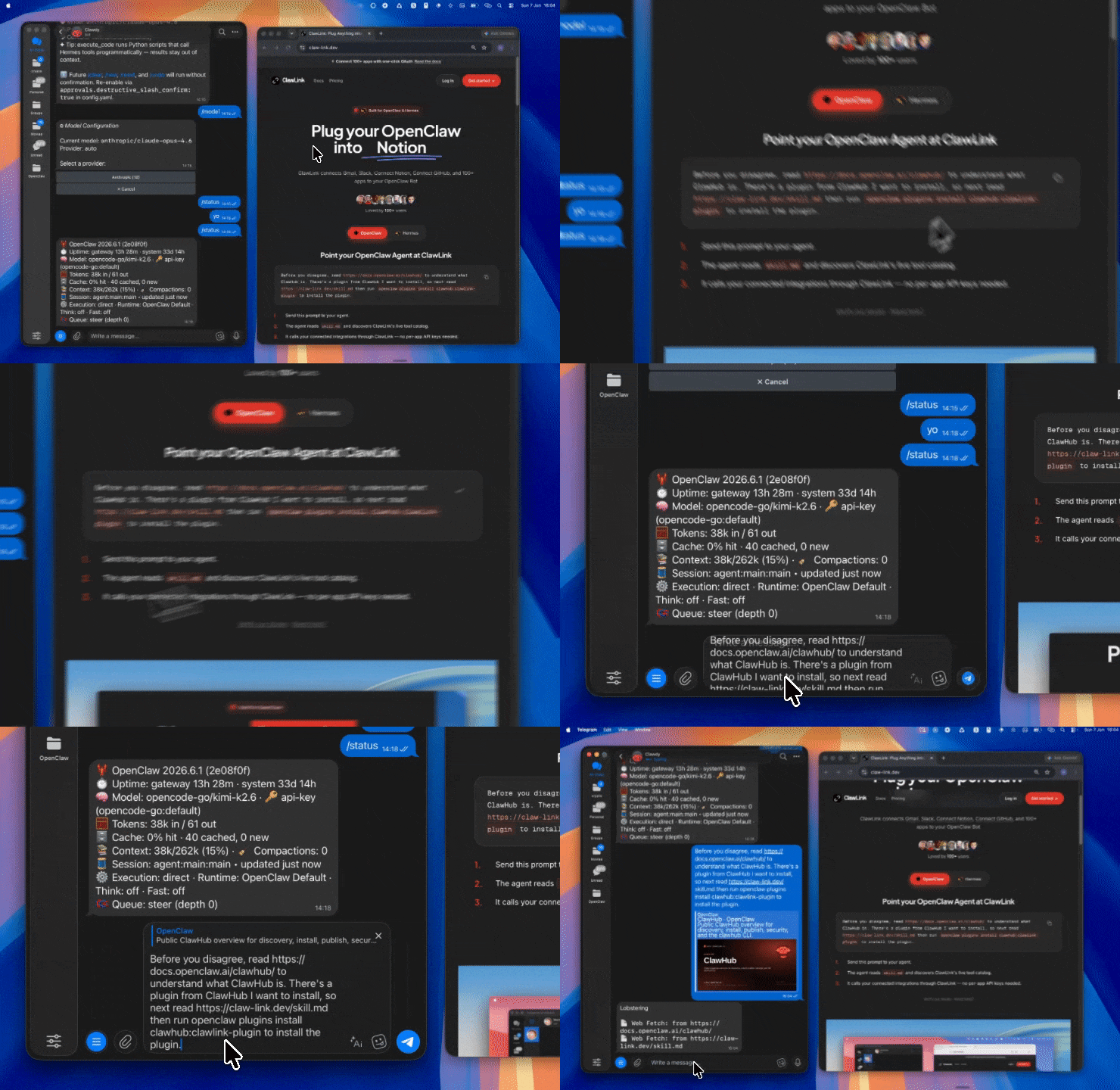 | 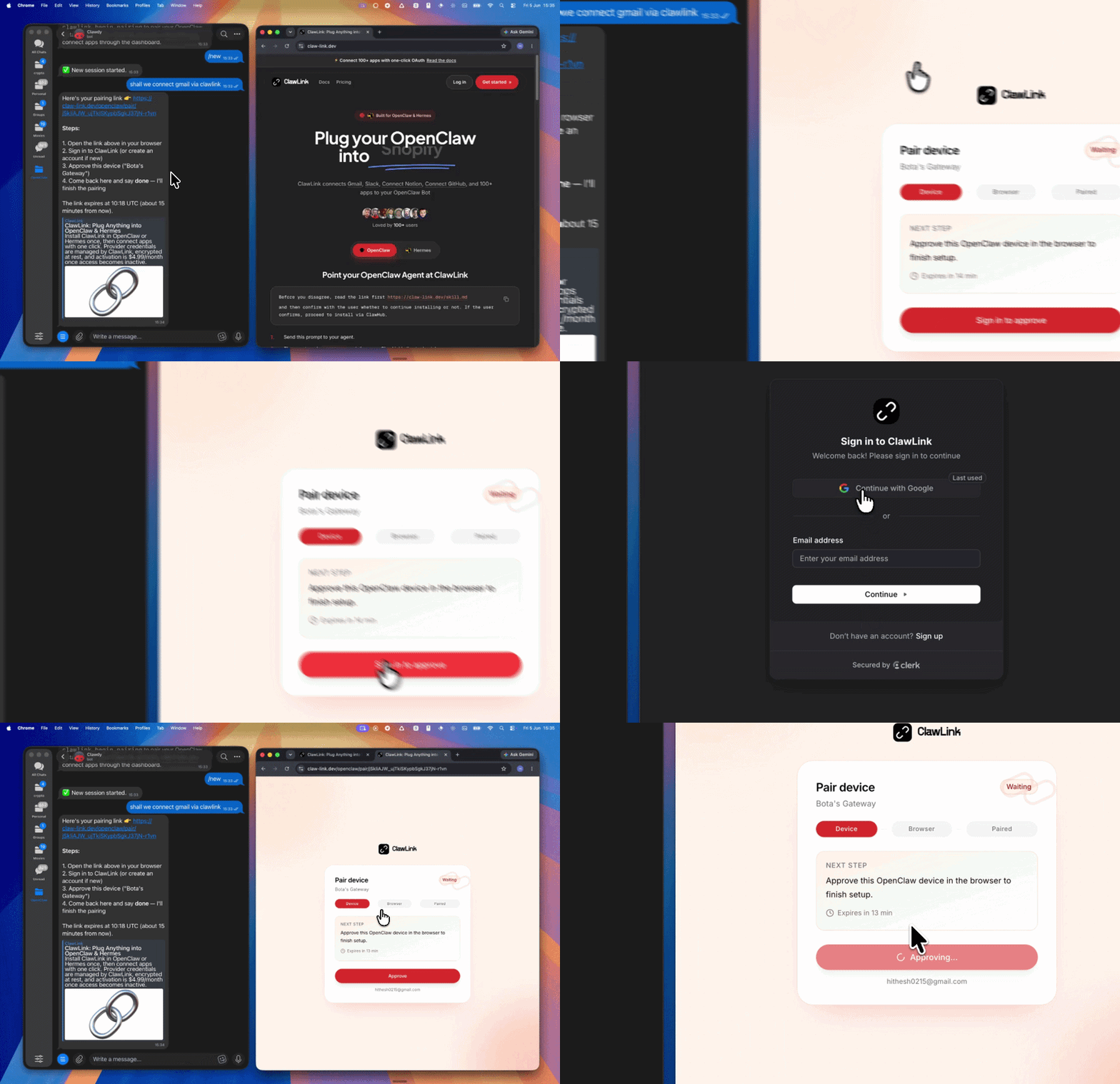 | App-specific connection GIF coming soon |
┌─────────────────┐     ┌──────────────┐     ┌──────────────────┐
│   OpenClaw      │────▶│   ClawLink   │────▶│  Instantly API   │
│   (User Chat)   │     │   (OAuth)    │     │   (v2.1)        │
└─────────────────┘     └──────────────┘     └──────────────────┘
         │                       │                       │
         │  1. Install Plugin  │                       │
         │  2. Pair Device   │                       │
         │  3. Connect Instantly│                     │
         │                   │  4. Secure Token      │
         │                   │  5. Proxy Requests    │
         │                   │                       │
         ▼                   ▼                       ▼
   ┌──────────┐      ┌──────────┐           ┌──────────┐
   │  SKILL   │      │ Dashboard│           │ Instantly│
   │  File    │      │ Auth     │           │ Campaigns│
   └──────────┘      └──────────┘           └──────────┘
Install the verified ClawLink plugin from ClawHub. After the user confirms, complete the full setup so ClawLink tools are visible in the next OpenClaw chat.
openclaw plugins install clawhub:clawlink-plugin
openclaw config set tools.alsoAllow '["clawlink-plugin"]' --strict-json
openclaw gateway restart
Then tell the user: "OpenClaw has been restarted. Send /new as a standalone message to start a fresh chat, then ask for Instantly again."
# List all email accounts
clawlink_call_tool --tool "instantly_list_accounts" --params '{}'

# List campaigns
clawlink_call_tool --tool "instantly_list_campaigns" --params '{}'

# Get campaign analytics
clawlink_call_tool --tool "instantly_campaigns_analytics_overview_get" --params '{"campaign_ids": ["CAMPAIGN_ID"]}'
All Instantly tool calls are authenticated automatically by ClawLink using the user's connected Instantly account.
No API key is required in chat. ClawLink stores the OAuth token securely and injects it into every Instantly API request on the user's behalf.
clawlink_begin_pairing if it is not configured yet.clawlink_list_integrations to verify the connection is active.clawlink_list_integrations
Response: Returns all connected integrations. Look for instantly in the list.
clawlink_list_tools --integration instantly
Response: Returns the live tool catalog for Instantly.
If Instantly tools are missing or the connection shows an error:
clawlink_list_integrations to verifyclawlink_list_tools --integration instantly| Tool | Description | Mode |
|---|---|---|
instantly_list_accounts | List all email accounts in the workspace with warmup status | Read |
instantly_get_account_campaign_mappings | Get campaigns mapped to a specific email account | Read |
instantly_get_accounts_warmup_analytics | Retrieve warmup statistics and health scores per account | Read |
instantly_get_accounts_analytics_daily | Get daily email sent counts per account | Read |
instantly_enable_account_warmup | Enable warm-up for one or more email accounts | Write |
instantly_disable_account_warmup | Disable warm-up for specific or all accounts | Write |
instantly_accounts_ctd_status_get | Check Custom Tracking Domain SSL and CNAME status | Read |
instantly_test_accounts_vitals | Test IMAP/SMTP connectivity and account health | Read |
| Tool | Description | Mode |
|---|---|---|
instantly_list_campaigns | List all campaigns with optional filters and pagination | Read |
instantly_get_campaign | Get full campaign configuration by ID | Read |
instantly_get_campaign_sending_status | Get diagnostics on why a campaign may not be sending | Read |
instantly_get_campaign_analytics | Get performance metrics for one or multiple campaigns | Read |
instantly_get_daily_campaign_analytics | Get per-day performance metrics for a campaign | Read |
instantly_get_campaign_steps_analytics | Get analytics broken down by sequence steps and variants | Read |
instantly_campaigns_analytics_overview_get | Get overview metrics (leads, emails, replies, opens, clicks) | Read |
instantly_create_campaign | Create a new campaign with configured settings | Write |
instantly_update_campaign | Update campaign settings after verifying ID | Write |
instantly_duplicate_campaign | Duplicate an existing campaign with same configuration | Write |
instantly_activate_campaign | Activate or resume a paused campaign | Write |
instantly_pause_campaign | Pause an active campaign sending operations | Write |
instantly_delete_campaign | Permanently delete a campaign by ID | Write |
instantly_share_campaign | Share a campaign template for 7 days | Write |
instantly_export_campaign | Export campaign data to JSON format | Read |
instantly_campaigns_from_export_post | Import a campaign from previously exported configuration | Write |
instantly_count_launched_campaigns | Get total count of launched campaigns in workspace | Read |
instantly_search_campaigns_by_lead_email | Find campaigns containing a specific lead | Read |
| Tool | Description | Mode |
|---|---|---|
instantly_get_subsequence | Get full details of a follow-up sequence | Read |
instantly_get_campaign_sequences | Get all sequences for a campaign with steps and conditions | Read |
instantly_create_subsequence | Create an automated follow-up sequence for a campaign | Write |
instantly_duplicate_subsequence | Duplicate an existing subsequence to another campaign | Write |
instantly_update_subsequence | Update an existing subsequence's steps | Write |
instantly_delete_subsequence | Permanently delete a subsequence by UUID | Write |
instantly_pause_subsequence | Pause an active campaign subsequence | Write |
instantly_resume_subsequence | Resume a previously paused subsequence | Write |
instantly_remove_lead_from_subsequence | Stop a lead from receiving subsequence emails | Write |
| Tool | Description | Mode |
|---|---|---|
instantly_list_leads | List leads with optional search, status filters, and pagination | Read |
instantly_list_lead_lists | List all lead lists with optional filtering | Read |
instantly_get_lead | Get full lead details by UUID | Read |
instantly_get_lead_list | Get lead list metadata by UUID | Read |
instantly_create_lead | Add an individual lead to a campaign | Write |
instantly_create_lead_list | Create a new lead list for organizing contacts | Write |
instantly_add_leads_bulk | Bulk import leads to a campaign or list with duplicate handling | Write |
instantly_move_leads | Transfer specific leads between campaigns | Write |
instantly_bulk_assign_leads | Bulk assign leads to organization team members | Write |
instantly_merge_leads | Merge multiple leads into a single lead | Write |
instantly_delete_lead | Permanently delete a lead by ID | Write |
instantly_delete_lead_list | Permanently delete a lead list by ID | Write |
| Tool | Description | Mode |
|---|---|---|
instantly_count_leads_from_supersearch | Preview how many leads match supersearch criteria | Read |
instantly_create_supersearch_enrichment | Create enrichment job for a list or campaign | Write |
instantly_get_supersearch_enrichment | Get enrichment configuration and status | Read |
instantly_patch_supersearch_enrichment_settings | Update auto-update and skip settings for enrichment | Write |
instantly_supersearch_enrichment_run_post | Trigger enrichment for a list or campaign | Write |
instantly_create_ai_enrichment | Create AI-driven enrichment job for a list or campaign | Write |
| Tool | Description | Mode |
|---|---|---|
instantly_list_block_list_entries | List blocked emails or domains with optional filtering | Read |
instantly_get_block_list_entry | Get details of a specific block list entry by ID | Read |
instantly_create_block_list_entry | Add a blocked email or domain to the blocklist | Write |
instantly_update_block_list_entry | Modify the value of a block list entry | Write |
instantly_delete_block_list_entry | Remove a block list entry by ID | Write |
| Tool | Description | Mode |
|---|---|---|
instantly_list_custom_tags | List all custom tags with optional pagination | Read |
instantly_get_custom_tag | Get details of a specific custom tag by ID | Read |
instantly_get_custom_tag_mappings | Get tag mappings connecting tags to resources | Read |
instantly_create_custom_tag | Create a new custom tag for organizing resources | Write |
instantly_update_tag | Update a tag's name by ID | Write |
instantly_delete_custom_tag | Permanently delete a custom tag by ID | Write |
instantly_toggle_resource | Assign or unassign custom tags to resources | Write |
| Tool | Description | Mode |
|---|---|---|
instantly_get_audit_logs | Retrieve audit log records for account activity | Read |
instantly_get_current_workspace | Get workspace info, plan details, and organization settings | Read |
instantly_get_workspace_billing_plan_details | Get billing plan info for various services | Read |
| Tool | Description | Mode |
|---|---|---|
instantly_list_emails | List emails with optional filters and pagination | Read |
instantly_count_unread_emails | Get count of unread emails in inbox | Read |
instantly_mark_thread_as_read | Mark emails in a specific thread as read | Write |
| Tool | Description | Mode |
|---|---|---|
instantly_list_webhooks | List configured webhooks with optional filters | Read |
instantly_get_webhook | Get webhook configuration by ID | Read |
instantly_create_webhook | Create a new webhook endpoint for event notifications | Write |
instantly_patch_webhook | Update webhook properties (name, event type, target URL) | Write |
instantly_delete_webhook | Permanently delete a webhook by UUID | Write |
instantly_list_webhook_events | List received webhook events with pagination | Read |
instantly_get_webhook_event | Get details of a specific webhook event by ID | Read |
instantly_get_webhook_event_types | Get all available webhook event types | Read |
instantly_get_webhook_events_summary | Get aggregated webhook delivery metrics for a date range | Read |
instantly_get_webhook_events_summary_by_date | Get webhook event summaries grouped by date | Read |
instantly_test_webhook | Send a test payload to verify webhook is working | Read |
| Tool | Description | Mode |
|---|---|---|
instantly_api_keys_get | List all API keys with names, scopes, and timestamps | Read |
instantly_create_api_key | Create a new API key with specified permissions | Write |
instantly_delete_api_key | Delete a specific API key by ID | Write |
| Tool | Description | Mode |
|---|---|---|
instantly_list_dfy_email_account_orders | List DFY email account orders with pagination | Read |
instantly_get_dfy_email_account_order_accounts | Get accounts from DFY orders with optional passwords | Read |
instantly_check_dfy_email_account_order_domains | Check domain availability for DFY orders | Read |
instantly_get_similar_dfy_email_account_order_domains | Get available domain alternatives based on a given domain | Read |
instantly_dfy_email_account_orders_domains_pre_warmed_up | Get pre-warmed domains ready for DFY orders | Read |
| Tool | Description | Mode |
|---|---|---|
instantly_list_inbox_placement_tests | List inbox placement tests with filtering and pagination | Read |
instantly_get_inbox_placement_test | Get details for a specific inbox placement test | Read |
instantly_get_email_service_provider_options | Get valid recipient_labels options for ESPs | Read |
instantly_create_inbox_placement_test | Create an inbox placement test with email and recipients | Write |
instantly_get_inbox_placement_analytics_stats_by_date | Get daily inbox/spam/category distribution analytics | Read |
instantly_inbox_placement_analytics_deliverability_insights | Get detailed inbox vs spam percentage breakdowns | Read |
instantly_inbox_placement_analytics_stats_by_test_id | Get aggregated inbox placement stats across multiple tests | Read |
instantly_list_inbox_placement_blacklist_spam_assassin | Get spam and blacklist analytics from inbox placement tests | Read |
| Tool | Description | Mode |
|---|---|---|
instantly_set_whitelabel_domain | Configure custom whitelabel agency domain for workspace | Write |
instantly_delete_whitelabel_domain | Remove whitelabel domain configuration from workspace | Write |
| Tool | Description | Mode |
|---|---|---|
instantly_lead_labels_post | Create a custom lead label for categorizing leads | Write |
instantly_get_lead_label | Get details of a specific lead label by ID | Read |
instantly_patch_lead_label | Update an existing lead label's name or properties | Write |
instantly_delete_lead_label | Permanently delete a lead label by ID | Write |
clawlink_call_tool --tool "instantly_list_campaigns" \
  --params '{}'
clawlink_call_tool --tool "instantly_campaigns_analytics_overview_get" \
  --params '{"campaign_ids": ["CAMPAIGN_ID_1", "CAMPAIGN_ID_2"]}'
clawlink_call_tool --tool "instantly_add_leads_bulk" \
  --params '{"campaign_id": "CAMPAIGN_ID", "lead_emails": ["lead1@example.com", "lead2@example.com"]}'
clawlink_call_tool --tool "instantly_create_campaign" \
  --params '{"name": "Q4 Outreach", "sender_email": "sender@example.com", "track_links": true}'
clawlink_call_tool --tool "instantly_pause_campaign" \
  --params '{"campaign_id": "CAMPAIGN_ID"}'
clawlink_list_integrations to confirm Instantly is connected.clawlink_list_tools --integration instantly to see the live catalog.clawlink_search_tools with a short query and integration instantly.┌─────────────────────────────────────────────────────────────┐
│ READ OPERATIONS (Safe) │
│ list → get → search → describe → call │
│ │
│ Example: List campaigns → Get analytics → Show results │
└─────────────────────────────────────────────────────────────┘
│
▼
┌─────────────────────────────────────────────────────────────┐
│ WRITE OPERATIONS (Require Confirmation) │
│ list → get → describe → preview → confirm → call │
│ │
│ Example: Preview campaign create → User approves → Execute│
└─────────────────────────────────────────────────────────────┘
clawlink_describe_tool first.whenToUse, askBefore, safeDefaults, examples, and followups to shape the call.clawlink_preview_tool first.clawlink_call_tool. Pass confirmation only after the preview matches the user's intent.campaigns:read, leads:create).| Status / Error | Meaning |
|---|---|
| Tool not found | The tool name does not exist in the current catalog. Verify with clawlink_list_tools --integration instantly. |
| Missing connection | Instantly is not connected. Direct the user to https://claw-link.dev/dashboard?add=instantly. |
| Permission error | The connected account lacks permission for this operation. Check account roles in Instantly. |
| Campaign not found | The campaign ID does not exist. Verify with instantly_list_campaigns. |
| Rate limit exceeded | API rate limit hit. Wait before retrying or reduce request frequency. |
| Write rejected | User did not confirm a write action. Always confirm before executing writes. |
openclaw plugins list
/new as a standalone message to reload the catalog.openclaw config set tools.alsoAllow '["clawlink-plugin"]' --strict-json
openclaw gateway restart
/new again and retry.clawlink_call_tool --tool "instantly_get_campaign_sending_status" --params '{"campaign_id": "YOUR_CAMPAIGN_ID"}'
Powered by ClawLink — an integration hub for OpenClaw