Install
openclaw skills install @hith3sh/google-superUnified Google services API integration with managed OAuth. Manage Gmail, Google Calendar, Drive, Docs, Sheets, Slides, Meet, Tasks, Photos, Maps, Google Analytics, and Google Ads across a single connection. Use this skill when users want to send email, manage calendar events, edit spreadsheets, search Drive files, create documents, or query analytics data.
openclaw skills install @hith3sh/google-super
Access the full suite of Google services from chat -- Gmail, Calendar, Drive, Docs, Sheets, Slides, Meet, Tasks, Photos, Maps, Analytics, and Ads through a single connection. Powered by ClawLink for hosted OAuth.
Note: This integration bundles 400+ tools across multiple Google services. The reference below highlights the most important tools per service. Use clawlink_list_tools --integration google-super to discover the full catalog.
| Step 1: Install | Step 2: Pair Account | Step 3: Connect Google |
|---|---|---|
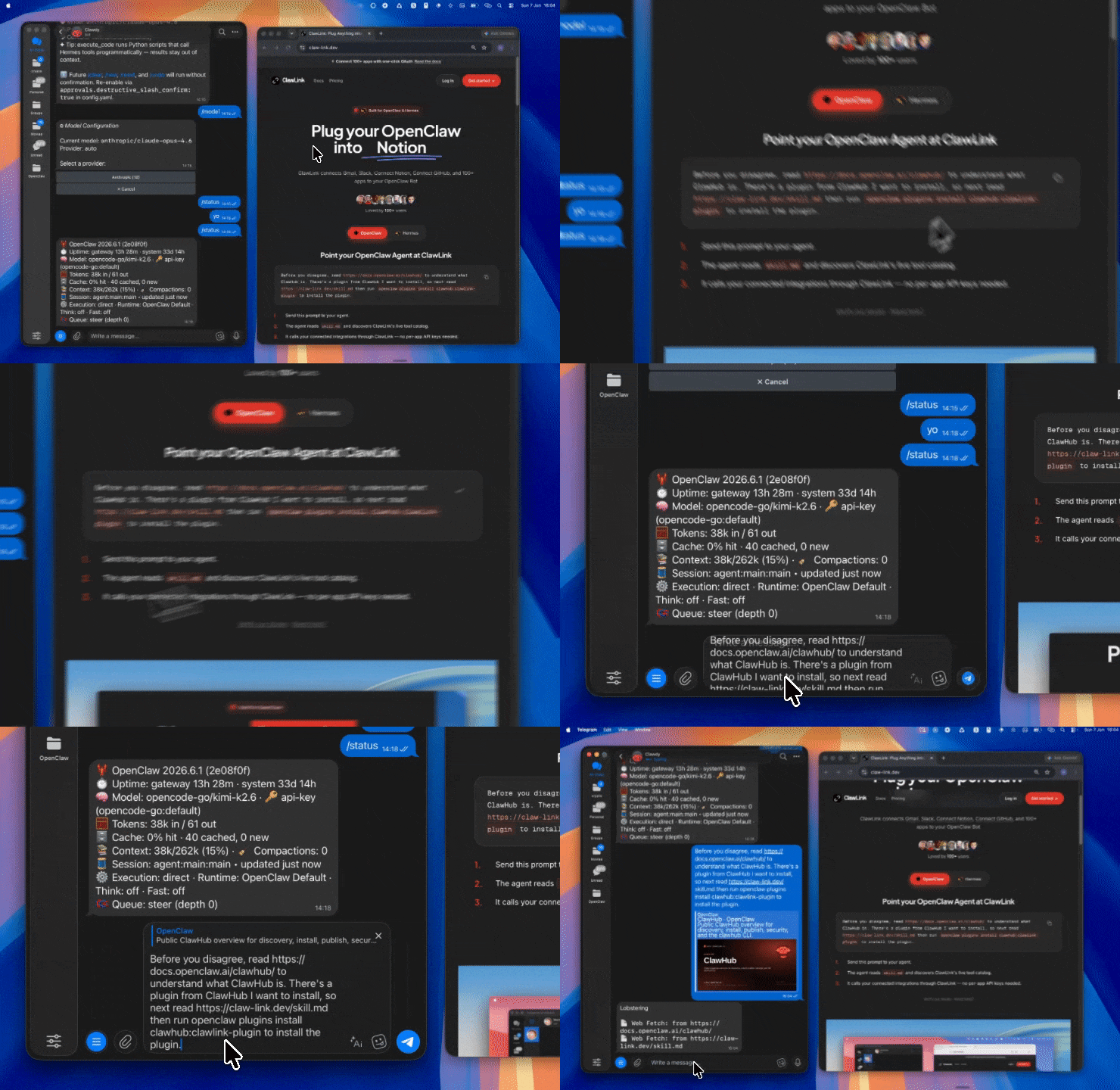 | 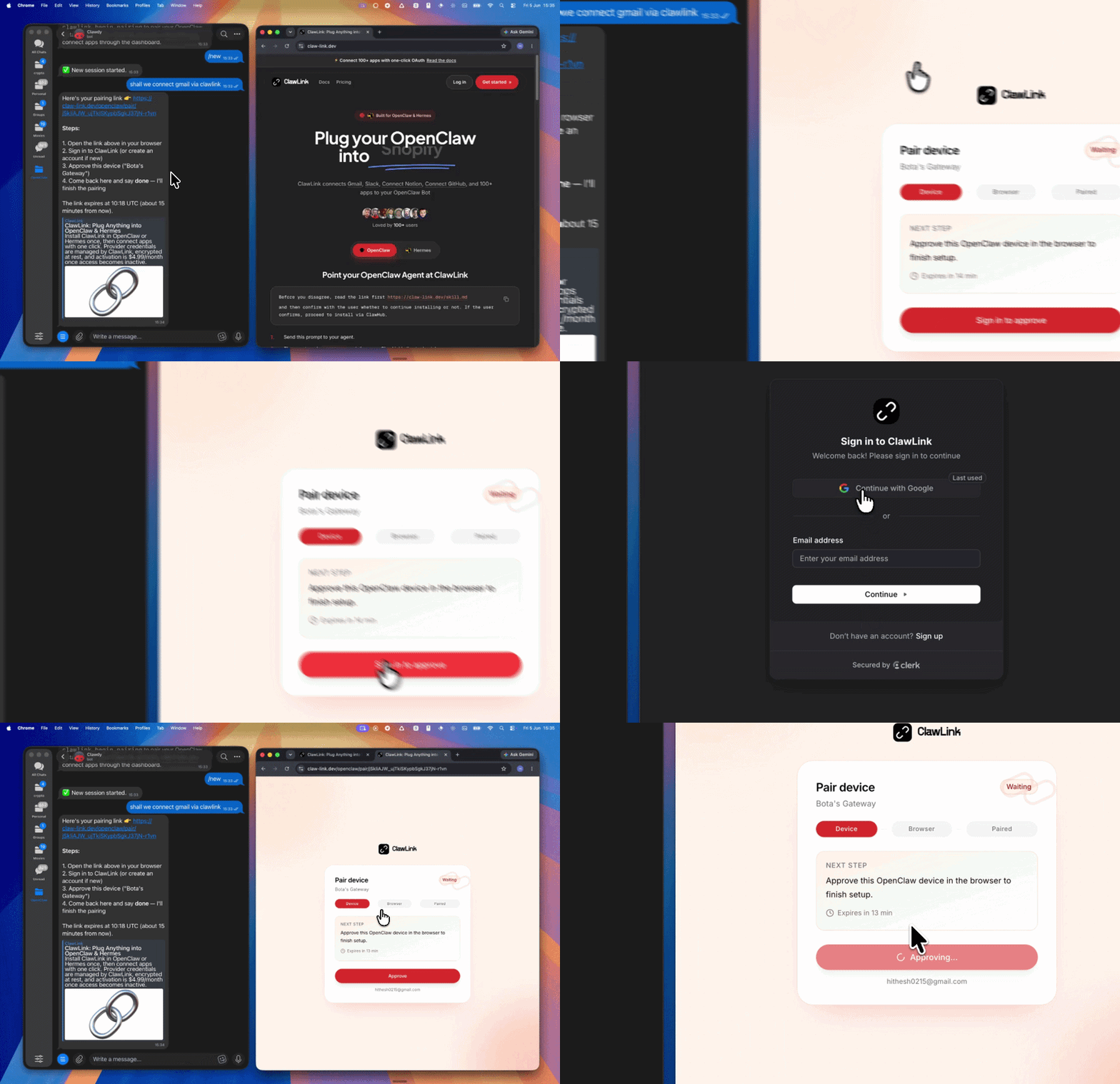 | App-specific connection GIF coming soon |
| Run the install command in OpenClaw | Sign in and approve the device | Open the dashboard and connect Google |
┌─────────────────┐     ┌──────────────┐     ┌──────────────────┐
│   OpenClaw      │────▶│   ClawLink   │────▶│  Google APIs     │
│   (User Chat)   │     │   (OAuth)    │     │  (Multi-service) │
└─────────────────┘     └──────────────┘     └──────────────────┘
openclaw plugins install clawhub:clawlink-plugin
openclaw config set tools.alsoAllow '["clawlink-plugin"]' --strict-json
openclaw gateway restart
// 1. Send an email
clawlink_call_tool({ tool: "googlesuper_send_email", parameters: { to: "user@example.com", subject: "Hello", body: "Hi there!" } })

// 2. List calendar events
clawlink_call_tool({ tool: "googlesuper_events_list", parameters: { calendarId: "primary" } })

// 3. Search Drive files
clawlink_call_tool({ tool: "googlesuper_find_file", parameters: { query: "report" } })
ClawLink manages the full Google OAuth flow with broad scopes. Connect at claw-link.dev/dashboard?add=google-super. The connection grants access to all bundled Google services.
// List connections
clawlink_list_integrations()

// Verify by listing calendars
clawlink_call_tool({ tool: "googlesuper_list_calendars", parameters: {} })
| Tool | Description | Mode |
|---|---|---|
googlesuper_send_email | Send an email message | Write |
googlesuper_fetch_emails | List and search emails | Read |
googlesuper_fetch_message_by_message_id | Get a specific email by ID | Read |
googlesuper_create_email_draft | Create a draft email | Write |
googlesuper_send_draft | Send an existing draft | Write |
googlesuper_reply_to_thread | Reply to an email thread | Write |
googlesuper_forward_message | Forward an email | Write |
googlesuper_add_label_to_email | Add/remove labels on a message | Write |
googlesuper_batch_modify_messages | Modify labels on up to 1,000 messages | Write |
googlesuper_batch_delete_messages | Permanently delete multiple messages | Write |
googlesuper_delete_message | Permanently delete a message | Write |
googlesuper_move_thread_to_trash | Move thread to trash | Write |
googlesuper_list_labels | List all Gmail labels | Read |
googlesuper_create_label | Create a new label | Write |
googlesuper_list_threads | List email threads | Read |
googlesuper_list_drafts | List email drafts | Read |
| Tool | Description | Mode |
|---|---|---|
googlesuper_create_event | Create a calendar event | Write |
googlesuper_update_event | Update an existing event | Write |
googlesuper_delete_event | Delete an event | Write |
googlesuper_events_list | List events for a calendar | Read |
googlesuper_events_get | Get a specific event | Read |
googlesuper_find_event | Search events | Read |
googlesuper_find_free_slots | Find available time slots | Read |
googlesuper_batch_events | Batch up to 1,000 event mutations | Write |
googlesuper_list_calendars | List user's calendars | Read |
googlesuper_get_calendar | Get calendar details | Read |
googlesuper_calendar_list_insert | Subscribe to a calendar | Write |
| Tool | Description | Mode |
|---|---|---|
googlesuper_find_file | Search files by name or content | Read |
googlesuper_find_folder | Search for folders | Read |
googlesuper_create_file | Create a new file | Write |
googlesuper_create_folder | Create a new folder | Write |
googlesuper_upload_file | Upload a file to Drive | Write |
googlesuper_download_file | Download file content | Read |
googlesuper_copy_file_advanced | Copy a file | Write |
googlesuper_move_file | Move a file to another folder | Write |
googlesuper_trash_file | Move file to trash | Write |
googlesuper_untrash_file | Restore file from trash | Write |
googlesuper_get_file_metadata | Get file metadata | Read |
googlesuper_list_changes | List Drive changes | Read |
googlesuper_create_permission | Share a file with a user | Write |
googlesuper_list_permissions | List file permissions | Read |
googlesuper_create_shortcut_to_file | Create a shortcut to a file | Write |
googlesuper_get_about | Get Drive storage and user info | Read |
| Tool | Description | Mode |
|---|---|---|
googlesuper_create_document | Create a new Google Doc | Write |
googlesuper_get_document_by_id | Get document content and structure | Read |
googlesuper_get_document_plaintext | Get document as plain text | Read |
googlesuper_update_existing_document | Update document content | Write |
googlesuper_search_documents | Search across documents | Read |
googlesuper_copy_document | Copy a document | Write |
googlesuper_export_document_as_pdf | Export document as PDF | Read |
googlesuper_create_comment | Add a comment to a document | Write |
googlesuper_list_comments | List document comments | Read |
| Tool | Description | Mode |
|---|---|---|
googlesuper_create_google_sheet1 | Create a new spreadsheet | Write |
googlesuper_batch_get | Read data from cell ranges | Read |
googlesuper_values_get | Read values from a range | Read |
googlesuper_spreadsheets_values_append | Append rows to a sheet | Write |
googlesuper_values_update | Update values in a range | Write |
googlesuper_update_values_batch | Batch update multiple ranges | Write |
googlesuper_add_sheet | Add a new sheet to a spreadsheet | Write |
googlesuper_create_spreadsheet_row | Insert a row | Write |
googlesuper_create_spreadsheet_column | Insert a column | Write |
googlesuper_lookup_spreadsheet_row | Look up a row by column value | Read |
googlesuper_get_spreadsheet_info | Get spreadsheet metadata | Read |
googlesuper_search_spreadsheets | Search for spreadsheets | Read |
googlesuper_aggregate_column_data | Aggregate column data with math ops | Read |
googlesuper_clear_values | Clear values from a range | Write |
| Tool | Description | Mode |
|---|---|---|
googlesuper_create_presentation | Create a new presentation | Write |
googlesuper_create_slides_markdown | Create slides from Markdown | Write |
googlesuper_presentations_get | Get presentation details | Read |
googlesuper_presentations_batch_update | Batch update a presentation | Write |
googlesuper_create_chart | Create a chart | Write |
googlesuper_replace_all_text | Replace text across slides | Write |
googlesuper_replace_image | Replace an image in slides | Write |
| Tool | Description | Mode |
|---|---|---|
googlesuper_create_meet | Create a Meet link | Write |
googlesuper_get_meet | Get meeting details | Read |
googlesuper_list_conference_records | List conference records | Read |
googlesuper_get_transcript | Get a meeting transcript | Read |
googlesuper_list_recordings | List meeting recordings | Read |
googlesuper_list_participants | List meeting participants | Read |
| Tool | Description | Mode |
|---|---|---|
googlesuper_insert_task | Create a new task | Write |
googlesuper_list_all_tasks | List all tasks | Read |
googlesuper_update_task_full | Update a task | Write |
googlesuper_delete_task | Delete a task | Write |
googlesuper_move_task | Move a task | Write |
googlesuper_create_task_list | Create a task list | Write |
googlesuper_list_task_lists | List task lists | Read |
googlesuper_clear_tasks | Clear all completed tasks | Write |
| Tool | Description | Mode |
|---|---|---|
googlesuper_autocomplete | Place autocomplete suggestions | Read |
googlesuper_text_search | Text-based place search | Read |
googlesuper_nearby_search | Search nearby places | Read |
googlesuper_get_place_details | Get detailed place info | Read |
googlesuper_geocode_address_with_query | Geocode an address | Read |
googlesuper_get_route | Get route directions | Read |
| Tool | Description | Mode |
|---|---|---|
googlesuper_create_album | Create a new album | Write |
googlesuper_list_albums | List all albums | Read |
googlesuper_batch_create_media_items | Upload and create media items (max 50) | Write |
googlesuper_list_media_items | List media items | Read |
googlesuper_search_media_items | Search media items by filters | Read |
| Tool | Description | Mode |
|---|---|---|
googlesuper_run_report | Run a standard analytics report | Read |
googlesuper_run_realtime_report | Get real-time analytics data | Read |
googlesuper_run_pivot_report | Run a pivot table report | Read |
googlesuper_batch_run_reports | Batch multiple report requests | Read |
googlesuper_list_properties_filtered | List GA4 properties | Read |
googlesuper_list_custom_dimensions | List custom dimensions | Read |
googlesuper_list_data_streams | List data streams | Read |
| Tool | Description | Mode |
|---|---|---|
googlesuper_list_accessible_customers | List accessible ad accounts | Read |
googlesuper_mutate_campaigns | Create/update/remove campaigns | Write |
googlesuper_mutate_ad_groups | Create/update/remove ad groups | Write |
googlesuper_create_customer_list | Create a customer match list | Write |
googlesuper_add_or_remove_to_customer_list | Add/remove contacts from list | Write |
// Search for recent emails
const emails = await clawlink_call_tool({
  tool: "googlesuper_fetch_emails",
  parameters: { query: "from:boss@company.com newer_than:1d" }
});

// Reply to a thread
await clawlink_call_tool({
  tool: "googlesuper_reply_to_thread",
  parameters: {
    thread_id: "thread_123",
    body: "I'll review the proposal today."
  }
});
// Find free slots for a meeting
const slots = await clawlink_call_tool({
  tool: "googlesuper_find_free_slots",
  parameters: { calendarId: "primary", date: "2026-06-10" }
});

// Append data to a spreadsheet
await clawlink_call_tool({
  tool: "googlesuper_spreadsheets_values_append",
  parameters: {
    spreadsheetId: "sheet_abc",
    range: "A1:D1",
    values: [["2026-06-08", "Meeting", "30min", "Confirmed"]]
  }
});
// Search for a file
const files = await clawlink_call_tool({
  tool: "googlesuper_find_file",
  parameters: { query: "Q3 report" }
});

// Share the file
await clawlink_call_tool({
  tool: "googlesuper_create_permission",
  parameters: {
    fileId: "file_123",
    emailAddress: "colleague@company.com",
    role: "reader"
  }
});
clawlink_list_integrations to confirm google-super is connected.clawlink_list_tools --integration google-super to see the full 400+ tool catalog.clawlink_search_tools({ query: "spreadsheet", integration: "google-super" }) to find specific tools.READ (safe): fetch_emails → events_list → find_file → run_report → list_calendars
WRITE (confirm): send_email → create_event → upload_file → values_append → insert_task
DELETE (high): batch_delete_messages → delete_event → trash_file → clear_values
bigquery.readonly)| Status / Error | Meaning |
|---|---|
| 401 Unauthorized | Google OAuth token expired -- reconnect at dashboard |
| 403 Forbidden | Insufficient Google API scope for this action |
| 404 Not Found | File, event, or resource ID does not exist |
| 429 Rate Limited | Google API quota exceeded -- apply exponential backoff |
clawlink_list_integrations to confirm pairinggooglesuper_get_about to check current Drive accessPowered by ClawLink -- an integration hub for OpenClaw