
Ace Data Cloud
Ace Data Cloud models, image, video, music, speech, search and creative tools for OpenClaw.
Install
openclaw plugins install clawhub:@acedatacloud/openclaw-providerAce Data Cloud provider for OpenClaw
An Ace Data Cloud maintained provider for LLMs, images, video, music, speech, Google web search and creative tools. Source: AceDataCloud/OpenClawProvider.
Install from the ClawHub listing. The package is vendor maintained and is not bundled with OpenClaw. Security audit results are shown on the listing; an official publisher badge is a separate review and has not been granted.
Get your Ace Data Cloud API key
- Open Ace Data Cloud → Applications. Sign in, or register an account first.
- Find General application. If it has not been created, choose Initialize General Application. A general key can use the services available to your account; a dedicated application's key is limited to its service. Check the required service/model access and current pricing.
- Copy the API Key from the application card, or open Keys / Manage Keys → Create to create a separate key for this integration. Give it a recognizable name so you can revoke or rotate it independently.
- When creating a key, review Expiration Time, Set Usage Limitation, and Allowed APIs. Enable only the restrictions you need, allow the operations you will call, then click Create and copy the token from the key list. Task lookup does not grant permission to submit a generation. Confirm the application's balance can cover your first request; any trial allowance is whatever your account currently displays.
- Copy only the token value, without quotation marks, spaces, or
Bearer. An API Key / API Token field expects this raw value; only a manually configured HTTPAuthorizationheader needs theBearerprefix. Aplatform-...account-management token cannot replace a generation API key.
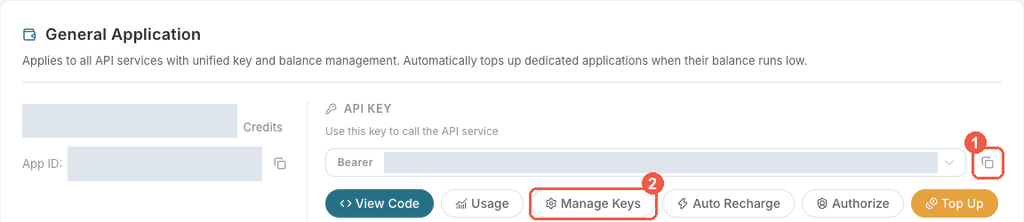
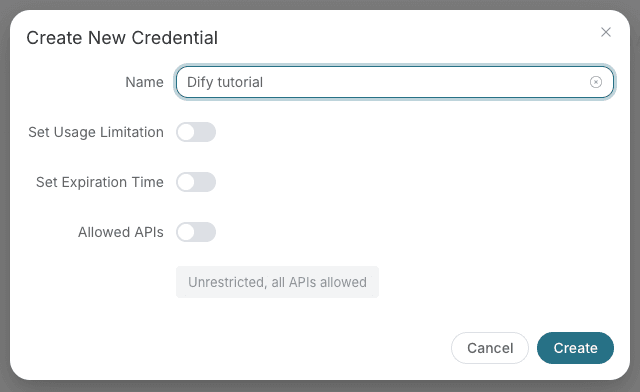
Save the key in the client's credential store or the environment variable shown below. Never put it in a prompt, shared workflow, screenshot, or Git commit. If authentication fails, check the full copied value, application/service access, expiration, usage limit, and balance before creating another key.
Setup
Install from ClawHub and enter an API key through the onboarding prompt:
openclaw plugins install clawhub:@acedatacloud/openclaw-provider
openclaw onboard --auth-choice acedatacloud-api-key
Review OpenClaw's source/capability prompts before accepting installation. To pin
an exact release, append @2026.10.12 to the ClawHub package spec. The same package
is distributed on npm
and as a .tgz on GitHub Releases.
Follow the API key steps above before onboarding.
The default model is acedatacloud/gpt-4.1-mini.
The chat catalog covers 90 public models across OpenAI, Claude, Gemini, Grok, DeepSeek, Kimi, and GLM. Each model uses its own supported Chat Completions, Responses, or Messages route, input capabilities, reasoning controls, and prices. See model support and cost estimates. No automatic fallback changes the chosen model.
Native media providers cover Nano Banana, GPT Image, Seedream, Flux, Qwen Image, Midjourney, Seedance, Veo, Kling, Grok Video, Happy Horse, MiniMax H3, Wan, Suno and Fish Audio. 97 optional tools across 17 services expose advanced editing, voice/persona management, face transformation, search and task retrieval. See capability and tool reference and the official-contract architecture decision.
Setup and validation cookbook includes environment-key setup, model selection, and optional web search.
For a native image after setup:
openclaw infer image generate --model acedatacloud-nano-banana/nano-banana-2-lite \
  --prompt "A blue circle on a white background" --count 1 --output image.jpg
This is a paid generation. Use the task retrieval tools to recover an existing result after a timeout instead of generating it again.
Credentials and network access
Chat sends the selected model's prompts and tool messages to its documented
endpoint under https://api.acedata.cloud with the user's API key. Native Claude
Messages also receives an explicit Bearer header.
Optional search sends the query to https://api.acedata.cloud/serp/google.
Media generation uses the corresponding service endpoint on that same host.
Media downloads use the host's SSRF guard without forwarding your API key.
Billable generation and tool operations consume Ace Credits; model, count,
resolution and duration affect cost. Optional tools follow normal OpenClaw
policy and do not add a separate payment approval dialog.
The plugin has no shell commands, filesystem tools, or background service.
Use a service-scoped key where possible; cross-service use needs appropriate access.
Never send API keys to maintainers or attach them to issue reports.
Development
Use Node 24.16+ and pnpm 9.15.4. The published OpenClaw SDK is pinned as a development dependency, so no sibling source checkout is needed.
pnpm install --frozen-lockfile
pnpm sync-catalog:check
pnpm sync-services:check
pnpm typecheck
pnpm test
pnpm build
pnpm pack
clawhub package validate .
clawhub package publish . --owner acedatacloud --dry-run
The package uses built JavaScript entrypoints. Runtime APIs come from the installed OpenClaw host. Report problems through GitHub issues.
MIT License. Maintained by Ace Data Cloud, dev@acedata.cloud.