
Turn OpenClaw's hidden Markdown memory into a visible second brain: browse what your agent remembers, follow its timeline, search its knowledge and explore connections, without leaving OpenClaw.

Install
openclaw plugins install clawhub:websidian🧠 Websidian for OpenClaw
See what your AI remembers.
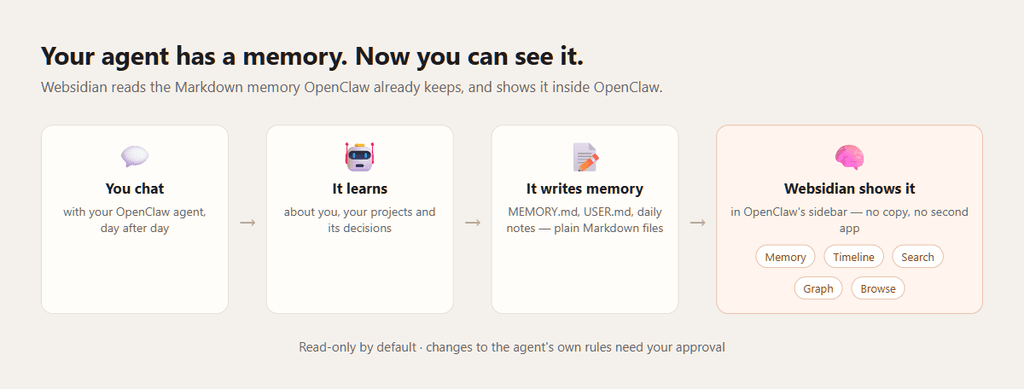
OpenClaw remembers — what it learns about you, your projects, the decisions it made, what happened each day. But that memory lives quietly in Markdown files in its workspace, where you never look.
Websidian turns that hidden memory into a place you can actually see and explore, directly inside OpenClaw. No digging through folders, no separate knowledge-base app, no copying your memory somewhere else. Install it, and a 🧠 Memory section appears in OpenClaw's sidebar.
Your agent has a memory. Now you can see it.
Open the Memory page to understand what is happening behind your conversations:
- what OpenClaw remembers about you
- its long-term memory
- its recent daily memories, and what changed lately
- how its notes connect to each other
- everything it has written into its workspace
Instead of wondering "what does my agent actually remember?", you simply look. And when the agent creates or updates a note, its reply ends with a link to open it.
A tour of your agent's second brain
The screenshots show a fictional agent that helps Maya run her bakery — the kind of memory any OpenClaw agent builds up after a few weeks.
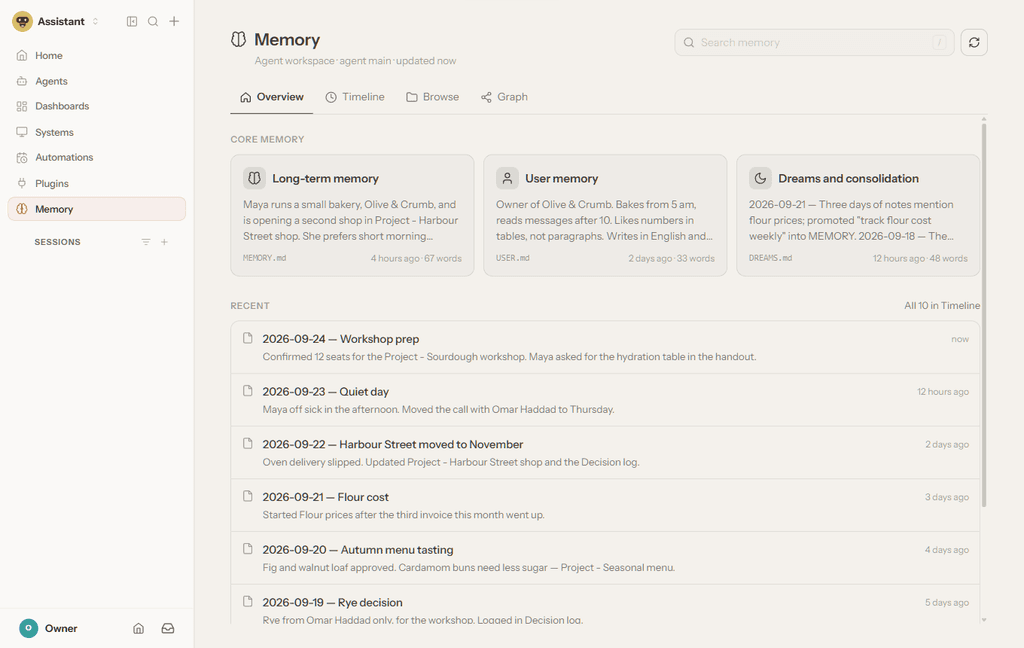
🧠 Memory — what matters, at a glance
The overview above: long-term memory, what the agent knows about you, its consolidated memories ("dreams") and its latest daily notes, each with a preview and when it changed.
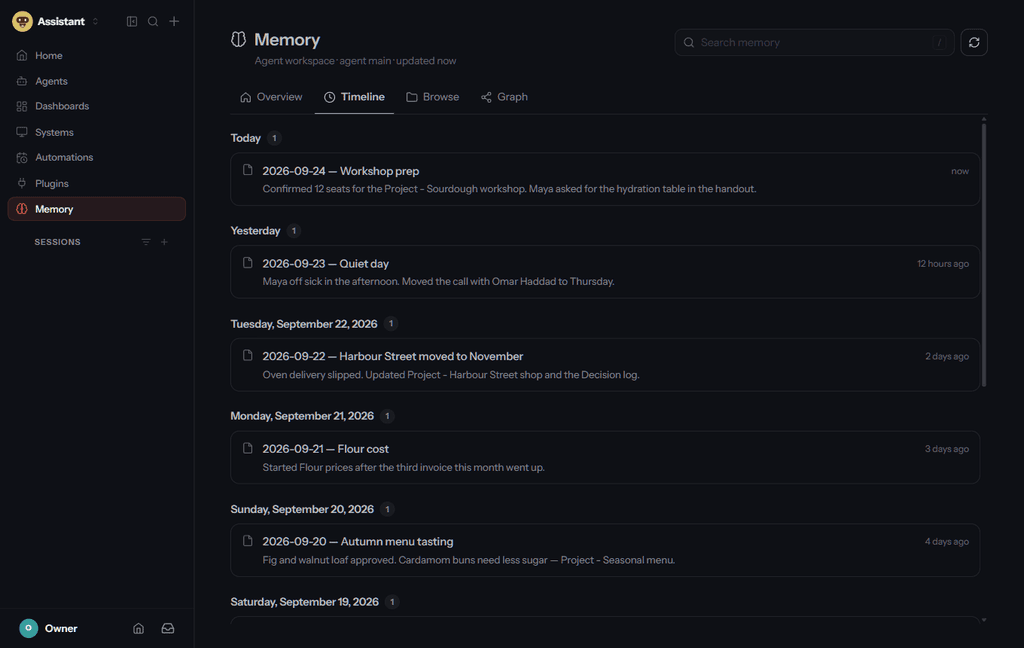
🕒 Timeline — memory as it developed
Every daily note, grouped by day — Today, Yesterday, then the dates. What did it learn yesterday, last week, during that project?
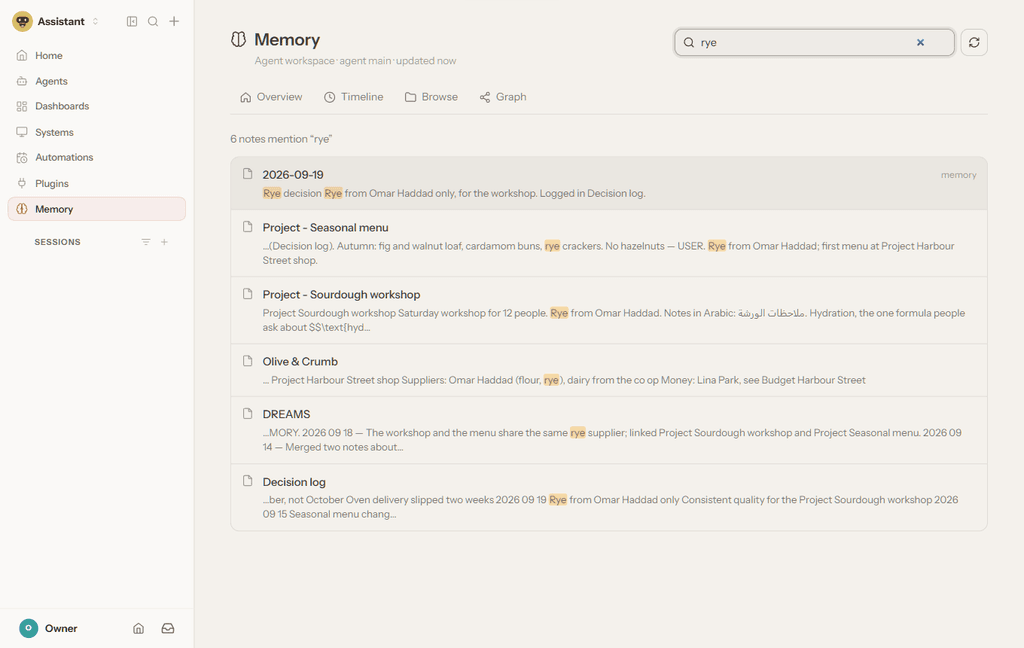
🔎 Search — ask the memory directly
Search everything the agent has written, instead of asking it to recall something and hoping it finds the right
context. The matching words are highlighted; press / to jump to the search box.
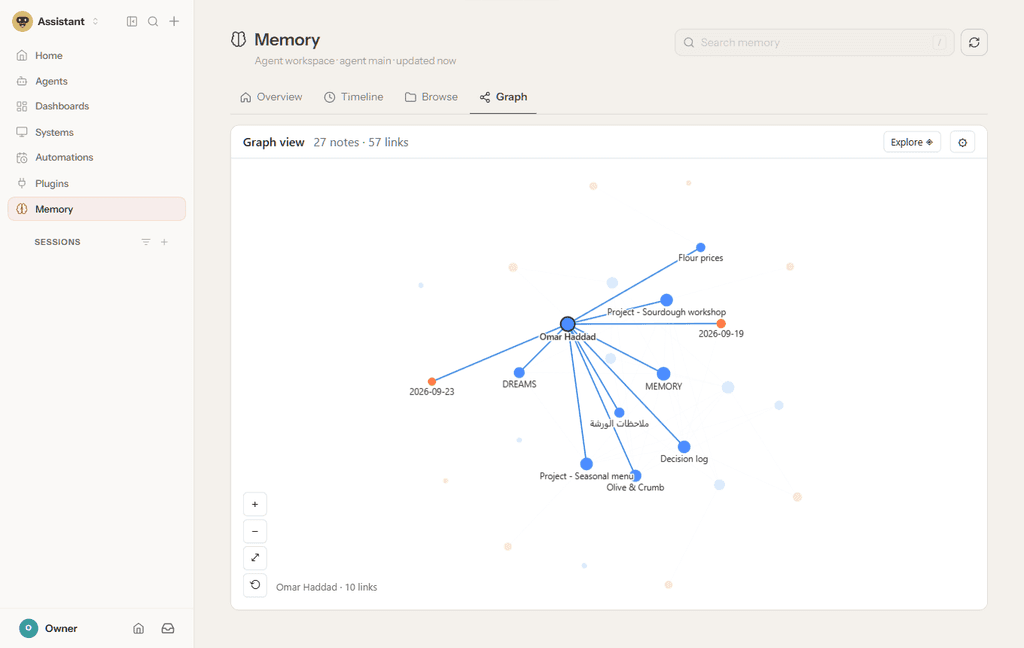
🕸️ Graph — see how it all connects
Every note is a dot and every link a line. Hover one to light up what it touches — here, everything the agent connects to Maya's flour supplier: the projects, the decisions, the days he came up. Click a dot to read that note.
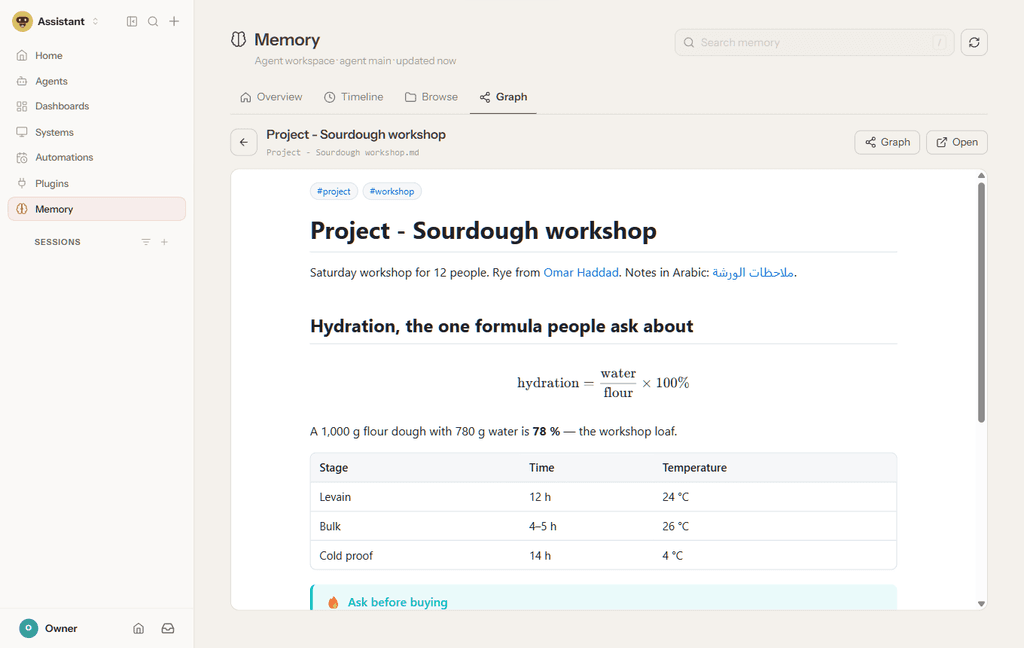
📖 Read any note — properly rendered
Open a note from anywhere and it reads like a page, right inside OpenClaw: tables, math, callouts, tags and links you can follow — and, at the bottom, every note that links back to it.
Diagrams render too, and the page follows OpenClaw's light or dark theme:

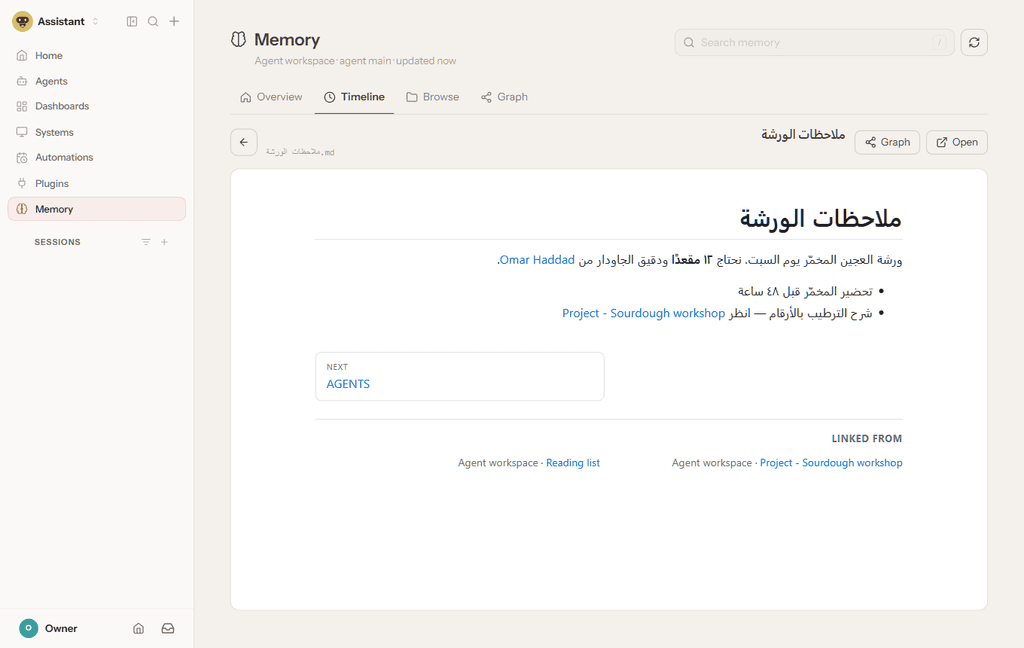
Arabic and other right-to-left languages are laid out the right way round:
When the agent creates or updates a note, its reply ends with a link to open it.
More than a viewer
Websidian also keeps you in control of the files that shape your agent. When the agent tries to change its own
instruction or memory files — SOUL.md, AGENTS.md, MEMORY.md, USER.md and the rest — you are asked to
approve first. The same tool that lets you see the agent's brain tells you when that brain is being changed.
And notes must stay plain Markdown, so text the agent copied from a web page can never turn into a script in your
browser.
Your files stay your files
Websidian is not another memory database. It reads the Markdown files OpenClaw already uses:
- no second copy of your memory
- no cloud knowledge base
- no migration of your notes
- no second account — it uses your OpenClaw login
Your workspace stays the source of truth. Websidian simply makes it visible.
Install
openclaw plugins install clawhub:websidian --accept-capabilities
openclaw config set gateway.controlUi.experimental.customPlugins true
openclaw config set plugins.entries.websidian.hooks.allowConversationAccess true
openclaw gateway restart
About 15 seconds after the restart, 🧠 Memory appears in the sidebar. The default workspace works immediately —
no Websidian configuration needed — and everything starts read-only. Needs OpenClaw 2026.9.5 or later (tested)
with npm available; the first start downloads Websidian's own libraries once.
Who is it for?
Anyone who uses OpenClaw as more than a chatbot — especially if your agent:
- remembers things between conversations
- keeps project notes or writes daily memories
- holds research or operational knowledge
- works across several projects for weeks or months
- has instruction files you want to keep under human control
The longer your agent runs, the more it pays to understand what it has accumulated.
OpenClaw gives your agent memory. Websidian gives you a window into it.
Source, issues and full documentation: github.com/satabd/Websidian.
Technical reference
Everything below is for operators and developers: every feature in detail, configuring vaults, security, editing, proxy authentication, hooks, routes and deployment.
- Write guard (
before_tool_call): agent instruction files (SKILL.md,SOUL.md,AGENTS.md,MEMORY.md,USER.md,TOOLS.md,IDENTITY.md,HEARTBEAT.md,BOOTSTRAP.md) under the OpenClaw state dir, an agent workspace or a vault pause for a human's approval (OpenClaw plugin approvals: chat buttons or/approve), or are blocked inprotectMode: "block". Vault writes must be plain Markdown:<script>,<iframe>, event-handler attributes,javascript:/data:text/htmlURLs and.html/.svg/.jsfiles are refused. Coverswrite,edit,apply_patchand, best-effort,exec. - Links (
after_tool_call+message_sending): notes the agent wrote get a "Notes updated:" footer with view (and edit) links; thewebsidian_linkstool returns them on demand;/brain [query]lists recent notes. - Pages behind the Gateway (
ui): the plugin runs a Websidian server on loopback for the configured vaults and proxies it athttp://<gateway>/plugins/websidian/w/<slug>/, behind a sign-in with the Gateway token. Vaults are serveduntrusted(inert HTML, CSP) and read-only unlessedit: true. - A native Memory page in the Control UI (
ui.memory): a 🧠 Memory destination in OpenClaw's own sidebar, beside Chat and Sessions, that opens inside OpenClaw. Overview cards forMEMORY.md,USER.mdandDREAMS.md, a timeline of the dated notes undermemory/, and the vault's graph and search — read-only, from the OpenClaw workspace, with no second sign-in and no second copy of anything. - Skill
websidian: how to write notes as Obsidian Markdown and share links.
Plain ESM JavaScript, no build step, no dependencies — the Gateway serves dist/control-ui/ as it is, so
openclaw plugins build is not needed. Tested against OpenClaw 2026.9.5 (and, without the Memory page, 2026.6.9).
Layout
openclaw.plugin.json   manifest (id, contracts.tools, skills, strict configSchema)
package.json           openclaw.extensions -> ./index.js
index.js               entry: the same shape as definePluginEntry(), without importing the SDK
lib/plugin.js          register(api): hooks, tool, command, service, HTTP route
lib/guard.js           the write guard (pure)
lib/links.js           view/edit URLs, recent notes (pure)
lib/sites.js           vault -> site slugs, settings, workspace/state dir resolution (pure)
lib/tracker.js         notes written per session
lib/supervisor.js      Websidian config generation, secrets, the child-process supervisor
lib/proxy.js           sign-in, status page, reverse proxy (auth: "plugin" route)
lib/native.js          the Memory route (auth: "gateway"): model JSON + a framed fallback page
lib/memory.js          which workspace files are memory, and how they group (pure)
dist/control-ui/       the browser Control UI plugin the Gateway serves as-is
  websidian.js           entry: { id, activate(host) }, registers the Memory page and navigation
  memory-page.js         the native page: search, Overview, Timeline, Browse, Graph, reading pane
  memory.css             styles, all under .websidian-memory
skills/websidian/      SKILL.md
deploy/                pack.mjs (the self-contained package), installers (native profile, Docker container)
test/                  node --test
Install
From ClawHub (recommended)
Published as websidian (owner satabd). On the OpenClaw host:
openclaw plugins install clawhub:websidian --accept-capabilities
openclaw config set gateway.controlUi.experimental.customPlugins true              # the Memory page
openclaw config set plugins.entries.websidian.hooks.allowConversationAccess true   # the prompt section
openclaw gateway restart
Update: openclaw plugins update websidian, then restart.
From a tarball (the same package, offline hand-over)
npm run pack:openclaw at the repository root builds .release/websidian-<version>.tgz: this plugin plus the
Websidian runtime (runtime/: src/, public/, package.json, package-lock.json). Install it with
openclaw plugins install npm-pack:/path/to/websidian-0.2.0.tgz --accept-capabilities, then the same two
config set lines and a restart.
How the package works
No other config is needed: without vaults the plugin serves the default agent's workspace. On the first start
(and after an update) the websidian-runtime service copies runtime/ to <state dir>/plugin-data/websidian/app
and runs npm ci --omit=dev --ignore-scripts there (provision() in lib/supervisor.js), then starts it. The
runtime never runs from the installed package: OpenClaw overrides some dependency versions for every plugin
(path-to-regexp 8, which Express 4 cannot use) and loads plugins from a rebuilt copy, so the package declares no
dependencies and the runtime gets Websidian's own lock file.
Releasing a new version
- Bump
versionin bothpackage.jsonandopenclaw.plugin.json(they must match), commit and push. npm run pack:openclaw -- --keep(prints the staging folder).npx clawhub loginonce, then from the staging folder:clawhub package publish <staging> --family code-plugin --name websidian --owner satabd --version <v> --source-repo satabd/Websidian --source-commit <sha> --source-ref main --source-path integrations/openclaw/websidian --changelog "…" --wait(--dry-runfirst).- On Windows the ClawHub CLI 0.23.3 cannot start
npm(spawnSync npm ENOENT); run it with aNODE_OPTIONS=--requireshim that sendsspawnSync("npm", …)tonpm-cli.js— see the guide note.
From a checkout (the installers)
Two copies make up the integration: the plugin (this folder) and the Websidian runtime (a copy of the
repository root: src/, public/, package.json, package-lock.json, with node_modules installed inside it).
The runtime lives at <state dir>/plugin-data/websidian/app (ui.appDir), the plugin wherever OpenClaw loads it from.
Native install (macOS, Linux, Git Bash), from the repository root:
bash integrations/openclaw/websidian/deploy/install-local.sh
Windows PowerShell:
powershell -ExecutionPolicy Bypass -File integrations\openclaw\websidian\deploy\install-local.ps1
Docker container (e.g. alpine/openclaw):
bash integrations/openclaw/websidian/deploy/install-into-container.sh <container>
Each installer copies the runtime, runs npm ci --omit=dev inside it, copies the plugin to
<state dir>/plugin-data/websidian/plugin, stamps both with the git revision, boots the runtime once on a throw-away
vault to check /_health, and prints the two commands it does not run for you:
openclaw plugins install --link <state dir>/plugin-data/websidian/plugin
openclaw gateway restart      # or restart the container
--link registers the folder as an installed plugin (plugins.entries.websidian). The alternative is
plugins.load.paths: ["<that folder>"] in openclaw.json. A restart of the Gateway is what makes the hooks, the
tool, the command and the pages exist.
On OpenClaw 2026.9.5
openclaw plugins inspect websidian --runtime asks for three things 2026.6.9 did not:
- requires capability consent →
openclaw plugins enable websidian --accept-capabilities(once). - typed hook "before_prompt_build" blocked →
plugins.entries.websidian.hooks.allowConversationAccess: true(without it only the Websidian vaults prompt section is lost). - For the Memory page:
gateway.controlUi.experimental.customPlugins: true(Settings → Labs → Custom plugin UI).
Restart the Gateway afterwards. OpenClaw 2026.9.5 needs Node 24.16+ or 26.1+.
Configure
openclaw.json, under plugins.entries.websidian.config (the manifest schema is strict; unknown keys fail
validation):
{
  plugins: {
    entries: {
      websidian: {
        enabled: true,
        config: {
          vaults: [
            { path: "/home/node/.openclaw/workspace", slug: "workspace", title: "Agent workspace" },
            { path: "/srv/brain", slug: "brain", edit: true },
            { path: "/srv/team", url: "https://notes.example.com/team/" }   // an external Websidian; links go there
          ],
          protectMode: "approve",          // or "block"
          // protect: ["SKILL.md", "SOUL.md", ...],   // defaults to the nine instruction files
          // blockActiveContent: true, appendLinks: true,
          ui: {
            enabled: true,
            port: 8095,
            publicBase: "http://127.0.0.1:18789",   // how browsers reach the Gateway (used in links)
            auth: "gateway"                         // sign in with the Gateway token; or "password" + password
          }
        }
      }
    }
  }
}
pathis the vault folder as the Gateway process sees it (inside the container for Docker).- Vaults default to
untrusted: trueandedit: false; browser editing is opt-in per vault. - Point
pathat content folders (a vault,workspace/), never at the whole state dir: it holds credentials. tools.allowis not needed:websidian_linksis a required tool of the plugin.
Pages
http://127.0.0.1:18789/plugins/websidian/ (through the published port for Docker): sign in with the Gateway token,
see every site, open a vault. Notes are at /plugins/websidian/w/<slug>/<Note>, the editor (when edit: true) at
/plugins/websidian/w/<slug>/_edit/<Note>. The sign-in sets an HttpOnly cookie scoped to /plugins/websidian
for ui.sessionHours (12); the proxy signs requests in to Websidian with a shared secret (proxyAuth), so
Websidian itself needs no login and only listens on loopback.
The Memory page
A 🧠 Memory entry in OpenClaw's own sidebar, opening inside the Control UI. Two halves, either of which works without the other:
- Backend. A second HTTP route,
/plugins/websidian-memory, withauth: "gateway"— OpenClaw authenticates the operator before the plugin sees the request. It serves the model as JSON and, for a host with no native view, the same dashboard as plain HTML. Asurface: "tab"Control UI descriptor points at it, which is what puts the entry in the sidebar and what makes the Gateway mint the browser's grant for that route. - Browser.
dist/control-ui/websidian.jsis loaded by the Control UI (defineControlUiPlugin's shape) and registers a native page with the same id,memory, plus a navigation item. It draws the header search, the Overview cards with previews, the Timeline and the reading pane's bar itself; Websidian, in shell mode, renders the note (chrome=none), the Browse tree (chrome=tree) and the Graph inside the content area.
Turn it on with Settings → Labs → Custom plugin UI, or in openclaw.json:
{ gateway: { controlUi: { experimental: { customPlugins: true } } } }
then restart the Gateway and reload the page. Set ui.memory.enabled: false to leave the sidebar alone; everything
else in the plugin is unaffected either way.
One sign-in, not two. The Memory route answers only requests OpenClaw has already authenticated, so it mints the plugin's own session cookie for that browser — the very cookie a successful sign-in on the form mints, same secret, same scope. The notes it links to then open through the existing proxy with no second sign-in and no new kind of credential. The stand-alone pages at
/plugins/websidian/keep their own sign-in, untouched.
Why a sibling path and not
/plugins/websidian/memory. OpenClaw refuses two plugin routes whose prefixes overlap ("http route overlap rejected"), and the stand-alone prefix route already claims everything below it.
Memory is read-only: the page never offers the editor, whatever edit a vault is given elsewhere, and the
model it hands the browser carries vault-relative paths only — never a filesystem path, never anything outside the
configured vault.
Agents
One vault today, chosen by ui.memory.vault (default: the first vault the plugin serves itself). The page already
reads host.agents.selectedId and shows it; per-agent workspaces plug in at memoryVault() in lib/memory.js
and the vault setting, without touching anything else.
Is it really installed?
| # | Check |
|---|---|
| 1 | openclaw plugins inspect websidian --runtime lists the hooks, tool websidian_links, command brain, service websidian-runtime and 2 HTTP routes, with no diagnostics |
| 2 | <appDir>/src/server.js and <appDir>/node_modules/ exist |
| 3 | GET /plugins/websidian/ answers 302 to /plugins/websidian/login (without a session) |
| 4 | After signing in, /plugins/websidian/status.json says running: true and lists the sites |
| 5 | An untrusted note carries a CSP and X-Content-Type-Options: nosniff |
| 6 | The agent's reply to "write a note in the vault" ends with "Notes updated:" and a working link |
| 7 | Asking the agent to change SOUL.md produces an approval prompt |
Updating
Re-run the installer, then restart the Gateway. It replaces the runtime (src, public, dependencies) and the
plugin folder; nothing already running picks up new code until the restart.
Tests
npm test                                   # repository root: Websidian + this plugin
node --test "integrations/openclaw/websidian/test/*.test.js"
test/plugin.test.js drives register() with a fake plugin API; the hook and tool contracts it mirrors were read
from OpenClaw 2026.6.9 (before_tool_call result shape, after_tool_call and message_sending events,
registerTool/registerCommand/registerHttpRoute/registerService signatures).