

Install
openclaw skills install @pondsi/unreadbadgeopenclawMark OpenClaw sessions with a sidebar unread badge when a reply completes or fails — attention icon + timestamp note, always visible in the Control UI session list, auto-clears on read. Use for reply notifications, sidebar markers, unread badges, session status flags, 会话未读标记, 未读徽章.
openclaw skills install @pondsi/unreadbadgeopenclaw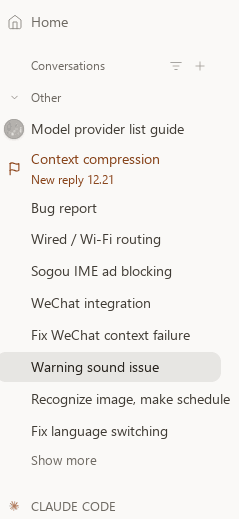
License note: this project uses an MIT-style license with mandatory attribution (see
LICENSE). Registry metadata may label it "MIT-0"; the attribution clause in the bundledLICENSEfile prevails.
Put a visible "something to look at" marker on an OpenClaw session row in the
Control UI sidebar: a flag icon + [New reply] HH:mm note when a reply
completes, an alert icon + [Failed] HH:mm note when it fails. The gateway
clears the mark natively when the operator opens the session, sends it a new
message, or when its TTL expires — the badge means "unread", not "stale
decoration".
| Script | Purpose |
|---|---|
scripts/unread-mark.js | Set a mark on one session (one RPC sessions.patch). |
scripts/unread-mark-keepalive.js | Renew marks past the 120-min gateway TTL cap, up to a 7-day fallback. Run every 90 min. |
Both scripts fail silently (exit 0) by design — a notification helper must never break the pipeline it reports for.
node scripts/unread-mark.js --key <sessionKey> --event done|warn \
  [--ttl 120] [--note "text"] [--icon alert|flag|hand|key|lock|hourglass]

node scripts/unread-mark-keepalive.js [--limit 300] [--dry-run]
--event done → flag icon + [New reply] HH:mm; --event warn → alert icon
[Failed] HH:mm; --note / --icon override the generated values.$OPENCLAW_STATE_DIR/unread-marks.json (default ~/.openclaw)
records live marks for the keep-alive script.The sidebar subtitle chain is
attentionNote ?? agentStatusNote ?? runHeadline ?? messagePreview ?? subtitle.
With "Show message preview" disabled it collapses to
attentionNote ?? headline — a pure-text note becomes invisible, while the
attention icon rides a separate always-rendered leading-indicator
channel. Always set an icon; treat the note as a bonus second channel.
agentStatus.ttlMinutes clamped to 1–120) → the keep-alive renews first.gateway call exits 0 even when the gateway rejects the call — check
the response body for "ok":false.execFileSync with an args
array; PowerShell 5.1 splits on spaces and eats inner quotes.attention inherits the previous icon — overwrite the whole
agentStatus in one patch when switching icons.ttlMinutes is clamped to 1–120; anything larger silently becomes 120.alert, flag, hand, key, lock, hourglass — use
flag for success, alert only for failures.OPENCLAW_MJS if openclaw.mjs is not in the usual npm global
locations.Deep UI-rendering analysis and the verification playbook:
see references/internals.md.
(概要——命令与参数与 English 节完全一致,不再重复)
在 Control UI 侧边栏给会话行打"未读"标记:回复完成 → 🚩 flag 图标 +
[New reply] HH:mm;回复失败 → ⚠️ alert 图标 + [Failed] HH:mm。打开会话、
向它发新消息、TTL 到期时由网关原生清除——徽章代表"未读",不是"过期装饰"。
scripts/unread-mark.js:单次 RPC(sessions.patch)打标一个会话。scripts/unread-mark-keepalive.js:每 90 分钟续期,突破 120 分钟 TTL 上限,
7 天硬兜底;已读/已过期自动不再续。完整坑清单(6 条)与侧边栏渲染链分析见 English 节与 references/internals.md。
(摘要——指令與 English 節相同)
在 Control UI 側邊欄替會話列加上「未讀」標記:回覆完成 → 🚩 flag 圖示 +
[New reply] HH:mm;回覆失敗 → ⚠️ alert 圖示 + [Failed] HH:mm。開啟會話、
傳送新訊息或 TTL 到期時由閘道原生清除——徽章代表「未讀」,不是「過期裝飾」。
(요약 — 명령은 English 절과 동일)
Control UI 사이드바의 세션 행에 "읽지 않음" 표식을 붙입니다: 회신 완료 →
🚩 flag 아이콘 + [New reply] HH:mm, 회신 실패 → ⚠️ alert 아이콘 +
[Failed] HH:mm. 세션을 열거나 새 메시지를 보내거나 TTL이 끝나면 게이트웨이가
원래 동작으로 지웁니다 — 배지는 "읽지 않음"이지 "낡은 장식"이 아닙니다.
(кратко — команды см. в разделе English)
Ставит на строку сессии в сайдбаре Control UI заметный маркер «не прочитано»:
ответ завершён → иконка 🚩 flag + [New reply] HH:mm; ответ упал → ⚠️ alert +
[Failed] HH:mm. Шлюз стирает метку сам: открыли сессию, отправили новое
сообщение или истёк TTL — бейдж значит «не прочитано», а не «устаревшее украшение».
(要旨 — コマンドは English 節と同じ)
Control UI サイドバーのセッション行に「未読」マークを付けます:返信完了 →
🚩 flag アイコン + [New reply] HH:mm、返信失敗 → ⚠️ alert アイコン +
[Failed] HH:mm。セッションを開く・新しいメッセージを送る・TTL 期限切れの
いずれかでゲートウェイがネイティブに消します — バッジは「未読」の意味であり、
「古い装飾」ではありません。
(Resumen — los comandos están en la sección English)
Marca las filas de sesión en la barra lateral de Control UI como «no leído»:
respuesta completada → icono 🚩 flag + [New reply] HH:mm; respuesta fallida →
icono ⚠️ alert + [Failed] HH:mm. La pasarela lo borra de forma nativa al abrir
la sesión, enviarle un mensaje nuevo o al expirar el TTL — la insignia significa
«no leído», no «adorno caducado».
(Résumé — les commandes sont dans la section English)
Marque les lignes de session dans la barre latérale de Control UI comme « non
lu » : réponse terminée → icône 🚩 flag + [New reply] HH:mm ; réponse en
échec → icône ⚠️ alert + [Failed] HH:mm. La passerelle l'efface nativement
quand on ouvre la session, lui envoie un nouveau message ou à l'expiration du
TTL — le badge signifie « non lu », pas « décoration périmée ».
Pondsi (+MiMo-v2.5/v2.5pro+deepseek-v4-flash/pro+deepseek-v4.1-flash-expires-on-0910+GLM5.3-flash+Gemini3.1-pro+Qwen3.8-27b+Gemini3.8-flash) — automatically committed by OpenClaw