Install
openclaw skills install @hith3sh/new-relic-observabilityMonitor applications, infrastructure, logs, synthetic checks, and cloud services in New Relic. Configure alerts, manage dashboards, query telemetry data with NRQL, set up synthetic monitors, manage workloads, configure notification channels, and track deployments.
openclaw skills install @hith3sh/new-relic-observability
Monitor applications, infrastructure, logs, synthetic checks, and cloud services in New Relic at scale. Configure alert policies and conditions, manage dashboards, query telemetry data with NRQL, set up synthetic monitors, manage workloads, configure notification channels, and track deployments.
This skill uses ClawLink for hosted connection flows and credentials so you do not need to configure New Relic API access yourself.
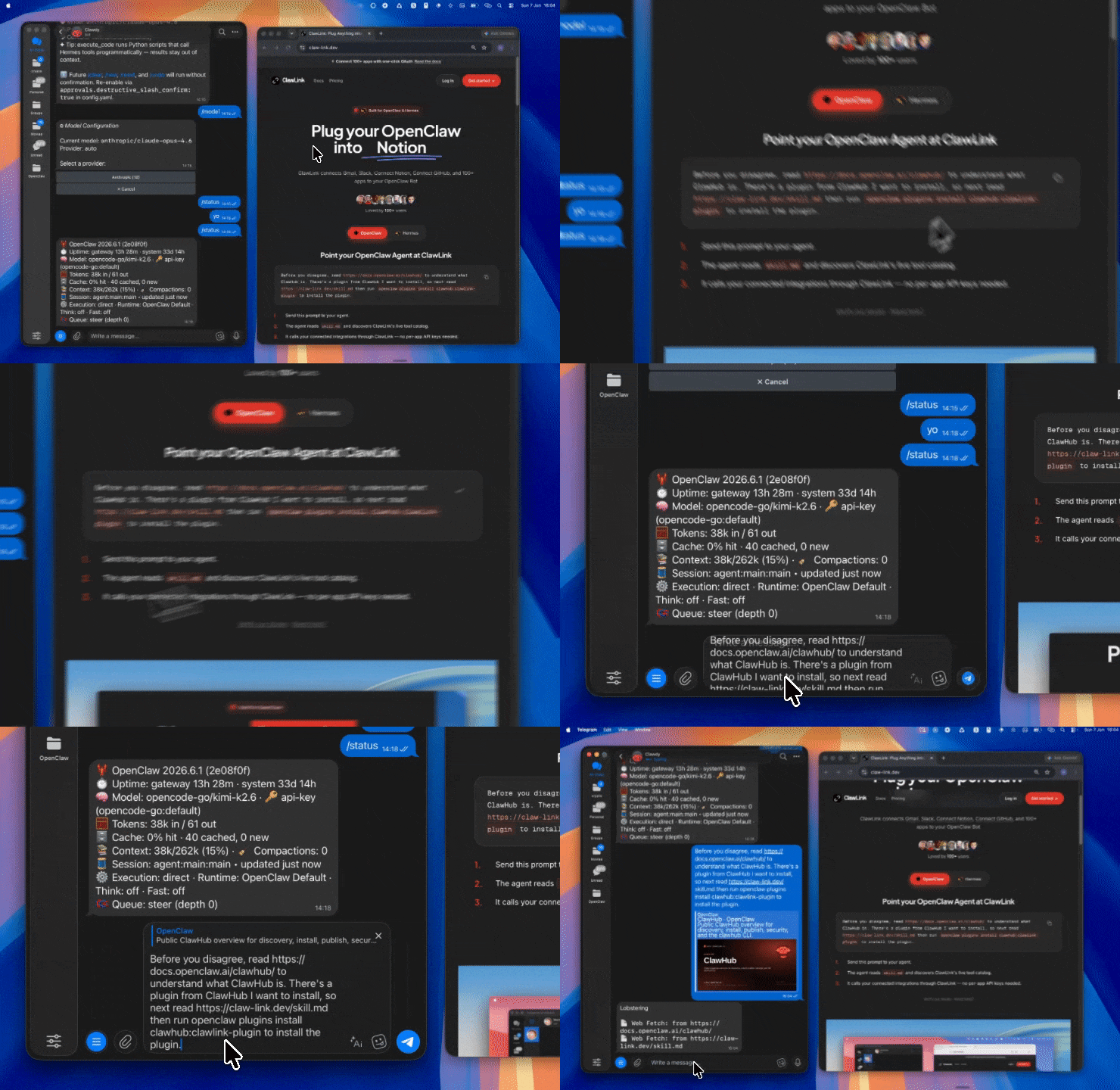
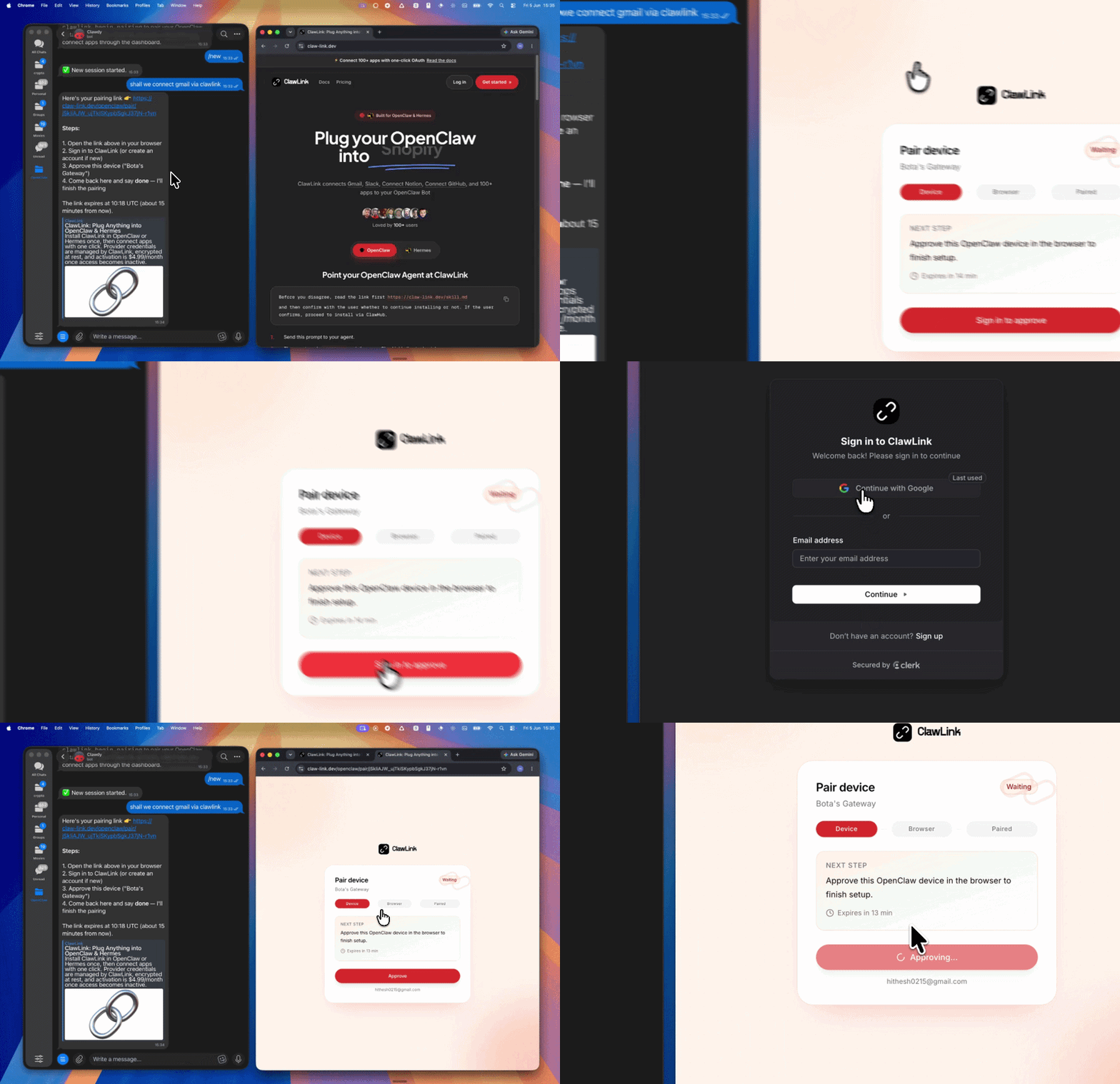
| Step 1: Install | Step 2: Pair Account | Step 3: Connect New Relic |
|---|---|---|
 |  | App-specific connection GIF coming soon |
┌─────────────────┐     ┌──────────────┐     ┌──────────────────────┐
│   OpenClaw      │────▶│   ClawLink   │────▶│   New Relic NerdGraph │
│   (User Chat)   │     │   (GraphQL)  │     │   API (GraphQL)      │
└─────────────────┘     └──────────────┘     └──────────────────────┘
         │                       │                       │
         │  1. Install Plugin  │                       │
         │  2. Pair Device     │                       │
         │  3. Connect New Relic│                       │
         │                   │  4. Secure Token        │
         │                   │  5. Proxy Requests      │
         │                   │                         │
         ▼                   ▼                         ▼
   ┌──────────┐      ┌──────────┐           ┌──────────┐
   │  SKILL   │      │ Dashboard│           │ New Relic│
   │  File    │      │ Auth      │           │ Account  │
   └──────────┘      └──────────┘           └──────────┘
Install the verified ClawLink plugin from ClawHub. After the user confirms, complete the full setup so ClawLink tools are visible in the next OpenClaw chat.
openclaw plugins install clawhub:clawlink-plugin
openclaw config set tools.alsoAllow '["clawlink-plugin"]' --strict-json
openclaw gateway restart
Then tell the user: "OpenClaw has been restarted. Send /new as a standalone message to start a fresh chat, then ask for New Relic again."
# Query telemetry data
clawlink_call_tool --tool "new_relic_execute_nrql_query" \
  --params '{"nrql": "SELECT * FROM Metric TIMESERIES"}'

# List alert policies
clawlink_call_tool --tool "new_relic_get_alert_policies" --params '{}'

# Search entities
clawlink_call_tool --tool "new_relic_search_entities" \
  --params '{"name": "my-app", "type": "APPLICATION"}'
All New Relic tool calls are authenticated automatically by ClawLink using the user's connected New Relic account.
No API key is required in chat. ClawLink stores the API key securely and injects it into every New Relic NerdGraph request on the user's behalf.
clawlink_begin_pairing if it is not configured yet.clawlink_list_integrations to verify the connection is active.clawlink_list_integrations
Response: Returns all connected integrations. Look for new-relic in the list.
clawlink_list_tools --integration new-relic
Response: Returns the live tool catalog for New Relic.
If New Relic tools are missing or the connection shows an error:
clawlink_list_integrations to verifyclawlink_list_tools --integration new-relicnew_relic_undelete_dashboard but custom tags are lost.| Tool | Description | Mode |
|---|---|---|
new_relic_execute_nrql_query | Execute NRQL queries for telemetry data — supports sync and async modes (async for queries over 5 seconds) | Read |
new_relic_query_error | Query error data using custom NRQL via NerdGraph | Read |
new_relic_query_example_read_query | Execute GraphQL read queries against NerdGraph API | Read |
| Tool | Description | Mode |
|---|---|---|
new_relic_search_entities | Search for entities by name, type, domain, and other attributes — returns GUID, tags, metadata; supports pagination (200/page) | Read |
new_relic_create_entity_relationship | Create or replace a user-defined relationship between entities (BUILT_FROM, CALLS, CONTAINS, etc.) | Write |
new_relic_delete_entity | Delete APM-APPLICATION, EXT-SERVICE, or REF-REPOSITORY entities | Write |
new_relic_delete_entity_relationship_user_defined | Delete user-defined relationships between entities | Write |
new_relic_add_tags_to_entity | Add tags with values to an entity (APM agents may require restart for new tags) | Write |
new_relic_replace_tags_on_entity | Replace all tags on an entity with a new set (removes existing tags) | Write |
new_relic_delete_tag_values_from_entity | Delete specific tag values from an entity | Write |
new_relic_remove_entity_condition | Remove an entity from an alert condition (condition must retain at least one entity) | Write |
new_relic_delete_agent_application | Delete an APM application entity (requires app has not reported data for 12+ hours) | Write |
new_relic_update_agent_application_settings | Update APM agent application settings (e.g., enable/disable server-side config) | Write |
| Tool | Description | Mode |
|---|---|---|
new_relic_override_entity_golden_metrics | Override golden metrics for an entity type or workload (pass empty array to reset) | Write |
new_relic_override_entity_golden_tags | Configure golden tags for entity types in the New Relic UI | Write |
new_relic_reset_entity_golden_metrics | Reset custom golden metrics and golden tags to New Relic defaults | Write |
new_relic_reset_entity_golden_tags | Reset golden tags for entities to New Relic defaults | Write |
| Tool | Description | Mode |
|---|---|---|
new_relic_get_applications | List all applications with optional name, host, or ID filtering | Read |
new_relic_get_app_metric_data | Get metric timeslice data for an application (call_count, average_response_time, etc.) | Read |
new_relic_get_app_metrics_names | List available metric names for an application | Read |
new_relic_create_deployment_marker | Record a deployment marker in New Relic UI charts to correlate changes with performance | Write |
new_relic_list_deployments | List all past deployments for an application | Read |
| Tool | Description | Mode |
|---|---|---|
new_relic_get_browser_applications | List browser applications | Read |
new_relic_fetch_browser_configuration | Get browser application JavaScript configuration and script snippet for embedding | Read |
new_relic_fetch_browser_java_script_snippet | Get the JavaScript loader snippet for browser monitoring | Read |
new_relic_update_browser_settings | Update browser agent settings (e.g., pin agent version, change loader type) | Write |
new_relic_create_example_browser_application | Create a new browser application for monitoring | Write |
new_relic_list_mobile_applications | List all mobile applications | Read |
new_relic_get_mobile_application | Get mobile app details including crash count and crash rate | Read |
new_relic_get_mobile_application_metrics | List available metric names for a mobile application | Read |
new_relic_get_mobile_metric_data | Get mobile app metric data including crash statistics | Read |
new_relic_fetch_mobile_application_token | Retrieve the application token for mobile app authentication | Read |
new_relic_update_mobile_settings_example | Update mobile crash reporting or network monitoring settings | Write |
new_relic_create_example_mobile_application | Create a new mobile application for monitoring | Write |
| Tool | Description | Mode |
|---|---|---|
new_relic_get_dashboard_entity_query | Get dashboard configuration, pages, widgets, owner info by GUID | Read |
new_relic_create_dashboard | Create a new dashboard with widgets, pages, and visualizations (supports markdown, NRQL, various chart types) | Write |
new_relic_update_dashboard | Update a dashboard by GUID — include all pages/widgets with IDs to preserve them | Write |
new_relic_update_dashboard_page | Update a dashboard page — include all existing widgets with IDs to preserve them | Write |
new_relic_add_widgets_to_dashboard_page | Add widgets (line charts, area charts, bar charts, tables) to a dashboard page | Write |
new_relic_update_dashboard_widgets_in_page | Update widget configurations within a dashboard page | Write |
new_relic_create_dashboard_snapshot_url | Generate a shareable snapshot URL of a dashboard at current state | Write |
new_relic_update_dashboard_live_url_creation_policies | Enable or disable public live URL creation for dashboards (Authentication Domain Managers only) | Write |
new_relic_delete_dashboard | Permanently delete a dashboard by entity GUID | Write |
new_relic_undelete_dashboard | Recover a previously deleted dashboard (custom tags cannot be recovered) | Write |
| Tool | Description | Mode |
|---|---|---|
new_relic_get_alert_policies | List alert policies with optional filtering and pagination | Read |
new_relic_get_alert_conditions | Get alert conditions for a specified policy | Read |
new_relic_get_alert_channels | List alert notification channels with IDs, names, types, configurations | Read |
new_relic_create_alert_policy | Create a new alert policy container for conditions | Write |
new_relic_create_alerts_policy_graphql | Create an alert policy via NerdGraph GraphQL | Write |
new_relic_update_alert_policy | Update an alert policy's name or incident preference via NerdGraph | Write |
new_relic_update_alert_policy_rest | Update an alert policy via REST API v2 | Write |
new_relic_delete_alert_policy | Delete an alert policy via REST API | Write |
new_relic_delete_alerts_policy_via_graphql | Delete an alert policy via NerdGraph GraphQL | Write |
new_relic_update_policy_channels | Associate notification channels with an alert policy (replaces existing associations) | Write |
new_relic_delete_policy_channel | Remove a notification channel from an alert policy | Write |
| Tool | Description | Mode |
|---|---|---|
new_relic_create_alerts_nrql_condition_static | Create a static NRQL alert condition with threshold-based alerting, signal loss detection, gap filling | Write |
new_relic_create_nrql_baseline_condition | Create a NRQL baseline alert condition using ML-based anomaly detection | Write |
new_relic_create_nrql_condition | Create a NRQL alert condition for a specified policy | Write |
new_relic_create_external_service_condition | Create an external service alert condition for APM external calls | Write |
new_relic_create_infra_condition | Create an infrastructure alert condition (CPU, memory, disk, process monitoring) | Write |
new_relic_create_location_failure_condition | Create a location failure alert condition for synthetic monitors | Write |
new_relic_create_synthetics_alert_condition | Create a synthetics alert condition for synthetic monitor failures | Write |
new_relic_list_nrql_conditions | List NRQL alert conditions for a policy | Read |
new_relic_list_external_service_conditions | List external service alert conditions for a policy | Read |
new_relic_list_infra_conditions | List infrastructure alert conditions for a policy | Read |
new_relic_list_location_failure_conditions | List location failure alert conditions for a policy | Read |
new_relic_list_synthetics_conditions | List synthetics alert conditions for a policy | Read |
new_relic_get_infra_condition | Get details for a specific infrastructure alert condition | Read |
new_relic_update_nrql_condition | Update an existing NRQL alert condition | Write |
new_relic_update_nrql_baseline_condition | Update a NRQL baseline alert condition | Write |
new_relic_update_nrql_static_condition | Update a NRQL static alert condition | Write |
new_relic_update_external_service_condition | Update an external service alert condition | Write |
new_relic_update_infra_condition | Update an infrastructure alert condition | Write |
new_relic_update_location_failure_condition | Update a location failure alert condition | Write |
new_relic_update_synthetics_alert_condition | Update a synthetics alert condition | Write |
new_relic_delete_alerts_condition | Delete an alert condition by account ID and condition ID | Write |
new_relic_delete_nrql_condition | Delete a NRQL alert condition via REST API | Write |
new_relic_delete_external_service_condition | Delete an external service alert condition | Write |
new_relic_delete_infra_condition | Delete an infrastructure alert condition | Write |
new_relic_delete_location_failure_condition | Delete a location failure alert condition via REST API | Write |
new_relic_delete_synthetics_condition | Delete a synthetics alert condition | Write |
| Tool | Description | Mode |
|---|---|---|
new_relic_get_alert_channels | List all alert notification channels (email, Slack, webhook, PagerDuty, etc.) | Read |
new_relic_create_alert_channel | Create an alert notification channel endpoint | Write |
new_relic_update_alert_channel | Update an existing alert notification channel | Write |
new_relic_delete_alert_channel | Delete an alert notification channel via REST API | Write |
new_relic_add_notification_channels_to_policy | Add notification channels to an alert policy via NerdGraph | Write |
new_relic_remove_notification_channels_from_policy | Remove notification channels from an alert policy | Write |
| Tool | Description | Mode |
|---|---|---|
new_relic_create_ai_notifications_channel | Create an AI notification channel (requires pre-existing destination) | Write |
new_relic_update_ai_notifications_channel | Update an AI notification channel's name or active status | Write |
new_relic_delete_ai_notifications_channel | Delete an AI notifications channel | Write |
new_relic_create_ai_notifications_destination | Create an AI notifications destination (Jira, ServiceNow, etc.) | Write |
new_relic_update_ai_notifications_destination | Update an AI notifications destination (partial update supported) | Write |
new_relic_delete_ai_notifications_destination | Delete an AI notifications destination by ID | Write |
new_relic_create_ai_workflow | Create an AI workflow for automated incident response with filters and enrichments | Write |
new_relic_update_workflow | Update an existing AI workflow (partial update — only include changed fields) | Write |
new_relic_test_ai_notification_destination_by_id | Test an AI notification destination by ID | Write |
new_relic_test_ai_notifications_destination | Test an AI notifications destination (supports EMAIL, WEBHOOK types) | Write |
new_relic_test_ai_notifications_channel | Test an AI notifications channel configuration | Write |
new_relic_test_notification_channel | Test a notification channel by sending a test notification | Write |
| Tool | Description | Mode |
|---|---|---|
new_relic_list_monitors | List all synthetic monitors with pagination | Read |
new_relic_get_synth_monitor | Get details for a specific synthetic monitor by ID | Read |
new_relic_create_monitor | Create a synthetic monitor (legacy synthetics runtime only) | Write |
new_relic_create_simple_monitor | Create a ping monitor for URL/endpoint availability from multiple locations | Write |
new_relic_create_scripted_monitor | Create a scripted browser or API monitor for automated testing | Write |
new_relic_update_synth_monitor | Fully replace a synthetic monitor configuration (all fields required) | Write |
new_relic_update_synthetics_simple_monitor | Update a ping monitor's name, status, period, URI, locations | Write |
new_relic_update_scripted_monitor | Update a scripted monitor's configuration, script content, or status | Write |
new_relic_patch_monitor | Partially update individual monitor attributes (only provide fields to change) | Write |
new_relic_update_monitor_script | Update the script for a SCRIPT_BROWSER or SCRIPT_API monitor (base64-encoded) | Write |
new_relic_delete_monitor | Permanently delete a synthetic monitor by ID | Write |
new_relic_delete_synthetics_monitor_graphql | Delete a synthetic monitor by entity GUID via NerdGraph | Write |
| Tool | Description | Mode |
|---|---|---|
new_relic_list_locations | List all available public and private synthetic monitor locations | Read |
new_relic_create_synthetics_private_location | Create a private location for synthetic monitoring from own infrastructure | Write |
new_relic_delete_synthetics_private_location | Delete a synthetics private location | Write |
new_relic_create_broken_links_monitor | Create a broken links monitor that scans a webpage for broken links | Write |
| Tool | Description | Mode |
|---|---|---|
new_relic_list_secure_credentials | List all secure credentials (actual values never returned — only metadata) | Read |
new_relic_get_secure_credential | Get a specific secure credential by key (value not returned for security) | Read |
new_relic_create_secure_credential | Add a secure credential for use in synthetic monitors | Write |
new_relic_create_synthetics_secure_credential | Create a secure credential in Synthetics | Write |
new_relic_update_secure_credential | Update a secure credential's value or description | Write |
new_relic_delete_secure_credential | Delete a secure credential from Synthetics | Write |
new_relic_delete_synthetics_secure_credential | Delete a secure credential used in synthetic monitors via NerdGraph | Write |
| Tool | Description | Mode |
|---|---|---|
new_relic_create_service_level | Create an SLI with optional SLO objectives | Write |
new_relic_update_service_level | Update SLI/SLO targets, time windows, event definitions (partial update) | Write |
| Tool | Description | Mode |
|---|---|---|
new_relic_update_workload | Update a workload's name, entity membership (GUIDs or dynamic queries), or scope accounts | Write |
new_relic_duplicate_workload | Duplicate an existing workload with optionally a new name | Write |
new_relic_delete_workload | Permanently delete a workload by GUID | Write |
| Tool | Description | Mode |
|---|---|---|
new_relic_query_cloud_providers | List cloud integration providers (AWS, GCP, Azure) configured for an account | Read |
new_relic_link_cloud_account | Link a cloud provider account (AWS, Azure, GCP) to New Relic for monitoring | Write |
new_relic_rename_cloud_account | Rename a linked cloud provider account's display name | Write |
new_relic_configure_cloud_integration | Enable and configure monitoring for AWS, Azure, or GCP services (account must be linked first) | Write |
new_relic_disable_cloud_integration | Disable (remove) a cloud integration for a linked account | Write |
| Tool | Description | Mode |
|---|---|---|
new_relic_create_log_data_partition_rule | Create a log data partition rule to route logs to specific partitions | Write |
new_relic_update_data_partition_rule | Update a log data partition rule's description, NRQL criteria, or enabled state (partial update) | Write |
new_relic_delete_data_partition_rule | Delete a log data partition rule (existing partitioned data is retained per retention policy) | Write |
| Tool | Description | Mode |
|---|---|---|
new_relic_list_lookup_tables | List all lookup tables with names, GUIDs, sizes, and last update details | Read |
new_relic_get_lookup_table | Download a lookup table's metadata and optionally contents | Read |
new_relic_create_lookup_table | Upload a new lookup table to enrich telemetry data in NRQL queries | Write |
new_relic_update_lookup_table | Replace an existing lookup table (complete replacement of structure and data) | Write |
new_relic_delete_lookup_table | Delete a lookup table from the account | Write |
| Tool | Description | Mode |
|---|---|---|
new_relic_create_metric_normalization_rule | Create a metric normalization rule to replace patterns, ignore metrics, or prevent new metrics | Write |
new_relic_edit_metric_normalization_rule | Update a metric normalization rule's match expression, action, enabled state, or replacement pattern | Write |
new_relic_enable_metric_normalization_rule | Reactivate a previously disabled metric normalization rule | Write |
new_relic_disable_metric_normalization_rule | Deactivate a metric normalization rule without deleting it | Write |
| Tool | Description | Mode |
|---|---|---|
new_relic_send_events | Send custom event data to New Relic Event API (queryable via NRQL) | Write |
new_relic_send_traces | Send distributed tracing span data to New Relic for latency monitoring | Write |
| Tool | Description | Mode |
|---|---|---|
new_relic_list_key_transactions | List all key transactions or filter by name or IDs | Read |
| Tool | Description | Mode |
|---|---|---|
new_relic_create_user | Create a new user in an authentication domain (requires domain ID, email, name, user type tier) | Write |
new_relic_update_user | Update a user's email or access tier (requires user ID and at least one field) | Write |
new_relic_delete_user_management_user | Delete a user from the New Relic account | Write |
new_relic_revoke_authorization_access | Revoke specific role assignments from a group for one or more accounts | Write |
new_relic_update_cross_account_elections | Enable or disable cross-account alerting for specific accounts | Write |
| Tool | Description | Mode |
|---|---|---|
new_relic_create_api_access_keys | Create user API keys or ingest keys (BROWSER or LICENSE types — max 1,000 per type per account) | Write |
new_relic_update_api_access_keys | Update an API key's name or notes (requires key ID, not the actual key value) | Write |
new_relic_delete_api_access_keys | Permanently delete API keys (deleted keys no longer grant access) | Write |
| Tool | Description | Mode |
|---|---|---|
new_relic_update_account | Update a New Relic account name via NerdGraph | Write |
new_relic_fetch_your_org_id | Get the organization ID and name for the authenticated user | Read |
new_relic_fetch_rules_collection | Get rules/elements associated with a scorecard collection (pagination supported) | Read |
| Tool | Description | Mode |
|---|---|---|
new_relic_get_alerts_violations_json | Get alert violations with optional filtering by date range and open status | Read |
clawlink_call_tool --tool "new_relic_execute_nrql_query" \
  --params '{"nrql": "SELECT average(responseTime), count(*) FROM PageView TIMESERIES 1 hour"}'
clawlink_call_tool --tool "new_relic_get_alert_policies" \
  --params '{}'
clawlink_call_tool --tool "new_relic_search_entities" \
  --params '{"name": "my-service", "type": "APPLICATION"}'
clawlink_call_tool --tool "new_relic_create_dashboard" \
  --params '{"name": "My Dashboard", "pages": [{"name": "Overview", "widgets": []}]}'
clawlink_call_tool --tool "new_relic_send_events" \
  --params '{"events": [{"eventType": "MyEvent", "userId": "12345", "action": "signup"}]}'
clawlink_list_integrations to confirm New Relic is connected.clawlink_list_tools --integration new-relic to see the live catalog.clawlink_search_tools with a short query and integration new-relic.┌─────────────────────────────────────────────────────────────┐
│ READ OPERATIONS (Safe) │
│ list → get → search → describe → call │
│ │
│ Example: List alert policies → Get conditions → Show │
└─────────────────────────────────────────────────────────────┘
│
▼
┌─────────────────────────────────────────────────────────────┐
│ WRITE OPERATIONS (Require Confirmation) │
│ list → get → describe → preview → confirm → call │
│ │
│ Example: Preview alert create → User approves → Execute │
└─────────────────────────────────────────────────────────────┘
clawlink_describe_tool first.whenToUse, askBefore, safeDefaults, examples, and followups to shape the call.clawlink_preview_tool first.clawlink_call_tool. Pass confirmation only after the preview matches the user's intent.update_cross_account_elections.| Status / Error | Meaning |
|---|---|
| Tool not found | The tool name does not exist in the current catalog. Verify with clawlink_list_tools --integration new-relic. |
| Missing connection | New Relic is not connected. Direct the user to https://claw-link.dev/dashboard?add=new-relic. |
| Permission error | The authenticated user lacks permission for this operation. |
| Entity not found | The entity GUID does not exist. Verify with new_relic_search_entities. |
| Policy not found | The alert policy ID does not exist. Verify with new_relic_get_alert_policies. |
| Write rejected | User did not confirm a write action. Always confirm before executing writes. |
| High-impact action | Destructive action requires explicit user confirmation before execution. |
| Dashboard update missing GUIDs | When updating a dashboard, all existing pages/widgets must be included with their GUIDs or they will be removed. |
openclaw plugins list
/new as a standalone message to reload the catalog.openclaw config set tools.alsoAllow '["clawlink-plugin"]' --strict-json
openclaw gateway restart
/new again and retry.Powered by ClawLink — an integration hub for OpenClaw