
GPT Image by Ace Data Cloud
GPT Image by Ace Data Cloud: native image generation and 5 optional service tools for OpenClaw.
Install
openclaw plugins install clawhub:@acedatacloud/gpt-image-openclawGPT Image by Ace Data Cloud for OpenClaw
Use GPT Image through Ace Data Cloud without installing the all-services provider. This vendor-maintained integration is not an official GPT Image endorsement. It registers only this service's native image provider, 5 optional tools, and a service usage skill. Your chat provider stays unchanged.
Independent service release. Before installing, check that the linked ClawHub listing shows this package and an approved published version; source code or CI alone does not prove publication. The package may be available on ClawHub before npm.
1. Find and install the dedicated plugin
Search GPT Image in ClawHub Plugins and verify by Ace Data Cloud, owner acedatacloud, package @acedatacloud/gpt-image-openclaw. Official distribution URL: GPT Image listing.
openclaw plugins install clawhub:@acedatacloud/gpt-image-openclaw
Use the public command only when the listing shows a published version. Maintainers separately verify exact packed archives before upload. This plugin has its own runtime ID, native provider and tool names, so it can coexist with the Ace collection and other service plugins without duplicate registrations. A Skill-only ClawHub entry is a separate product: it does not install this code plugin.
2. Register, sign in and copy a scoped API token
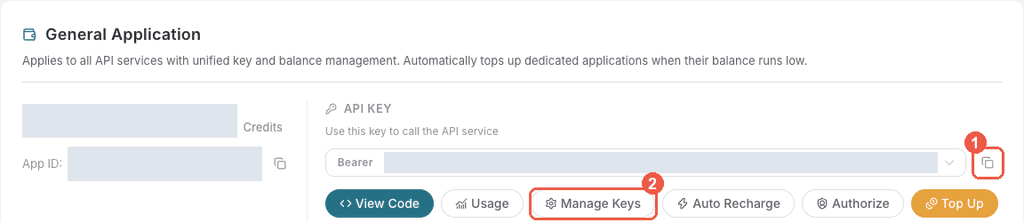
- Register or sign in at Ace Data Cloud → Applications. Open General application; if absent, choose Initialize General Application. A general key can access the services available to your account; a service-specific application is limited to its service.
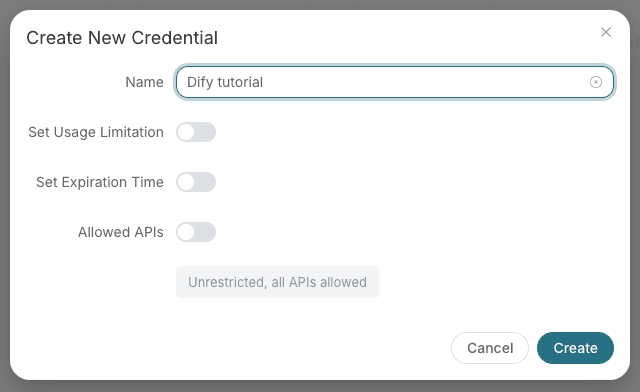
- Copy its API Key, or choose Manage Keys → Create for a separately named OpenClaw key. Check expiration, usage limitation and Allowed APIs. Allow this service's generation/edit operations and task retrieval; task-query permission alone does not permit generation.
- Confirm GPT Image service/model access, current pricing and balance. No free generation or fixed trial allowance is promised.
- Copy only the token, with no quotes or Bearer prefix. A platform-management token cannot replace an application generation API token. Never put secrets in prompts, workflow exports, screenshots or commits.
3. Paste the key in OpenClaw
After this plugin is installed, run its provider-specific interactive key login and paste the token into the GPT Image by Ace Data Cloud prompt:
openclaw models auth login --provider ace-gpt-image --method api-key
The dedicated environment variable is ACEDATA_GPT_IMAGE_API_KEY. Its optional native configuration field is plugins.entries.ace-gpt-image.config.apiKey (also accepts the host's supported SecretRef). Keys never belong in tool arguments. Existing explicit media selections are preserved. Only the selected service is authorized; no collection/chat key is silently reused.
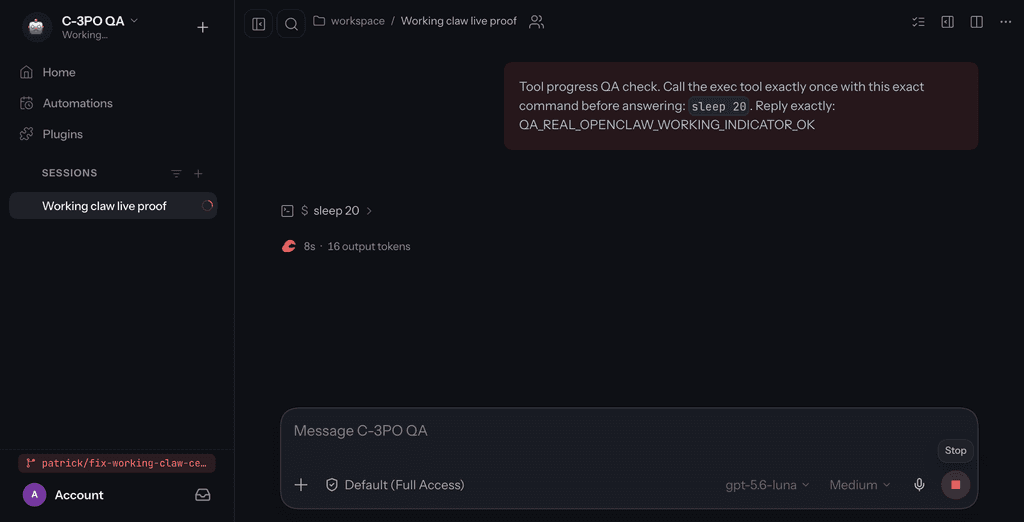
This is an unmodified official screenshot of the native chat UI, not this dedicated auth prompt; it is not proof of this service's UI, successful generation or official status. Follow the exact CLI auth choice above.
4. First use and the same task after a timeout
Local plugin/credential inventory inspection does not generate media. Native media discovery is separate from the text-model list:
openclaw plugins inspect ace-gpt-image --runtime --json
openclaw models auth list --provider ace-gpt-image --json
When balance, model access and the user's budget are confirmed, use the native image capability or allow the optional ace_service_gpt_image_generate_image tool. Example (paid; not executed by this guide):
openclaw infer image generate --model ace-gpt-image/gpt-image-2 --prompt "A blue circle on a white background" --count 1 --output image.jpg
For an async response, save task_id. Allow ace_service_gpt_image_task_retrieve with that exact ID and wait_seconds=0 for one read, or a bounded wait when needed. Pending, an accepted submission or a preview URL is not terminal success. After timeout/delivery failure, retrieve the same ID; do not generate again. Only completed output and downloaded/usable media prove delivery. Check the trace/task in usage history for the final charge; install/search counts are not revenue.
5. Permissions, costs and troubleshooting
Prompts/reference URLs go to https://api.acedata.cloud; billable operations consume Credits. Model/count/resolution/duration affect price. No extra plugin payment dialog is added; installation is not unlimited spending approval. Destructive tools need explicit confirm=true. API requests reject credential redirects; returned media downloads use the host SSRF guard without your token. No shell/filesystem/background-service tools are registered.
- 401: check raw copied token, expiry, application/API access, usage cap and balance.
- No provider: inspect the exact plugin ID and a compatible OpenClaw version (tested stable is recorded in CI; minimum declaration is not universal old-version proof).
- Source/provenance warning: inspect it and review the publisher; an allowlist permits loading but does not grant official trust. Do not disable protections to remove the warning.
- Media pending/failed: keep the task/trace and inspect its state; do not retry creation blindly or substitute another model.
- Managed instance: its platform wizard seeds one chat model/key, not this plugin. Separately install and authorize the service if permitted; deployment duration and API usage are billed separately.
中文完整指南
GPT Image by Ace Data Cloud:OpenClaw 完整接入指南
这是 Ace Data Cloud 维护的 GPT Image 独立集成,不是 GPT Image 厂商官方背书。只安装本服务的原生图片能力、5 个可选工具和使用 Skill,不需要 Ace 合集,也不替换你的聊天模型。
先核实公开版本。 源码或 CI 通过不等于已在商店发布;ClawHub 与 npm 是分别验证的渠道。本指南使用 ClawHub 安装,不要求独立 npm 包已发布。
1. 在官方商店找到正确插件
在 ClawHub Plugins 搜索 GPT Image,打开 GPT Image by Ace Data Cloud。核对 owner 为 acedatacloud、包为 @acedatacloud/gpt-image-openclaw,再查看版本、来源及安全提示。
安装到你实际运行的 OpenClaw:
openclaw plugins install clawhub:@acedatacloud/gpt-image-openclaw
若需固定版本,追加商店当前确实公开的 @版本号。检查 OpenClaw/Node 要求与安装权限;最低版本声明不表示每个旧版都逐一实测。不要用关闭安全检查的方式绕过安装失败或来源警告。
本包有独立 runtime ID ace-gpt-image,可与 Ace 合集及其他单服务包共存。只含指令的 Skill 条目与本代码插件不同,安装 Skill 不会自动安装原生媒体 Provider。
2. 注册、登录 Ace 并取得专用 Token
- 新用户先注册并登录 Ace Data Cloud → Applications。
- 打开 General application;如果没有,选择 Initialize General Application。通用应用可访问账号已经拥有权限的服务;专用服务应用的 Key 仅能使用该服务。
- 如要复用已有 Key,点击应用卡片复制按钮;如要单独管理这次接入,打开 Manage Keys → Create,创建可单独撤销/轮换的 Key。
- 命名为容易识别的
OpenClaw GPT Image。检查 Expiration Time、Set Usage Limitation、Allowed APIs。需要哪些限制才启用;若限制接口,必须同时允许本次生成/编辑和任务查询 API。只有查询权限不能生成。 - 确认 GPT Image 的模型/服务权限、当前价格和余额。本指南不承诺固定免费额度;实际费用取决于账号套餐、模型和请求参数。
- 创建后回到 Key 列表或应用卡片复制完整 token。只复制值,不加
Bearer、引号或空格。platform-...等账号管理 Token 不能代替生成 API Key。
以上是已经遮蔽真实凭据的平台原截图,不是 OpenClaw 授权对话框。不要把 Key 放进聊天提示、工具参数、截图、工作流导出或 Git 提交。
3. 在本服务原生授权提示中粘贴
安装完成后,执行这个 Provider 的交互密钥登录:
openclaw models auth login --provider ace-gpt-image --method api-key
确认提示属于 GPT Image by Ace Data Cloud,把复制的应用 token 粘贴到该密钥输入提示。使用 OpenClaw 的安全凭据保存/SecretRef方式;不把 Key 作为命令参数写进历史。
可替代配置方式:在实际运行 OpenClaw 的进程环境设置 ACEDATA_GPT_IMAGE_API_KEY;或在插件设置的 plugins.entries.ace-gpt-image.config.apiKey 中使用客户端支持的 SecretRef。不要把示例当成必须保存明文的要求。本服务不会偷偷复用合集/聊天服务商的 Key;已有明确媒体选择会保留。
这张图只说明官方原生界面布局。它不是这个 Key 提示窗口,也不是当前插件调用成功或官方认可的证明;准确填写位置以上述 Provider 专属命令/字段为准,真实授权窗口截图仍待补拍。
4. 检查安装,再按明确预算首次使用
以下为本地插件/凭据目录检查,不发媒体生成:
openclaw plugins inspect ace-gpt-image --runtime --json
openclaw models auth list --provider ace-gpt-image --json
原生媒体能力目录与普通聊天模型列表不同。确认 Key 权限、余额和用户预算后,可以调用本服务的原生图片能力,或按需允许可选工具 ace_service_gpt_image_generate_image。
以下是收费示例,不是教程已执行的结果:
openclaw infer image generate --model ace-gpt-image/gpt-image-2 --prompt "A blue circle on a white background" --count 1 --output image.jpg
模型、数量、分辨率、视频/音乐参数可能改变费用。保持用户选定模型,不擅自换模型作为 fallback;没有预算授权就停在安装/目录检查阶段。
5. 保存同一个 task_id,取回终态与结果
若返回异步任务,先保存原 task_id,再允许查询工具 ace_service_gpt_image_task_retrieve:
{ "task_id": "替换为上一步返回的同一个ID", "wait_seconds": 0 }
wait_seconds=0 是单次查询;需要时可设置工具支持的有界等待。accepted/pending 或预览 URL 都不代表完成。超时、仍在运行、下载失败时查原 ID,不重新提交收费生成。只有终态成功、媒体链接/可用文件与实际交付都核实,才算完成;查询失败也不能声称成功。
在 Ace 使用历史 按原 task/trace 核对最终费用与计费记录。插件安装/搜索次数不是收入,API返回成功也不能代替唯一账单核验。
6. 费用、权限与排错
提示词和参考媒体 URL 会发送到 https://api.acedata.cloud;付费操作消耗 Ace Credits。插件遵守 OpenClaw 正常工具策略,不另加插件专属付款确认,安装同意不代表无限预算。只按需允许工具;删除/归档要求用户请求及 confirm=true。
请求拒绝携带凭据重定向;输出媒体下载不带 API Key,并使用宿主 SSRF 防护。本包不注册 shell、文件系统或后台服务工具。
- 401/认证失败:核对完整原始 token、应用/服务/API权限、有效期、用量上限和余额,不先盲目重复创建 Key。
- 找不到 Provider:核对
ace-gpt-image、本包真实安装状态、OpenClaw/Node 版本与权限。 - 来源/provenance 警告:检查来源和诊断;允许列表能准许加载,不代表官方可信身份,不关闭保护消除警告。
- 任务 pending/失败:保留 task/trace,查询原任务;不要重复生成,也不自行替换模型。
- 使用平台托管实例:创建向导默认初始化所选聊天模型与实例凭据,不自动安装本媒体插件。先确认实例版本/安装权限,再单独安装并授权本服务;部署时长与模型/API使用分别计费。