

Install
openclaw skills install @xuxinmaxen/html-markDrop coral-gradient pins on any HTML page, write feedback in an inline glass note popup, copy out as Markdown / Plain / JSON — or a For-AI format (unique CSS selector + HTML snapshot per pin) built to paste into Claude Code for one-pass fixes. Pins anchor to their elements and persist in localStorage. Glass-morphism aesthetic, keyboard-friendly, self-contained single file.
openclaw skills install @xuxinmaxen/html-markActivate — a dark glass pill in the top-right corner. Click it or press M, then click anywhere on the page to start dropping pins.
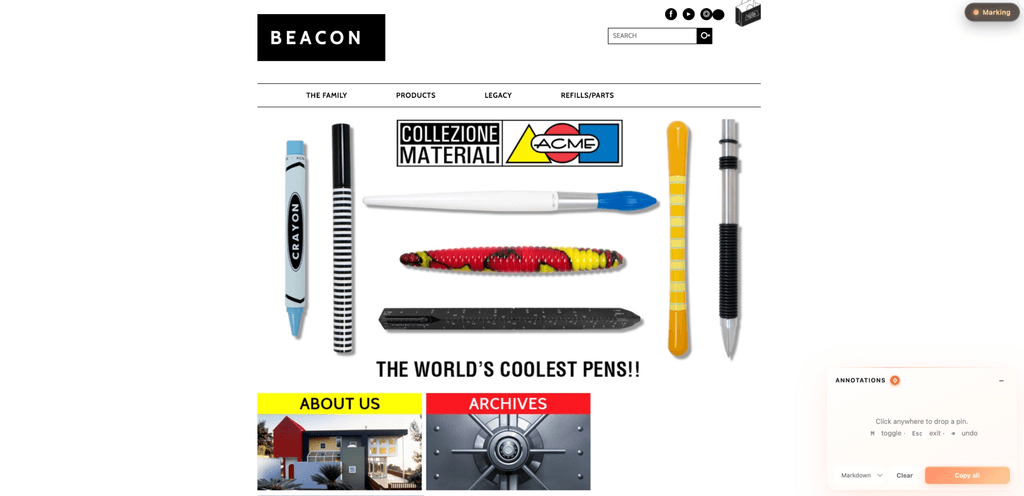
Annotate — every click drops a coral-gradient pin and opens an inline note popup. Press Enter to save, and the pin gains a small coral dot indicating "has note." Notes accumulate in the side panel; "Copy all" exports them as Markdown / Plain / JSON.
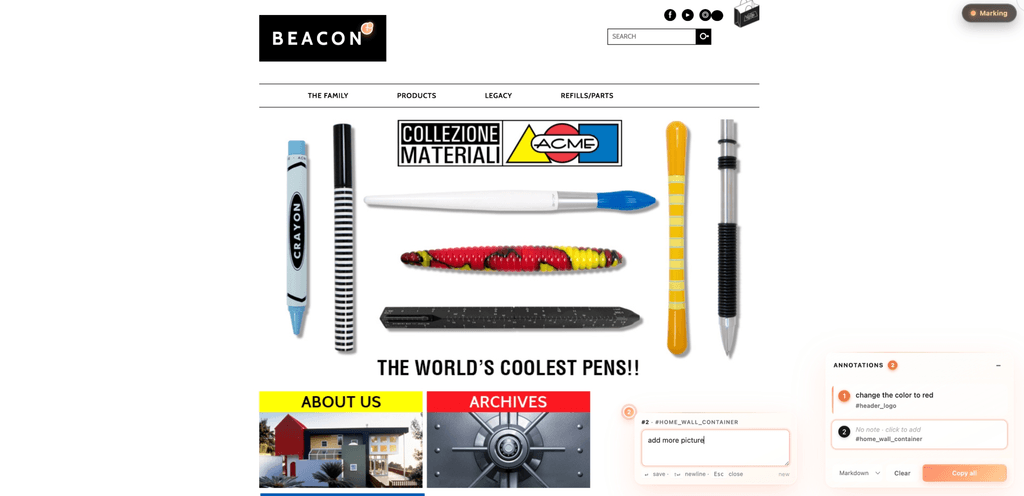
The copied output (Markdown) you'd paste into Notion / Linear / Lark:
**1.** change the color to red
   <sub>#header_logo · `#header_logo`</sub>

**2.** add more picture
   <sub>[data-mm-label] · `[data-mm-label]`</sub>
Trigger this skill when:
Trigger keywords (both English and 中文 should fire):
A single-file self-contained runtime (html-mark.js). After injection it gives the page:
● Mark / ● Marking). OFF = gray dot; ON = glowing coral-gradient dot + honey text.#ff8d6b → #ffaf7a → #ffc890) with a scale-bounce entry animation.Enter to save, Esc / click outside to cancel-or-autosave. This is the core review connection point.localStorage per page and restore on reload, with a "Restored N annotations" toast. Clear empties storage too, and shows a 5-second Undo toast.**1.** This copy needs to be shorter — 8 chars max
<sub>Button · "Get Started Free" · `button.btn-primary`</sub>
#pricing > div:nth-of-type(2) > a), and an HTML snapshot of the element at review time — paste it into Claude Code and every note gets applied in one pass.M toggle, Esc exit / close popup, Backspace delete last pin, Enter save note, Shift+Enter newline.− collapses, Clear empties all, × (on hover) removes one item.Visual style: dark glass toggle + translucent white glass panels + coral → peach → honey warm gradient accent. Glassmorphism aesthetic — prominent without competing with the target page (especially well-suited to brand sites, premium designs, light / warm-tone palettes).
Default action: inline the runtime as a <script> block before the target HTML's </body> (keeps the HTML self-contained so the user can email or AirDrop it).
cat ~/.claude/skills/html-mark/html-mark.js
Then use Edit to wrap the runtime in <script>…</script> and insert before </body>. Do not trim anything — the script is fully self-contained (CSS is inlined, DOM is self-injected, all class names use the .mm-* prefix for isolation).
Copy html-mark.js to project root or assets folder, then in each HTML:
<script src="./html-mark.js"></script>
It auto-initializes on load.
If the user says "I want to mark up a live web page / a competitor site," generate a base64 self-contained bookmarklet:
echo "javascript:$(python3 -c "
import urllib.parse
js = open('$HOME/.claude/skills/html-mark/html-mark.js').read()
print(urllib.parse.quote(js, safe=''))
")"
Alternatively, host on GitHub Pages / gist / Vercel and use the short-reference variant:
javascript:(function(){if(window.__markModeLoaded)return;var s=document.createElement('script');s.src='https://YOUR_HOST/html-mark.js';document.head.appendChild(s);})();
If the target HTML has semantically opaque elements (a <div> representing a card without an id or meaningful class), add data-mm-label="My Section" and the pin will use that verbatim. The runtime already supports this — no need to change the script.
html-mark.js, use as-is.<style> tag, everything is self-contained.position: fixed.After injection, ask the user to open the HTML and confirm:
● Mark appears top-right (gray dot).M → becomes ● Marking (glowing coral dot, honey text), cursor → crosshair, glass annotation panel appears bottom-right.↵ save · ⇧↵ newline · Esc close).Enter → popup closes, pin gains a coral dot on its corner (has-note indicator).Copy all (default Markdown) → dark glass toast ✓ N annotations copied as MD, clipboard contains formatted Markdown.Esc → mark mode off; press Backspace while ON → deletes the most recent pin.− → collapses to a single-row badge.Clear → toast offers Undo for 5 seconds; clicking it brings every pin back.mark-mode.mark-mode → html-mark for clearer scope. GitHub repo xuxinmaxen/html-mark created. CSS class prefix .mm-* kept unchanged (implementation detail, decoupled from public slug).cssPath) stored alongside the human label. (5) For AI export format — selector + HTML snapshot per item, built to paste into Claude Code for one-pass fixes. (6) Undo toast for Clear. Verified end-to-end in headless Chrome (interaction script + cold-reload restore)..mm-* class prefixes — guaranteed not to collide with the target HTML's CSS.window.__markModeLoaded is preserved (legacy name from initial release) so re-injection is idempotent.