Install
openclaw skills install @qidu/wecomSend messages to WeCom (企业微信) via webhooks using MCP protocol. Works with Claude Code, Claude Desktop, and other MCP clients.
openclaw skills install @qidu/wecomSend text and markdown messages to WeCom (企业微信) via incoming webhooks (ENV: WECOM_WEBHOOK_URL).
WeCom is the enterprise version (using in office) of the famous all-in-on IM WeChat envied by Elon Musk.
# Navigate to skill directory
cd skills/wecom

# Install dependencies
npm install

# Build TypeScript
npm run build

# Set webhook URL
export WECOM_WEBHOOK_URL="https://qyapi.weixin.qq.com/cgi-bin/webhook/send?key=YOUR_KEY"
Add to your ~/.config/claude_code/mcp.json:
{
  "mcpServers": {
    "wecom": {
      "command": "node",
      "args": ["/path/to/clawdbot/skills/wecom/dist/index.js"],
      "env": {
        "WECOM_WEBHOOK_URL": "https://qyapi.weixin.qq.com/cgi-bin/webhook/send?key=YOUR_KEY"
      }
    }
  }
}
Then restart Claude Code. You'll have three new tools:
send_wecom_messageSend a text message to WeCom.
# Simple message
await send_wecom_message({ content: "Hello from OpenClaw!" });

# With mentions
await send_wecom_message({
  content: "Meeting starting now",
  mentioned_list: ["zhangsan", "lisi"]
});
send_wecom_markdown_v2Send a markdown_v2 message to WeCom. Recommended — supports tables, code blocks, nested blockquotes, H1-H3 headers, and all standard markdown.
await send_wecom_markdown_v2({
  content: `# Annual Report

## Revenue by Quarter
| Quarter | Revenue | Growth |
| :---- | -----: | ----: |
| Q1 | ¥1.2M | +15% |
| Q2 | ¥1.8M | +50% |
| Q3 | ¥2.1M | +17% |

## Notes
> Key insight: mobile revenue grew 80%
>
>> Detail: driven by short video ads
>
>> Another point: new user acquisition cost down 30%

## Code Example
\`\`\`python
def hello():
    print("Hello WeCom!")
\`\`\`

---

More info [here](https://work.weixin.qq.com/api/doc)`
});
markdown_v2 supports everything the original markdown supports, plus:
| Feature | Syntax | Example |
|---|---|---|
| Tables | | col | col | with | :--- | -----: | | Supported with alignment |
| Nested blockquotes | >>> or >> | Up to 3 levels |
| H1/H2/H3 | # ## ### | Three heading levels |
| Code blocks | \code`and```lang` | Inline and multi-line |
| Horizontal rule | --- | Dividers |
| Links | [text](url) | Standard markdown |
| Images |  | Direct URL |
The original send_wecom_markdown supports these limited tags:
| Feature | Syntax |
|---|---|
| Bold | **text** or <strong>text</strong> |
| Italic | *text* or <i>text</i> |
| Strikethrough | ~~text~~ or <s>text</s> |
| Mention | <@userid> |
| Link | <a href="url">text</a> |
| Image | <img src="url" /> |
| Font size | <font size="5">text</font> |
| Color | <font color="#FF0000">text</font> |
⚠️ v1 does NOT support tables, code blocks, or H1-H3 headers. Use send_wecom_markdown_v2 when you need those.
| Variable | Required | Default | Description |
|---|---|---|---|
WECOM_WEBHOOK_URL | Yes | - | WeCom webhook URL |
WECOM_TIMEOUT_MS | No | 10000 | Request timeout (ms) |
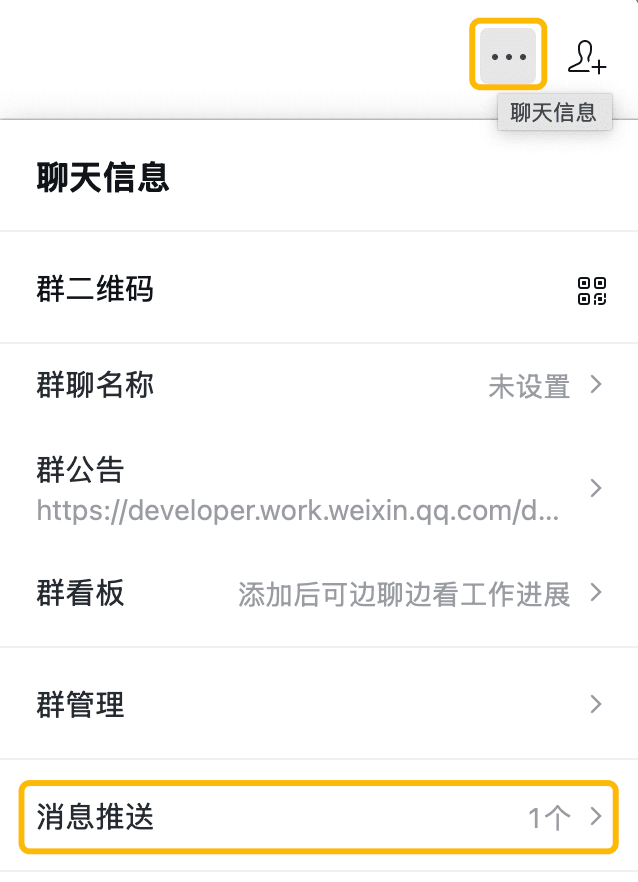
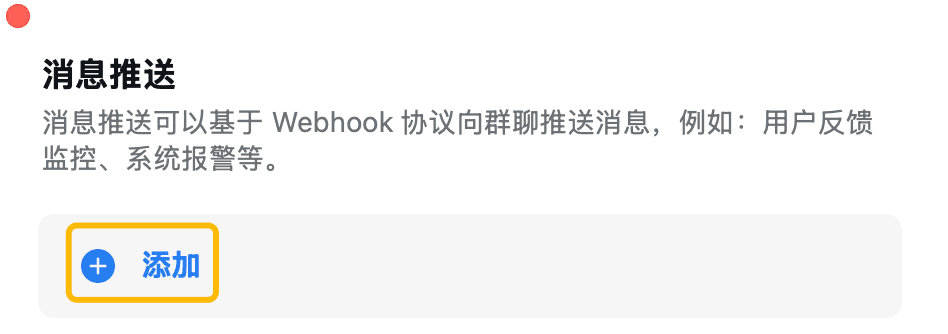
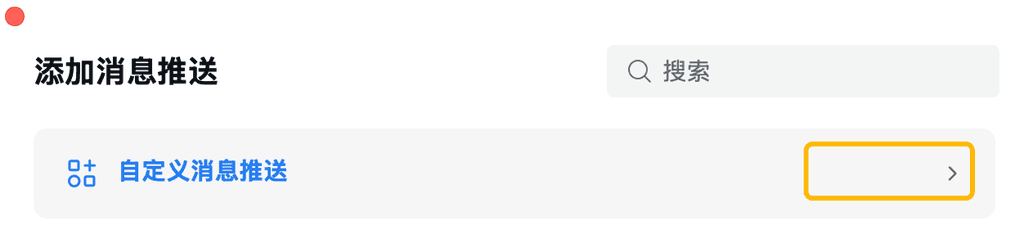
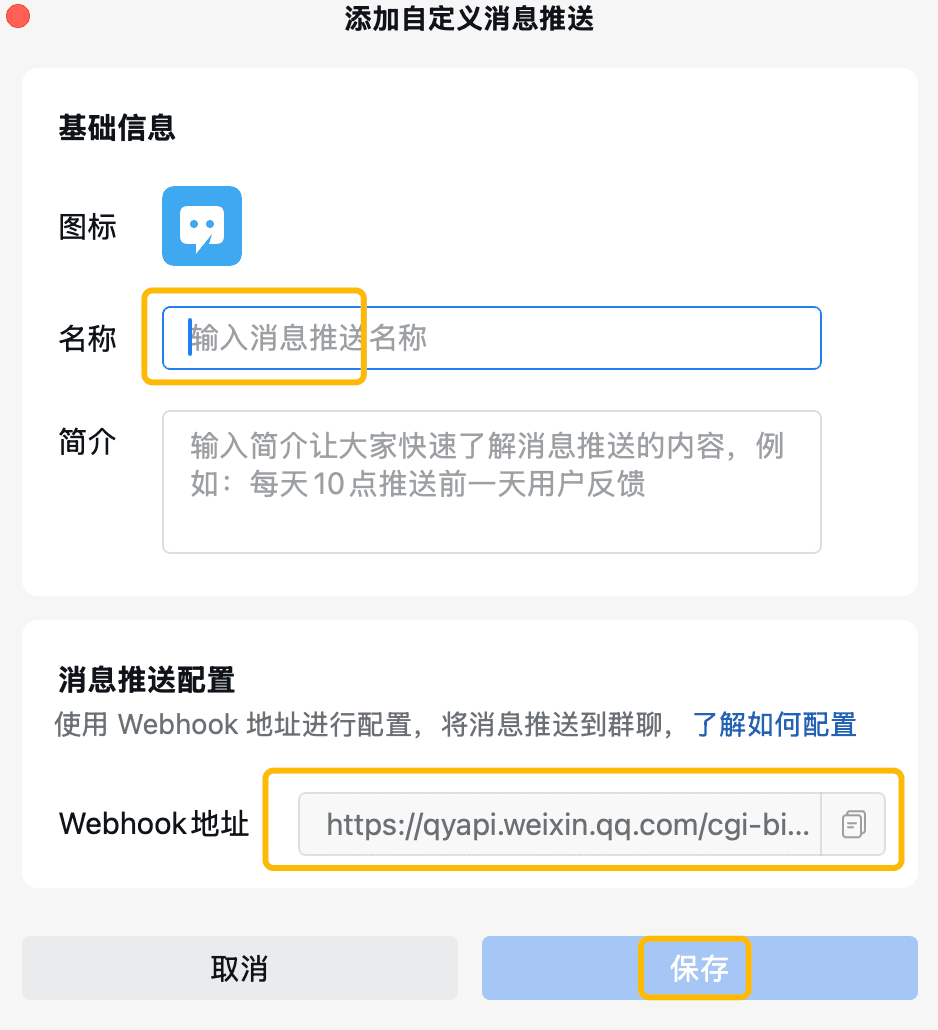
Get WECOM_WEBHOOK_URL following steps here, and envolve it as a bot into a group chat:
(Tip: You should get the WECOM_WEBHOOK_URL entirely as a URL, NOT just a KEY )