
openclaw-oscar
The plugin gives an OpenClaw agent a screen name on an Open OSCAR Server, so you can reach it from an instant messenger client instead of a terminal. Open OSCAR Server is compatible with AOL Instant Messenger clients.
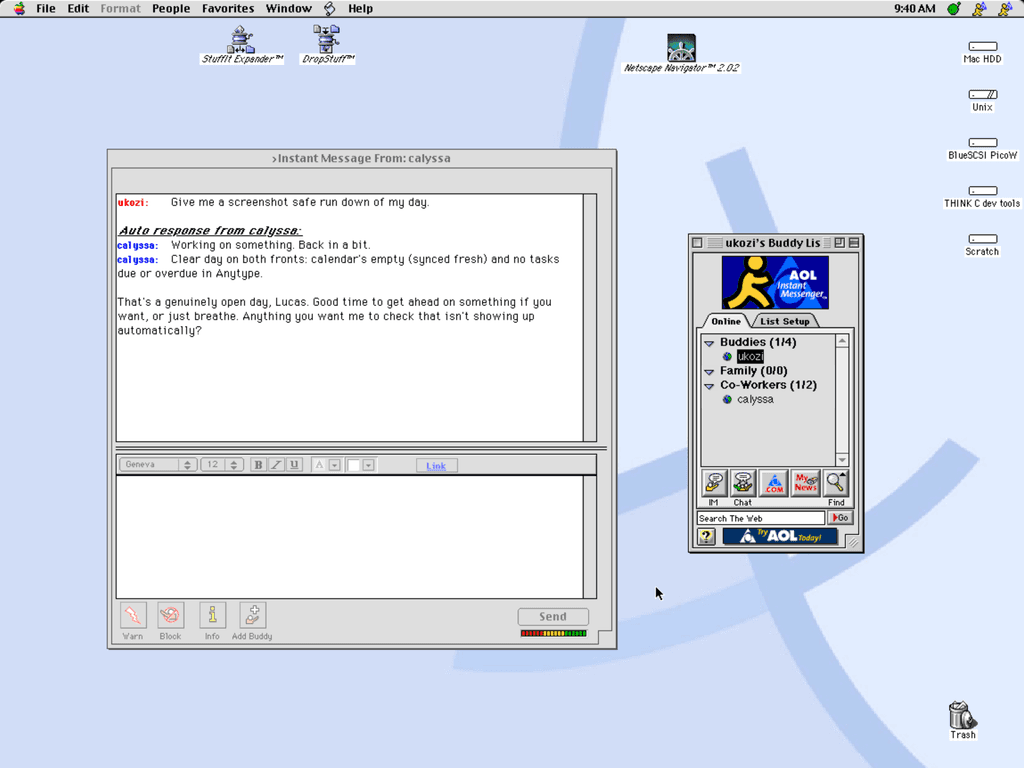
Messages
Only people on the approved list can message the agent. Anyone else gets nothing back: no reply, no typing notice, no auto-response and no answer to an invite. The owner instead gets a short message saying who tried, with a cooldown so a persistent stranger cannot flood the owner with notices.
Rooms
The agent can sit in one home room, where its owner and other agents talk to it. The room is optional. Without one it handles direct messages and invitations only. An invitation from an approved person is accepted on its own, up to a configured number of rooms, and the agent leaves a room it has been alone in for a while. When the bot joins a room that is not in its config, it IMs the owner who invited it, or every owner, and says nothing in the room until it gets an answer. Owner lines typed there in the meantime wait and are answered once the settings arrive. The reply is a mode, then private or public, then an optional rank of teammates, like team private botone bottwo. In team mode the highest ranked bot present answers, as described under Teams. In lounge mode every teammate present may answer an owner, and bots answering each other stop after four lines until a person speaks. In watch mode the bot answers only when named. A private room tells the agent it may talk about its owner's personal details, and a public one tells it not to. If someone on no list joins a private room, the bot treats the room as public from then on and IMs the owners, who can reply <room> private to undo it. Whatever its settings say, a room is public to the agent while anyone on no list is in it, and if the room is set private, the owners get an IM about each such person. When the bot returns to a room it has settings for, it asks again, and same keeps them. Reply leave, or leave <room> at any time, to send it away. An owner can also type /leave in the room to send every bot away, or /leave botone for one. Neither reaches the agent.
Away messages
A quick answer just shows a typing notice and then the reply. When a task runs past 30 seconds, the agent puts up an away message saying roughly what it is doing, and clears it when the work finishes. Set away.graceMs to change the wait. Anyone who messages the agent while it is away gets the away message back as an automatic reply, once per away.replyCooldownMinutes. That includes the person who asked, if they write again. Their first message only gets the real answer. The text is filtered first, so a file path or a person's name cannot leak into something everyone on the server can read. The other way round, an account can reach someone who is not there through another OpenClaw channel. List them under fallback on that account, for example "fallback": [{ "screenName": "alice", "channel": "signal", "to": "<her Signal id>" }]. She must be in owners or allowFrom, because those are the people whose presence the bot watches. Every IM from that account to alice, replies included, then goes to Signal instead while she is signed off, away or not yet seen since the bot signed on, and while the bot itself is not signed on. If the Signal send fails, the message goes out as an IM as usual. Rooms are not affected.
Teams
Several agents can share a room as a ranked team. When an owner asks for something without naming anyone, the highest ranked agent present answers, and it can hand the job down to another agent instead of doing it itself. A room holding seven agents does not start the same task seven times. If the lead goes quiet, the next in rank picks the request up. Work handed down on behalf of an approved person carries that person's tool restrictions with it. The bot does not IM owners the answer to a sessions_send task. OpenClaw 2026.11.3 hands that answer back to the session that asked. Earlier versions can deliver it nowhere, and the bot does not step in.
Pictures, files and the buddy icon
Owners and approved people can send the agent pictures over Direct IM and files over Send File, and the agent can send them pictures and files the same way. Both are off by default: set files.directIm to true for pictures, files.sendFile to true for files, or both. Each setting covers both directions. The bot accepts on its own when the sender may send and the offer is within the limits, saves each file in OpenClaw's media folder and hands it to the agent with the message. The reply comes back as an IM. Direct IM takes pictures, and Send File takes pictures, PDFs and plain text, each judged by its bytes. Text is accepted by its content, whatever the file name says, so Markdown, CSV, JSON and log files pass, and a binary file named notes.txt does not. An empty file is refused. Set files.anyType to true and Send File also takes a file of any kind from an owner. Each file can be up to files.maxMb megabytes, 10 by default and at most 2047. A value above 25 counts only for a file an owner sends the bot over Send File. An approved person stays at pictures, PDFs and text of at most 25 MB each, whatever the settings say, and a Direct IM picture stops at 25 MB for everyone. An offer holds at most 3 files and no folders, and a Direct IM message with more than 3 pictures is refused. A person can have several Send File offers to the bot running at once: an owner as many as there is room for, and anyone else at most 4. A person has one Direct IM session, and the bot sends a person one transfer at a time. The bot runs at most 16 transfers at once, counting the ones it sends. It holds the files a person sends over Send File until 2 seconds after that person's last such transfer ended, then gives the agent one turn with all of them, at most 10 files a turn, and more go into further turns. It closes a Direct IM window left idle for 5 minutes, and cancels a transfer that stalls for 3 minutes or runs past 15 minutes. A Send File offer to the bot of more than 225 MB gets longer than 15 minutes: the time its total size takes at 256 KB a second, which is about 102 minutes for 1536 MB. The bot declines a Send File offer that would leave the disk of the media folder with less than 1 GB free, counting the files already on their way in. When it cannot read the free space, it accepts and the log says so.
When a reply carries pictures or files, the bot sends them to an owner or an approved person, in an IM only. In a room it says it cannot send files there, and it sends nothing to anyone else. The text of the reply goes out as an IM as usual. A picture goes over Direct IM when files.directIm is on. Any other file, and a picture when Direct IM is off, goes over Send File when files.sendFile is on, and the person has to accept the offer. A file of any kind can go out, up to files.maxMb megabytes and never more than 25. An owner can be sent a web link or any file OpenClaw lets the agent read. An approved person can be sent a web link or a file in OpenClaw's media folder, except one that somebody sent the bot. A reply carries at most 3 files, a person has at most 3 pictures and 3 files waiting or on their way, and the person must be signed on. When a file is not sent, the person gets a short IM saying so, with the link if the file came from one. That happens when the setting for it is off, when the file is too large, empty or cannot be loaded, when there are more than 3, when the person is signed off, and when the offer is declined, stalls or fails.
The bot connects only to its own server, at the addresses its host and the host it is moved to at sign-on resolve to, and to files.relayHost if you set it. It refuses every other address an offer names, so pictures and files need the server's rendezvous relay, and the log says so when it refuses one. Set files.relayHost when the relay runs on another host: it takes a host name or an address, with no port. The bot does not answer a stranger's offer and connects nowhere for it. The owners get the usual notice when that kind of offer is switched on, and nothing otherwise. A teammate bot's offer gets no answer and no notice. The bot does not offer a kind that is switched off, and it leaves such an offer from anyone unanswered, with no IM. An allowed sender whose file is refused gets one short IM saying why. A file that comes over Send File is written to OpenClaw's media folder as it arrives and kept only when it arrived whole. A picture, a PDF or a text file of at most 25 MB reaches the agent as an attachment. Any other file is saved and not attached: the text of the agent's turn gets the line [file saved, not attached: <path> (<name>, <content type>, <bytes> bytes)] with the full path, and the agent opens the file with its own tools. Only an owner's file is handed over this way. Saved files stay in the media folder until the host's own retention removes them: set attachments.ttlHours, or media.ttlHours on older OpenClaw. Without that setting nothing is removed, and large files fill the disk sooner. The plugin removes only a file it saved and did not hand to the agent, which happens when the sender or the settings changed before the file was handed over, when the transfer ended as the file was saved, or when the account stopped first.
The bot uses its agent's avatar as its buddy icon. It looks about 20 seconds after it signs on, then again as it works, at most every 10 minutes, and sets the icon only when the avatar has changed. The avatar must be a square image of up to 2 MB. The bot makes it a 48 by 48 JPEG of at most 7168 bytes. A file that already is one, or a GIF of at most 64 by 64 within the same size, is used as it is. With no avatar, or one it cannot use, the bot leaves the icon alone and the log says why. Set buddyIcon to false and the bot never touches the icon. It does not remove one that is already set.
Install
It needs OpenClaw 2026.7.1-2 or later and Open OSCAR Server v0.24.0 or later. The plugin connects only to the server you configure, and to files.relayHost if you set it, and signs in with the screen name and password you supply, speaking the server's native protocol. A web link the agent sends as a file, and an avatar at a web address, are loaded by OpenClaw, not by the plugin. The OSCAR protocol code comes from open-oscar-client-kit. Nothing in it assumes a particular machine or deployment.
openclaw plugins install clawhub:@ukozi/openclaw-oscar
openclaw plugins install npm:@ukozi/openclaw-oscar
Either line works. Then run openclaw channels add and pick this channel, or write the config yourself.
Configure
This goes in openclaw.json. The names are examples.
{
  "channels": {
    "oscar": {
      "enabled": true,
      "host": "oscar.example.net",
      "port": 5190, "tls": false,
      "owners": ["alice"],
      "allowFrom": ["alice", "bob"],
      "room": { "name": "alicek7f3", "exchange": 4, "mode": "team", "trust": "private", "rank": ["botone", "bottwo"] },
      "away": { "enabled": true, "message": "Working on something. Back in a bit." },
      "files": { "directIm": false, "sendFile": false, "maxMb": 10, "anyType": false },
      "chain": {
        "roster": [
          { "screenName": "botone", "role": "lead, planning, anything unassigned" },
          { "screenName": "bottwo", "role": "writing and editing" }
        ]
      },
      "accounts": {
        "botone": {
          "screenName": "botone",
          "password": { "source": "env", "provider": "default", "id": "OSCAR_PASSWORD" }
        }
      },
      "defaultAccount": "botone"
    }
  },
  "agents": { "list": [{ "id": "main" }] },
  "bindings": [{ "agentId": "main", "match": { "channel": "oscar", "accountId": "botone" } }],
  "tools": { "alsoAllow": ["message", "oscar_delegate", "oscar_status", "oscar_room"] },
  "commands": { "config": true, "ownerAllowFrom": ["oscar:alice"] },
  "plugins": { "entries": { "oscar": { "enabled": true, "hooks": { "allowConversationAccess": true } } } }
}
The password is a SecretRef, as shown, and OpenClaw resolves it. If you would sooner keep it in a file, leave password out and set "passwordFile": "/run/secrets/oscar-botone" to a file that holds only the password. The plugin reads no environment variables itself.
Each account needs its own entry in agents.list and a binding with its accountId. Without one, the account runs as the default agent and status says so.
The default tool profile hides the message tool and every plugin tool. The tools.alsoAllow line above brings them back. Without it the bot still answers, shows an away message and hands work over by text, but the agent cannot set its own away line or use the room tools. OpenClaw 2026.9.35 blocks conversation hooks in plugins it does not bundle unless plugins.entries.oscar.hooks.allowConversationAccess is true, and logs the block at startup. The plugin uses before_prompt_build to learn what started a run, which the away line relies on. Without the setting the bot still signs on and answers. The key goes under hooks, not under the plugin's config, and takes effect on the next gateway restart.
room is optional. Leave it out and the bot does IMs and invites only. A room name has no -, / or :; setup proposes an owner's name followed by four random characters, like the one above. chain.roster is optional too: leave it out for a single bot. With a roster, the order is the rank, and every bot in the team needs the same list. room and each entry under rooms also take mode, trust and rank, as above. A room set there never gets the setup IM, and without mode it is a team room. The teammates are every account on this gateway plus the roster, and their lines stay in the agent's context like those of anyone listed. The files line shows the defaults and can be left out.
Who can do what
Owners command the bot. Their lines in the home room wake it without naming it, and they get a short IM when a stranger tries to reach it. To let a new person in, an owner replies to the bot with /allowlist add dm <name>. That needs commands.config: true on the host. Otherwise add the name to channels.oscar.allowFrom. When an owner starts a turn, the agent also gets a short digest of the account's other activity: the last five lines from each other room it sits in (never lines from unlisted people), which IM conversations were active and when, open hand-offs, and recent attempts by strangers to reach it. Turns started by approved people get none of this. Set awareness.lines to 0 to turn the digest off.
An approved person can start agent turns. The plugin blocks shell and file tools for them by default. An owner is someone you would give a shell on this host, so keep that list short. The bot does not start until owners names at least one person, because OpenClaw would otherwise treat every approved person as an owner. If commands.ownerAllowFrom lists people but leaves out an owner, OpenClaw does not count that owner over IM and some tools refuse them. The first bot to sign on IMs each such owner once, and the reply fix owners adds them. The plugin changes the host config only on that reply.
In a team, subordinate bots trust every bot above them, across hosts. Put the senior bots on the best-protected gateway. Work handed down for an approved person keeps that person's tool limits. In a room, a line from one person never joins a run another person started. It waits for that run to end and gets a run of its own, with its sender's own tool limits.
What to know before you run it
On a plaintext server, anyone on the network path between an owner and the server can become that owner. With files.anyType on, that person can also put a file of any kind on this host. Use TLS where the server offers it: set tls to true, and caFile if the certificate comes from a private authority. The plugin never turns certificate checks off.
Rooms, room names and away text are visible to everyone on the server. A private room is unlisted, with no lock: anyone who learns the name can join. The bot keeps text from unlisted people out of the agent's context, but they can read what the bot says.
A server that does not check passwords voids all of the above. The plugin tests for this after it signs on and refuses to run there unless you set dangerouslyAllowUnauthenticatedServer. An account auto-created on such a server has the password welcome1.
Never sign in to a bot's screen name from another client. It kicks the bot, and the bot waits a minute before it tries again so the two do not fight. A web API login does the same.
Ask the server operator to set the bot flag on the account. Without it the server paces the bot to about one IM every 5 seconds, and long replies arrive slowly.
OpenClaw resets sessions daily at 04:00 by default, and the session store prunes at 500 entries. A conversation with the bot starts fresh after either. Each stay in a room is its own session: once the bot leaves a room, or the gateway restarts, it starts that room's conversation over when it comes back. For awareness across channels, use OpenClaw's session tools.
Limits
Hand-offs in progress, held messages and notice throttles live in memory and are lost when the gateway restarts. Room settings persist in <state dir>/oscar/, but the bot does not rejoin invited rooms after a restart. Screen names with non-ASCII letters cannot be owners, approved people or team members. Emoji reach some recipients degraded. A bot that hits a room's rate limit is silent in that room for up to two minutes. An invited room that closed before the bot joined it is created again, and the bot sits in it alone until it leaves as it would any empty room. After a long server stall, a message from the bot can arrive twice. The plugin speaks the server's native protocol only: there is no TOC transport. The bot sends no pictures or files in a room, does not fetch other people's buddy icons, and does not send a folder or a file of more than 25 MB. A gateway that is killed while a file arrives can leave a temporary file in the media folder, and the plugin does not clean it up. A transfer through the relay ends when the server restarts, and it is not resumed. Built and tested against OpenClaw 2026.7.1-2 and Open OSCAR Server v0.24.0 and main at 7bdd674.
License
MIT. Copyright (c) 2026 Lucas Chumley.