

Install
openclaw skills install @symbolstar/echo-cuePatch a locally installed OpenClaw Control UI so that finishing an assistant reply plays a short Web-Audio two-tone "ding-dong" chime in the browser tab. Loc...
openclaw skills install @symbolstar/echo-cueClawHub package name:
echo-cue(the slugechois taken by another publisher; product is calledecholocally).
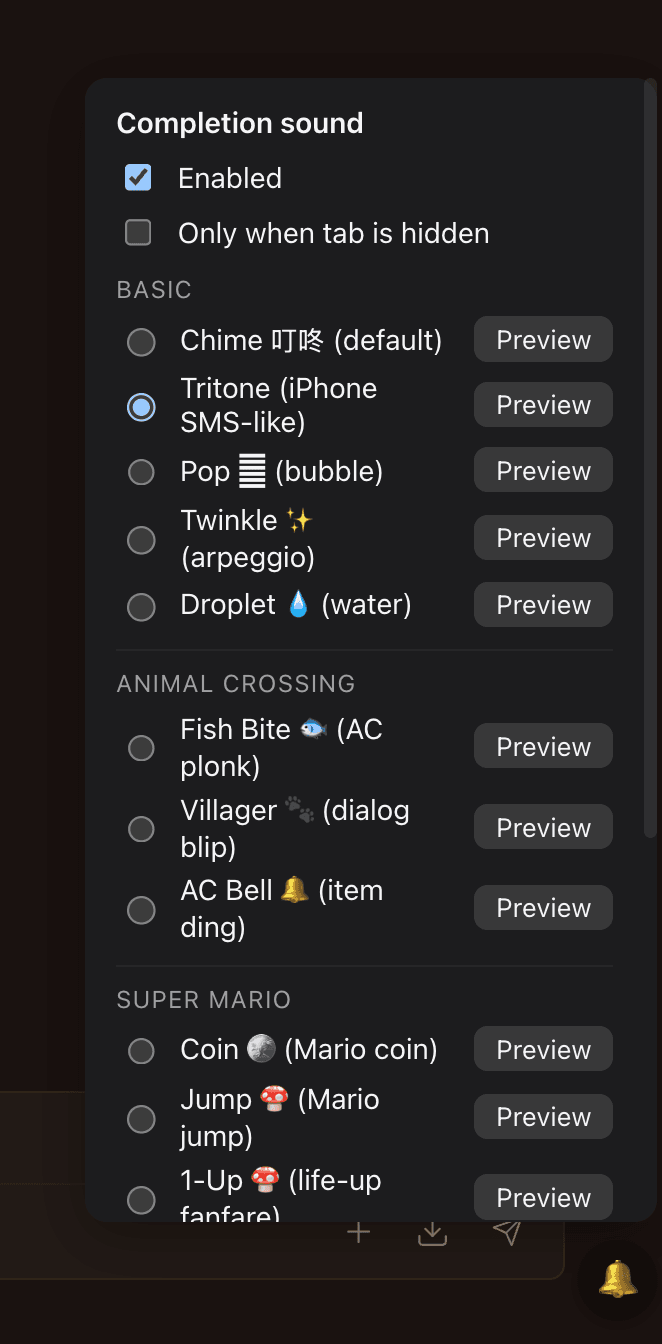
Click the floating 🔔 in the bottom-right corner to open the picker: enable / disable, choose a preset, Preview each sound — no DevTools required.
A zero-build local patch for OpenClaw Control UI (webchat) that plays a short two-tone chime (A5 → E5, ~900ms) when an assistant reply finishes streaming. Designed as a stop-gap until upstream PR openclaw/openclaw#73894 (issue #69186) lands.
OpenClaw Control UI has no completion sound on main yet. PR #73894 implements
it but has been OPEN without review since 2026-04-29. This skill injects an
equivalent IIFE into the bundled UI dist so it works today, and gracefully
steps aside when upstream ships.
NO_REPLY / empty silent completionsonlyHidden=on to limit to hidden tabs onlyindex.html to a new bundle filename so plain Cmd+R picks up the patchwhich openclaw resolvesbash apply.sh
Then refresh your Control UI browser tab (regular Cmd+R is enough, the script cache-busts the bundle filename). Click or press a key once on the page to unlock the AudioContext (this happens automatically the first time you send a message).
DevTools console:
window.__milly_cue_v1__ // → true
Send a question, switch to another tab — you should hear a ding-dong when the assistant finishes.
// Disable entirely
localStorage.setItem('milly.completionCue', 'off')

// Re-enable
localStorage.removeItem('milly.completionCue')

// Ring even when the tab is in foreground (default behaviour as of 0.2.0):
localStorage.removeItem('milly.completionCue.onlyHidden')

// Limit ringing to hidden / unfocused tabs only:
localStorage.setItem('milly.completionCue.onlyHidden', 'on')
Click the floating 🔔 button (bottom-right of Control UI) to open the picker:
enable / disable, switch preset (with Preview button per row), toggle
"Only when tab is hidden". Settings are stored in localStorage per browser.
| key | group | description |
|---|---|---|
chime (default) | Basic | Original two-tone bell (A5 → E5, ~900ms). 叮咚。 |
tritone | Basic | Approximation of the classic iPhone SMS "Tri-tone" — three quick bright pings (E6 / C6 / G6, ~420ms). |
pop | Basic | Single bubble pop — quick upward swoop, ~110ms. |
twinkle | Basic | Fast C → E → G arpeggio (triangle, ~280ms). ✨ |
droplet | Basic | Water droplet — downward sine sweep (1600 → 520 Hz, ~180ms). 💧 |
fishbite | Animal Crossing | Fish-bite plonk (low sine plop + tiny splash, ~220ms). 🐟 |
villager | Animal Crossing | Dialog "blip" — soft triangle chirp like villagers talking (~90ms). 🐾 |
acbell | Animal Crossing | Item ding — single bright bell tone with shimmer (~260ms). 🔔 |
coin | Super Mario | Classic two-note coin chirp (B5 → E6 square, ~220ms). 🪙 |
mariojump | Super Mario | Jump — fast upward square pitch sweep (~150ms). 🍄 |
oneup | Super Mario | 1-Up fanfare — ascending arpeggio E5-G5-E6-C6-E6-G6 (~450ms). 🍄 |
powerup | Super Mario | Mushroom power-up — fast ascending climb (~360ms). 🌟 |
pipe | Super Mario | Warp pipe — descending square slide (~280ms). 🟢 |
bump | Super Mario | Block bonk — short low square thump with a click (~120ms). 🧱 |
nokia | Retro | Nokia tune — iconic 13-note phrase from Tárrega's Gran Vals (square, ~1.2s). 📱 |
modem | Retro | Dial-up modem mini-impression — hi/low tones + brief screech tail (~600ms). 📞 |
Add more presets by appending to the SOUNDS array in
inject/completion-cue.iife.js (each entry needs key, label, play(ctx, master)),
then re-run bash apply.sh. The widget picks them up automatically.
localStorage.setItem('milly.completionCue.widget', 'off')
localStorage.removeItem('milly.completionCue.widget')   // bring it back
DevTools fallback (still works):
__milly_cue_sounds__              // list available presets
__milly_cue_preview__('tritone')  // preview without sending a message
localStorage.setItem('milly.completionCue.sound', 'tritone')
bash remove.sh
Restores the original bundle from index-*.js.milly.bak and the original
index.html from index.html.milly.bak.
openclaw updateThe update overwrites dist/control-ui/..., dropping the patch. Re-run:
bash apply.sh
apply.sh is idempotent and detects upstream:
responseCompletionSound shipped → skip + advise uninstall.chat-group.assistant DOM class. If OpenClaw renames it the patch
silently does nothing (fail-quiet, no breakage).| File | Purpose |
|---|---|
apply.sh | Detect every OpenClaw install, idempotent inject IIFE, backup, cache-bust |
remove.sh | Restore from .milly.bak files |
inject/completion-cue.iife.js | The patch payload |
tests/manual.md | 7-step verify checklist |
agent-tab-title