

Install
openclaw skills install @symbolstar/agent-token-usageSummarize daily LLM token usage per OpenClaw agent from trajectory logs, showing input, output, cache reads/writes, total, and optional billable token estima...
openclaw skills install @symbolstar/agent-token-usageAccurately attribute LLM token consumption across all OpenClaw agents for a given day.

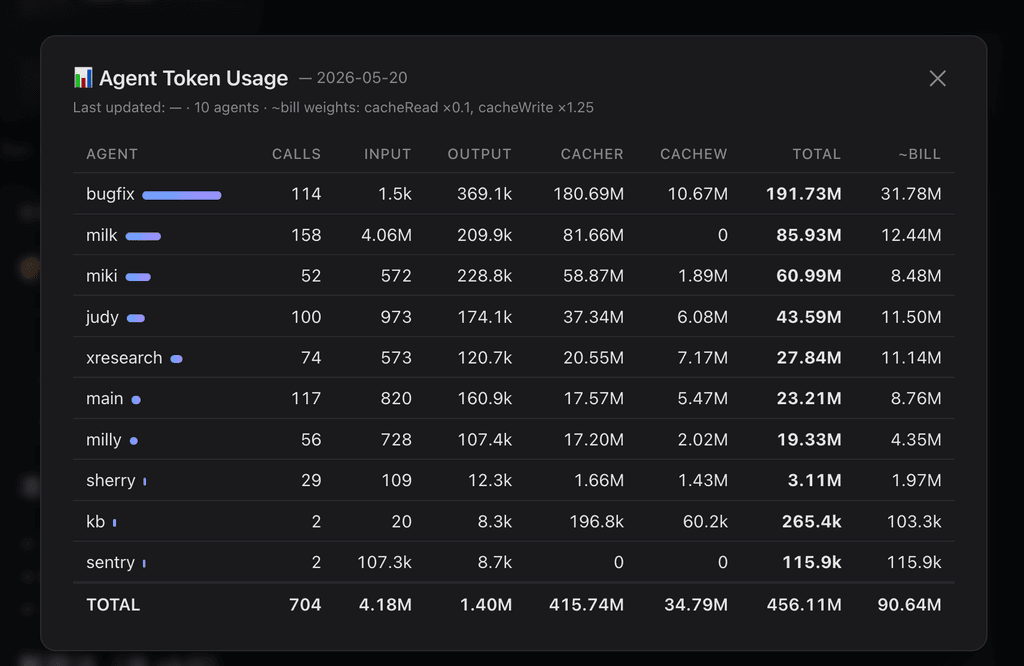
Ships two things in one skill:
scripts/agent_token_usage.py, always works, zero setupapply-ui.sh injects a 📊 button into Control UI's header next to Search; clicking shows today's per-agent table in a modalsessions_list returns each session's totalTokens field which is the last context window size, NOT the cumulative consumption across all LLM calls in that session. For long-running sessions, real consumption can be 100×+ larger. This skill reads the canonical session log (<id>.jsonl, NOT <id>.trajectory.jsonl) and sums every type=="message" / role=="assistant" row's usage object — exactly one entry per real LLM API call. This matches pew / openclaw's own accounting.
# default = today, UTC date (matches pew / openclaw accounting)
python ~/.openclaw/workspace/skills/agent-token-usage/scripts/agent_token_usage.py

# local-tz date instead of UTC
python …/agent_token_usage.py --tz local

# specific date
python …/agent_token_usage.py --date 2026-05-20

# equivalent billable (cacheRead × 0.1 + cacheWrite × 1.25 + input + output)
python …/agent_token_usage.py --date 2026-05-20 --billable

# JSON
python …/agent_token_usage.py --format json
bash ~/.openclaw/workspace/skills/agent-token-usage/apply-ui.sh
Then refresh the Control UI tab. The button appears next to Search; clicking shows the modal.
Uninstall:
bash ~/.openclaw/workspace/skills/agent-token-usage/remove-ui.sh
Per-browser toggle:
localStorage.setItem('milly.tokenUsageBtn', 'off')
localStorage.removeItem('milly.tokenUsageBtn')
launchd (5min)  →  refresh-data.sh  →  <ui>/data/agent-token-usage.json
                                              │ same-origin fetch
                                              ▼
                                    Control UI bundle (patched IIFE)
                                       📊 button → modal table
CSP-friendly (connect-src 'self') because data is served from the UI's own origin. No extra daemon, no extra port. After openclaw update overwrites dist/control-ui/*, just re-run apply-ui.sh — idempotent.
| Field | Meaning | Billing weight |
|---|---|---|
input | new, non-cached prompt tokens | 1.0× |
output | model-generated tokens | 1.0× (typically 5× input price) |
cacheRead | prompt tokens served from prompt cache | ~0.1× |
cacheWrite | prompt tokens written to cache | ~1.25× |
total | sum of all four (real LLM throughput) | — |
~bill | weighted billable-equivalent tokens | — |
Use total to see "who's burning the most LLM compute"; use ~bill to see "who's actually most expensive". High-cacheRead agents look huge but are cheap; high-input agents look small but cost more.
~/.openclaw/agents/<agent>/sessions/*.jsonl (excluding *.trajectory.jsonl, *.deleted*, *.bak)type=="message" and message.role=="assistant"timestamp against target date in chosen timezone (--tz utc default, --tz local available)message.usage.{input,output,cacheRead,cacheWrite} per agent; track sessions and modelsEach LLM call produces several trajectory events (prompt.submitted, context.compiled, model.completed, trace.artifacts, …) and every one of them embeds the same usage snapshot. A DFS sum over trajectory inflates the real number by ~2.6×. The canonical <id>.jsonl has exactly one type=="message" row per call — 1:1 with the API call, no de-dup needed.
usage object) — non-LLM tool calls excluded by designmodel-usage skill for $ amounts--date matches ISO timestamps in session logs (UTC by default). Use --tz local to bucket by your local day insteadscripts/refresh-data.sh via cron/systemd timer| File | Purpose |
|---|---|
scripts/agent_token_usage.py | CLI aggregator |
scripts/refresh-data.sh | Writes JSON into every patched Control UI dist |
scripts/token-usage-button.iife.js | UI patch payload (button + modal + same-origin fetch) |
apply-ui.sh | Inject IIFE, cache-bust, install launchd refresh job |
remove-ui.sh | Restore bundle, remove launchd job, delete data dir |