

Install
openclaw skills install @lufei4/docker-image-syncSync Docker Hub images to CNB.tool registry via GitHub Actions, solving domestic Docker pull failures for OpenClaw. Use when: - User needs to pull Docker images but direct access to hub.docker.com is blocked - OpenClaw fails to pull Docker images automatically - Setting up a Docker mirror using CNB + GitHub Actions proxy ─────────────────────────────── 使用 Github Action 同步 Docker 镜像至 cnb.tool 制品库,解决国内拉取镜像失败问题,从而解决 openclaw 自动拉取镜像失败的问题。 适用场景: - 无法直连 hub.docker.com,需要通过 CNB 代理拉取镜像 - OpenClaw 自动拉取 Docker 镜像失败 - 通过 GitHub Actions + CNB 构建 Docker 镜像中转服务
openclaw skills install @lufei4/docker-image-sync使用 Github Action 同步Docker 镜像至cnb.tool 制品库,解决国内拉取镜像失败问题,从而解决 openclaw 自动拉取镜像失败的问题。
技能介绍:https://github.com/lufei4/docker-image-sync
gh):登录检测、Fork 仓库、设置 Secrets、监控 Actions 状态
brew install gh(macOS)或 github.com/cligh auth logindocker):登录 CNB 制品库、推送和拉取镜像
brew install docker 或从 docker.com当无法直连 hub.docker.com 时,通过 GitHub Actions 代理中转:
images.txt,清空已有记录,只写入目标镜像技能安装后,请按以下步骤操作:
运行以下命令检测 GitHub 登录状态:
bash ~/.openclaw/workspace/skills/cnb-image-sync/cnb-pull.sh --check
cnb-docker-sync(默认私有,不会暴露镜像名)gh auth login 在终端登录,或提供 GitHub Personal Access Token 给 openclawToken 获取路径:GitHub → Settings → Developer settings → Personal access tokens → Generate new token
推荐方式(不过用户手): 运行
gh auth login,走设备码流程登录,token 自动由gh管理,无需用户复制粘贴如果必须提供 Token(细粒度最小权限): 创建 Fine-grained Personal Access Token,限制到仅
cnb-docker-sync仓库,权限:
Contents: read and write(读写仓库,触发 workflow)Secrets: read and write(设置 Repository Secrets)Workflows: read and write(触发 Actions) 不要给repo全部范围,只给这一个仓库
访问 cnb.cool,使用微信账号登录(支持扫码登录)。
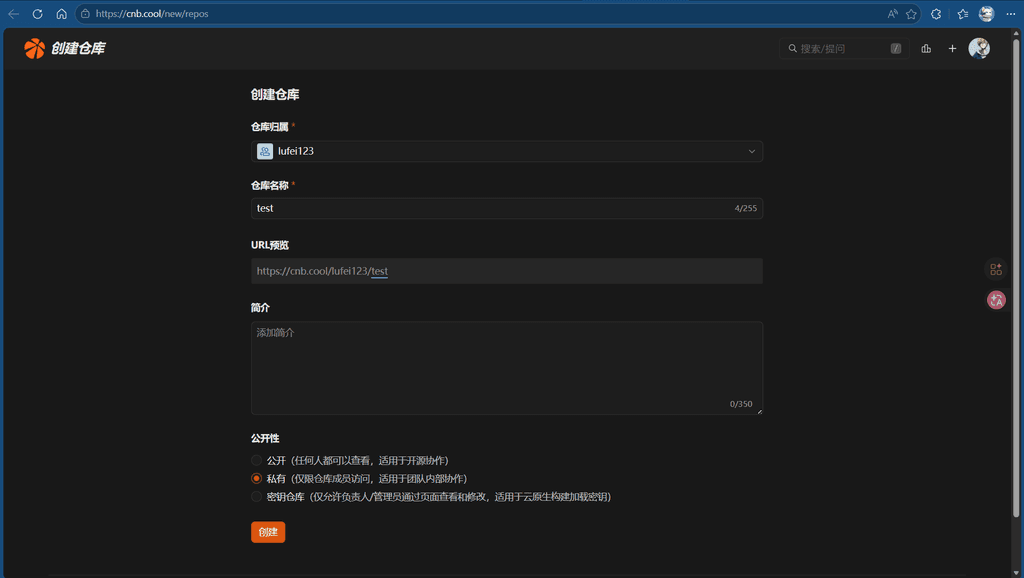
登录后,按以下路径操作:
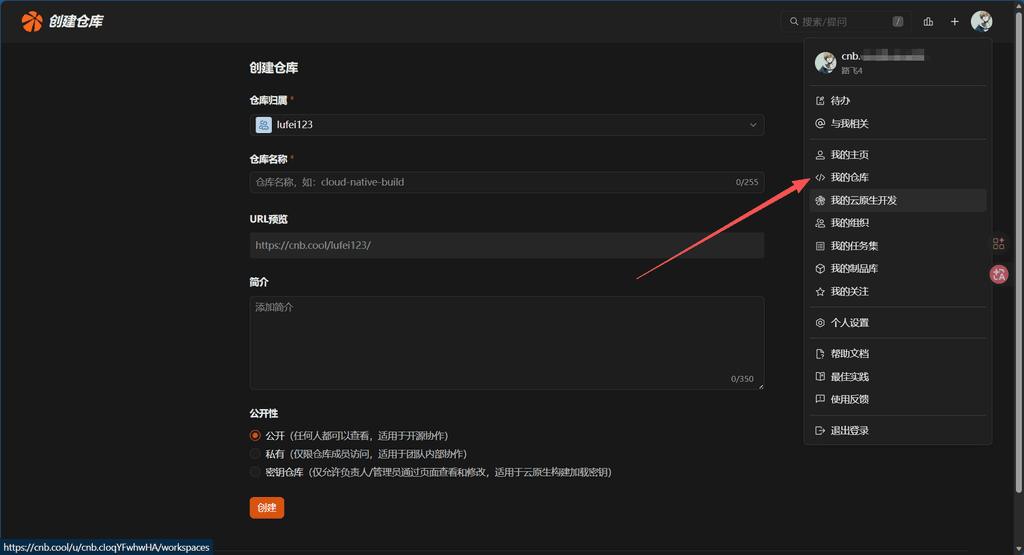
创建完成后,进入仓库列表:
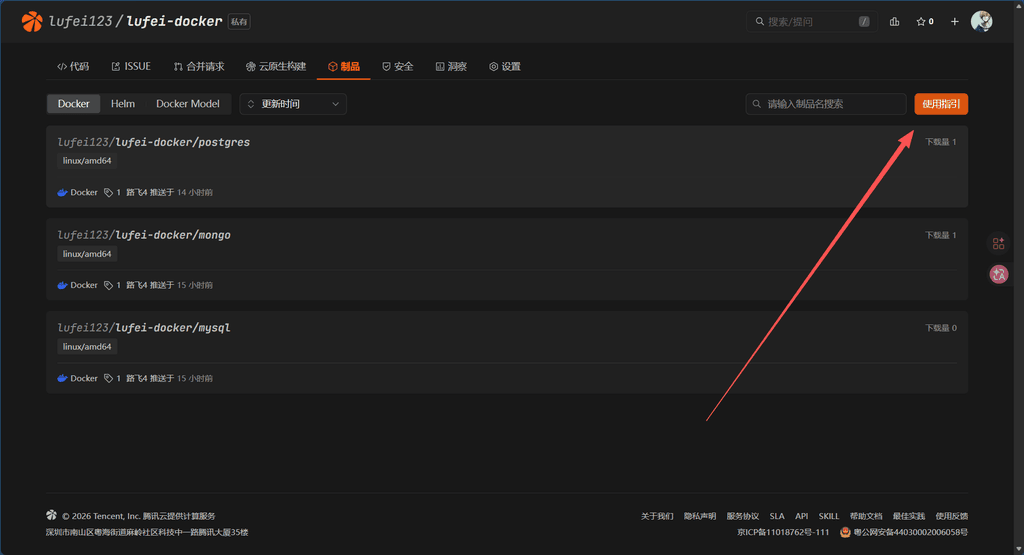
仓库创建完成后,进入仓库管理页,选择刚创建的仓库 → 制品 → 使用指引(或操作指引)。
点击使用指引,找到了解更多,这里包含本技能所需的 CNB 参数:
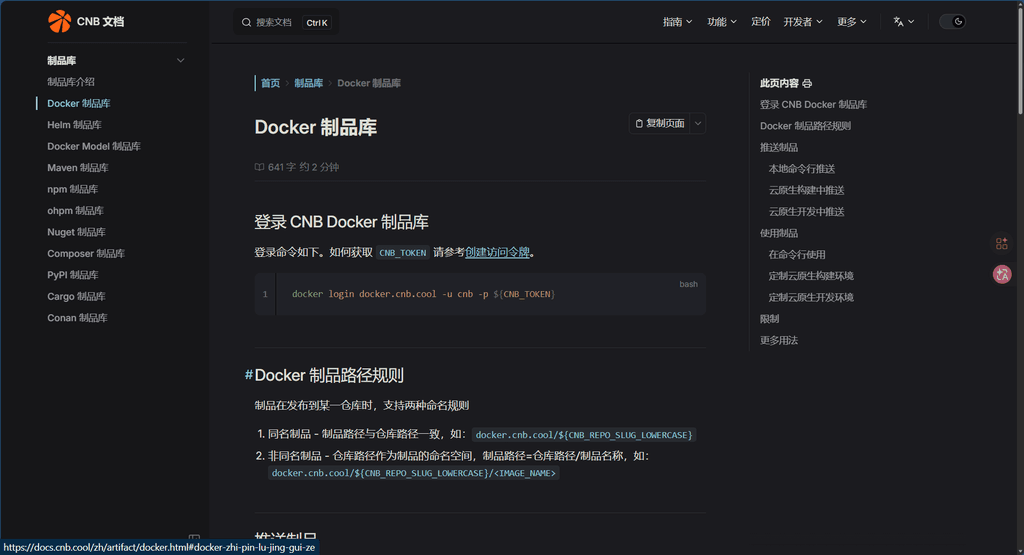
同时在仓库页面点击操作指引,可以看到推送和拉取命令,其中有两个关键信息需要记录:
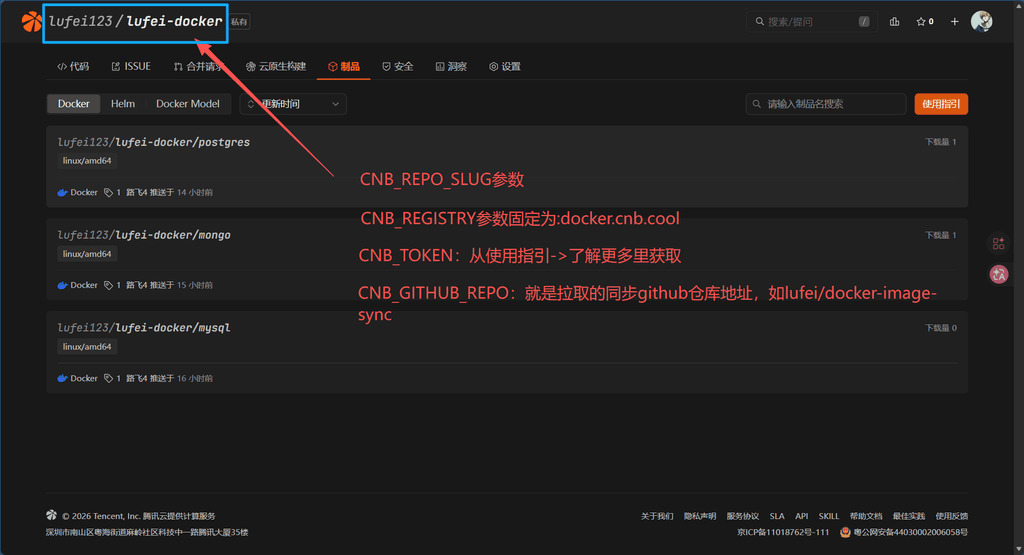
| 参数 | 对应信息 | 说明 |
|---|---|---|
CNB_REGISTRY | 仓库地址 | 固定值,如 docker.cnb.cool |
CNB_REPO_SLUG | 命名空间 | 格式 用户名/仓库名,需转为小写,如 lufei123/lufei-docker |
在制品库页面,找到访问令牌或 Access Token 配置,创建一个访问令牌(用于拉取凭证)。
准备好以下 4 个参数后,直接回复我这些值:
| 参数 | 说明 | 示例 |
|---|---|---|
CNB_TOKEN | CNB 访问令牌 | 8B76Bopie1d966fVDMgJnhFRepZ |
CNB_REGISTRY | CNB 仓库地址(固定值) | docker.cnb.cool |
CNB_REPO_SLUG | CNB 命名空间(小写) | lufei123/lufei-docker |
CNB_GITHUB_REPO | 私有仓库地址(格式:你的GitHub用户名/cnb-docker-sync) | 你的GitHub用户名/cnb-docker-sync |
openclaw 收到后会帮你完成以下操作:
~/.openclaw/.env(注意:请保持该文件可信,chmod 600 ~/.openclaw/.env)你的用户名/cnb-docker-sync(如不存在)CNB_REGISTRY、CNB_REPO_SLUG_LOWERCASE、CNB_TOKEN 设置到私有仓库的 Repository Secrets⚠️ 私有仓库默认不会暴露镜像名,这是相比 Fork 方案的关键改进
参数配置完成后,openclaw 自动拉取 postgres:latest 进行测试,通过后汇报结果。
.env 安全加载:使用 IFS 逐行解析,仅提取需要的变量,无 shell source,避免注入gh auth login 登录(不过用户手),或创建细粒度最小权限 Tokenchmod 600 ~/.openclaw/.envbash ~/.openclaw/workspace/skills/cnb-image-sync/cnb-pull.sh <镜像名>[:标签]
示例:
bash ~/.openclaw/workspace/skills/cnb-image-sync/cnb-pull.sh mongo:latest
bash ~/.openclaw/workspace/skills/cnb-image-sync/cnb-pull.sh nginx:1.25
bash ~/.openclaw/workspace/skills/cnb-image-sync/cnb-pull.sh redis:7-alpine
| 变量 | 说明 | 默认值 |
|---|---|---|
CNB_TOKEN | CNB 访问令牌(必填) | — |
CNB_REGISTRY | CNB 镜像仓库地址 | docker.cnb.cool |
CNB_REPO_SLUG | CNB 目标仓库(必填,需小写) | — |
CNB_GITHUB_REPO | GitHub 代理仓库(必填) | — |
| 问题 | 解决方案 |
|---|---|
gh: command not found | 安装 GitHub CLI:brew install gh |
| GitHub Actions 失败 | 检查 Repository Secrets 是否正确配置 |
| 拉取超时 | 稍后重试,CNB 制品同步有延迟 |
| 仓库不存在 | 确认 CNB_REPO_SLUG 与制品库命名空间完全一致 |
Sync Docker Hub images to CNB.tool registry via GitHub Actions, solving domestic Docker pull failures and enabling OpenClaw to auto-pull images without issues.
gh): Login detection, Fork repo, set Secrets, monitor Actions
brew install gh (macOS) or github.com/cligh auth logindocker): Login to CNB registry, push and pull images
brew install docker or from docker.comWhen hub.docker.com is unreachable, this skill proxies through GitHub Actions:
images.txt in the GitHub repo — clear all entries, write only the target imagebash ~/.openclaw/workspace/skills/cnb-image-sync/cnb-pull.sh --check
cnb-docker-sync (private by default, image names not exposed)gh auth login in terminal, or provide a GitHub Personal Access Token to openclawToken path: GitHub → Settings → Developer settings → Personal access tokens → Generate new token
Recommended (token never touches user input): Run
gh auth login— device flow, token managed bygh, no copy-paste neededIf you must provide a Token (fine-grained, minimal scope): Create a Fine-grained Personal Access Token limited to the
cnb-docker-syncrepo only, permissions:
Contents: read and write(commit/push to trigger workflow)Secrets: read and write(set Repository Secrets)Workflows: read and write(trigger Actions) Do NOT grant fullreposcope — limit to this single repository only
Visit cnb.cool, sign in with your Alibaba Cloud account (supports QR code login).
After creating the registry, go to: your repository → 制品 (Artifacts) → 使用指引 (Usage Guide) or 操作指引 (Operations Guide).
Click 了解更多 (Learn More) — this contains the CNB parameters needed by this skill:
Also in the repository page, click 操作指引 (Operations Guide) to see push/pull commands. Record these two values:
| Parameter | Maps to | Notes |
|---|---|---|
CNB_REGISTRY | Registry address | Fixed value, e.g. docker.cnb.cool |
CNB_REPO_SLUG | Namespace | Format username/repo-name, lowercase, e.g. lufei123/lufei-docker |
In the CNB registry page, find 访问令牌 (Access Token) configuration, create an access token for pull authentication.
Reply with these 4 values:
| Parameter | Description | Example |
|---|---|---|
CNB_TOKEN | CNB access token | 8B76Bopie1d966fVDMgJnhFRepZ |
CNB_REGISTRY | CNB registry address (fixed value) | docker.cnb.cool |
CNB_REPO_SLUG | CNB namespace (lowercase) | lufei123/lufei-docker |
CNB_GITHUB_REPO | Private repo address (format: your-github-username/cnb-docker-sync) | your-github-username/cnb-docker-sync |
openclaw will automatically:
~/.openclaw/.env (please keep this file trusted — run chmod 600 ~/.openclaw/.env)your-username/cnb-docker-sync (if not exists)CNB_REGISTRY, CNB_REPO_SLUG_LOWERCASE, CNB_TOKEN as Repository Secrets in the private repo⚠️ Private repos do not expose image names in public history — this is the key improvement over the fork approach
openclaw automatically pulls postgres:latest to verify the setup, then reports the result.
.env loading: Uses IFS line-by-line parsing, extracts only needed variables, no shell source, injection-safegh auth login (token never exposed in chat), or create fine-grained minimal-scope Tokenchmod 600 ~/.openclaw/.envbash ~/.openclaw/workspace/skills/cnb-image-sync/cnb-pull.sh <image>[:tag]
Examples:
bash ~/.openclaw/workspace/skills/cnb-image-sync/cnb-pull.sh mongo:latest
bash ~/.openclaw/workspace/skills/cnb-image-sync/cnb-pull.sh nginx:1.25
bash ~/.openclaw/workspace/skills/cnb-image-sync/cnb-pull.sh redis:7-alpine
images.txt locally after pull without pushing| Variable | Description | Default |
|---|---|---|
CNB_TOKEN | CNB access token (required) | — |
CNB_REGISTRY | CNB registry address | docker.cnb.cool |
CNB_REPO_SLUG | CNB target repo (required, lowercase) | — |
CNB_GITHUB_REPO | GitHub proxy repo (required) | — |
| Issue | Solution |
|---|---|
gh: command not found | Install GitHub CLI: brew install gh |
| GitHub Actions failed | Check Repository Secrets configuration |
| Pull timeout | Retry later — CNB sync may have delay |
| Repository not found | Verify CNB_REPO_SLUG matches the registry namespace exactly |