

Install
openclaw skills install @jwhowa/todo-webappDeploy a local TODO web app that reads and writes a Markdown TODO.md file. Serves a beautiful dark-themed, glassmorphism UI on the LAN (no HTTPS needed). Features live SSE auto-refresh, click-to-toggle checkboxes, and an "Archive Done" button that moves completed items to TODO-done.md. Auto-starts on boot via launchd (macOS). Use when a user wants a web UI to view and manage their OpenClaw TODO list from any device on their LAN.
openclaw skills install @jwhowa/todo-webappA zero-dependency Node.js web app that turns your TODO.md into a live, interactive task board.
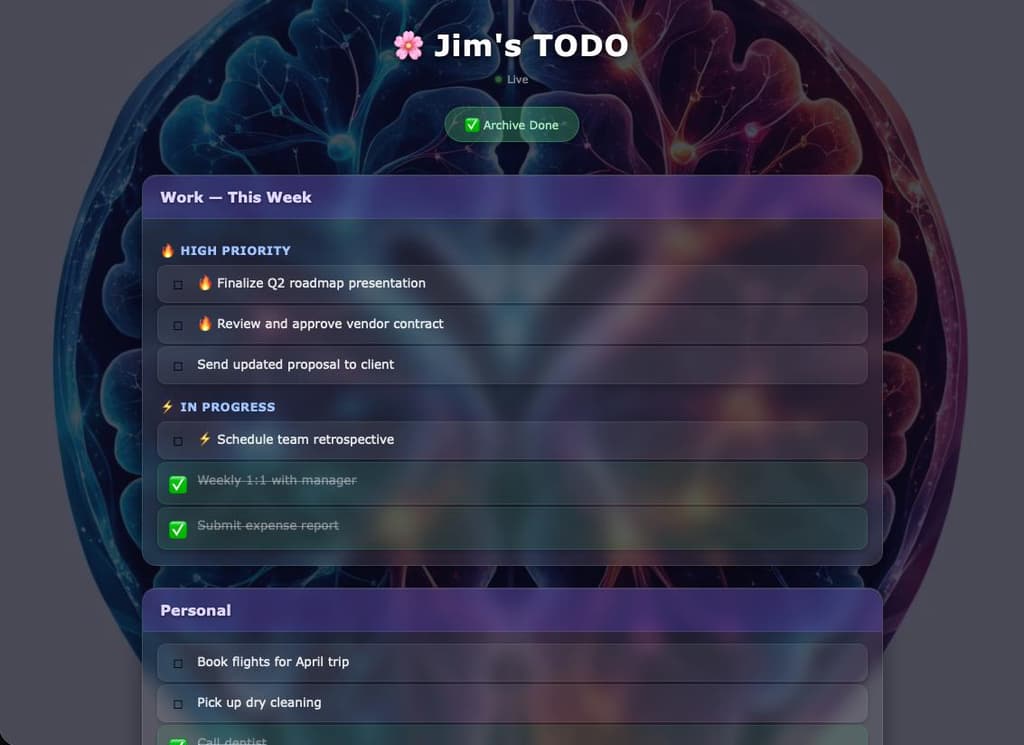
http://<hostname>.local:3456 (LAN only)TODO.md directly — ## headings become section cards, ### become subheadings, - [ ]/- [x] become clickable itemsTODO.md (by the agent or anyone else) pushes instantly to all open browser tabsTODO.md[x] items to TODO-done.md with a date stamp and removes them from TODO.mdCopy scripts/server.js to your desired app directory (e.g. ~/.openclaw/workspace/todo-app/server.js).
The server expects:
TODO.md at ../TODO.md relative to the script (i.e. one directory up)TODO-done.md at ../TODO-done.md (created automatically if missing)bg.jpg in the same directory as the script (optional background image)Drop any bg.jpg into the same folder as server.js. It will be rendered at ~22% opacity behind the UI. Works best with abstract or dark imagery.
Copy assets/com.todo.plist.template to ~/Library/LaunchAgents/com.todo.plist.
Edit the plist and update these two values:
node (run which node to find it)server.jsThen load it:
launchctl load ~/Library/LaunchAgents/com.todo.plist
Navigate to http://<your-mac-hostname>.local:3456 from any device on your LAN.
If you update server.js, restart with:
kill $(lsof -ti :3456) && sleep 1 && launchctl kickstart -k gui/$(id -u)/com.todo
The app parses standard OpenClaw-style markdown:
## Section Name

### Subheading

- [ ] Open task
- [x] Completed task
- **Bold text** is rendered in item labels
Any section added to TODO.md appears automatically. No app restart needed.
Default port is 3456. To change it, edit the PORT constant at the top of server.js.