

Install
openclaw skills install @holdyounger/plantuml-diagramsDraw UML and architecture diagrams with PlantUML text syntax: sequence, class, activity, use case, state, component, deployment, timing, ER, C4 architecture, network diagrams, mind maps, Gantt charts, WBS, JSON/YAML visualization, and Salt UI wireframes. 支持主题、样式定制与预处理。Renders as PNG/SVG/ASCII.
openclaw skills install @holdyounger/plantuml-diagrams使用 PlantUML 基于文本的语法生成 UML 图和其他图表类型。所有图表都以 @startuml 开始,以 @enduml 结束。
@startuml
' 图表内容
@enduml
注释:单行用 ',块注释用 /' ... '/。
title — 添加标题caption — 图片下方标题header / footer — 页眉/页脚(可加 left/center/right)legend ... end legend — 图例scale 1.5 / scale 200 width / scale 200*100 — 缩放left to right direction — 改变方向(仅类图 / 组件图 / 部署图可靠;活动图不支持,见「渲染与预览」排查清单⑤)**...**、斜体 //...//、列表等)拿到“画个图”的需求时,先按场景定类型,再去看对应章节的语法。拿不准先用 !theme plain 出图、再换皮。
| 场景 | 推荐图表 | 关键字 |
|---|---|---|
| 对象 / 服务间的消息调用顺序 | 时序图 Sequence | @startuml + participant |
| 业务流程、工作流、分支循环 | 活动图 Activity | start / stop |
| 对象生命周期的状态变迁 | 状态图 State | [*] --> |
| 系统功能与角色关系 | 用例图 Use Case | actor / usecase |
| 类 / 接口结构与继承、依赖 | 类图 Class | class |
| 模块组织与接口依赖 | 组件图 Component | component |
| 硬件 / 节点部署拓扑 | 部署图 Deployment | node |
| 某时刻对象实例快照 | 对象图 Object | object |
| 系统分层架构(上下文 / 容器 / 组件) | C4 | !include <C4/C4_*> |
| 网段划分 / 网络拓扑 | 网络图 nwdiag | @startnwdiag |
| 数据库表结构与表间关系 | ER 实体关系 | entity + ` |
| JSON 数据结构 | JSON 可视化 | @startjson |
| YAML 数据结构 | YAML 可视化 | @startyaml |
| 文法规则 | EBNF 语法图 | @startebnf |
| 正则表达式 | 正则图 Regex | @startregex |
| 项目进度排期 | 甘特图 Gantt | @startgantt |
| 任务层级分解 | WBS 工作分解 | @startwbs |
| 头脑风暴 / 知识整理 | 思维导图 MindMap | @startmindmap |
| 表单 / 界面原型 | Salt 界面线框 | @startsalt |
| 信号 / 时间约束 | 定时图 Timing | clock / binary |
| 企业架构 | Archimate | Archimate_* |
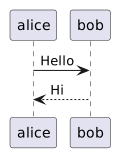
@startuml
participant Alice
actor Bob
boundary Wall
control C
entity E
database DB
collections Col
queue Q
@enduml
用 as 定义别名:participant Alice as A。
用 order 设定顺序:participant Alice order 10。
A -> B — 实线箭头A --> B — 虚线箭头A <- B — 反向A ->> B — 实线开放箭头A -\ B — 仅起始端箭头A \\- B — 仅末端箭头A x> B — 末端带XA -> B : 消息文本 — 带标签activate A / deactivate Aautoactivate on — 自动激活destroy A — 销毁alt/else — 条件分支opt — 可选loop — 循环par — 并行break — 中断critical — 关键group 标题 — 自定义分组note left/right/over — 注释A -> B : <text> 中可使用 \n 换行ref over A, B — 引用delay — 延迟divider — 分隔线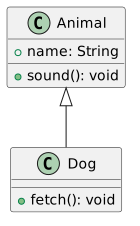
@startuml
class ClassName {
  + publicMethod()
  - privateField: Type
  # protectedField: Type
  ~ packageField: Type
  {static} staticField
  {abstract} abstractMethod()
}
interface InterfaceName
abstract class AbstractClass
enum EnumName {
  VALUE1
  VALUE2
}
annotation AnnotationName
@enduml
可见性:+ public, - private, # protected, ~ package。
A --|> B — 继承(A继承B)A ..|> B — 实现(A实现B接口)A --> B — 关联A --* B — 组合A ..* B — 聚合A o-- B — 聚合(反向)A ..> B — 依赖A -- B — 实线连接A .. B — 虚线连接关系标签:A --> "1" B : "包含","*" --> "1" 多重性。
@startuml
class InterfaceName <<interface>>
class AbstractClass <<abstract>>
class EnumName <<enumeration>>
class AnnotationName <<annotation>>
note right of InterfaceName : 构造型用 <<interface>> 标注
@enduml
构造型
<<...>>必须挂在已声明的元素后面(如class X <<interface>>)。单独写一行<<interface>> Xxx会被误判成时序图而报 Syntax Error。
类内注释:note left, note right, note top, note bottom。
@startuml
package "包名" {
  class A
  class B
}
@enduml
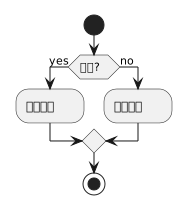
@startuml
start
:动作1;
:动作2;
stop
@enduml
动作以 : 开始,; 结束。隐式自动连接。
@startuml
if (条件?) then (yes)
  :动作A;
else (no)
  :动作B;
endif
@enduml
elseif 支持多分支。!pragma useVerticalIf on 切换垂直模式。
@startuml
switch (变量?)
case (值1)
  :动作1;
case (值2)
  :动作2;
endswitch
@enduml
@startuml
repeat
  :动作;
repeat while (条件?)
@enduml
@startuml
while (条件?) is (标签)
  :动作;
endwhile
@enduml
@startuml
fork
  :分支1;
fork again
  :分支2;
end fork
@enduml
@startuml
split
  :路径1;
split again
  :路径2;
end split
@enduml
@startuml
|泳道A|
:动作1;
|泳道B|
:动作2;
@enduml
泳道别名:|#<颜色>|<别名>| <标题>。
@startuml
partition "分区名" {
  :动作1;
  :动作2;
}
@enduml
也支持 group, package, rectangle, card。
kill / detach — 终止/分离break — 打断循环note — 注释(可用 floating 浮动)-> 可加文本和颜色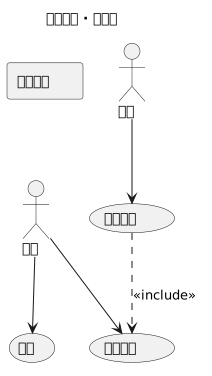
@startuml
actor 用户 as U
usecase "登录" as UC1
usecase "查看资料" as UC2
U --> UC1
U --> UC2
UC1 ..> UC2 : <<include>>
@enduml
actor 关键字或冒号语法 :用户名:usecase 关键字或括号 (用例名)as 定义别名rectangle "系统名" { ... } 分组--> 关联..> 依赖..> : <<include>> 包含..> : <<extend>> 扩展--|> 继承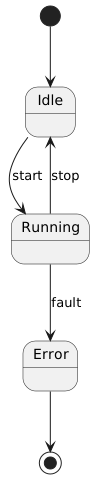
[*] --> State1
State1 --> State2 : 事件
State2 --> [*]
@startuml
state Composite {
  state Sub1
  state Sub2
  Sub1 --> Sub2
}
@enduml
<<fork>> / <<join>> — 分叉/合并<<choice>> — 选择<<entryPoint>> / <<exitPoint>> — 入口/出口[H] / [H*] — 历史/深历史状态用 -- 或 || 分隔并发区域。
note left of, note right of, note top of, note bottom of, note on link。
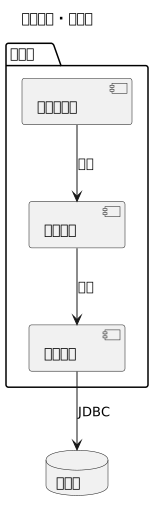
@startuml
component "组件A" as A
component [组件B]
interface "接口" as I
A --|> I
A ..> B : 使用
@enduml
component 或 [名称]interface 或 ()名称as 别名.. 虚线-- 实线--> 箭头package, node, folder, frame, cloud, database。
port, portIn, portOut 关键字。
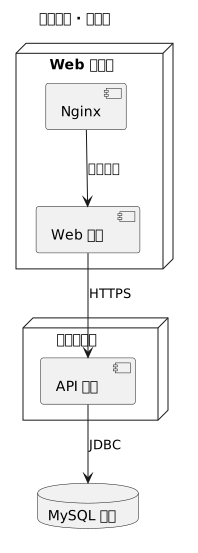
@startuml
actor 用户
component 组件
interface 接口
usecase 用例
node 服务器 {
  component 应用
}
database 数据库
@enduml
短格式::a: (actor), [c] (component), ()i (interface), (u) (usecase)。
与组件图相同的连接类型,支持线条样式、颜色、粗细。
所有元素可嵌套:node, package, folder, frame, cloud, database。
allowmixing 或 allow_mixing 指令允许在类图/对象图中混用部署元素。
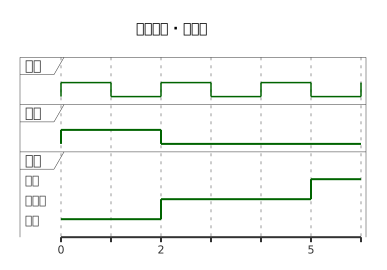
analog — 模拟信号(连续,线性插值)binary — 二进制信号clock — 时钟信号(必须用 with period N,可选 pulse / offset)concise — 简明表示robust — 状态线表示@startuml
clock "时钟" as clk with period 2
binary b
robust r
@0
b is high
r is state1
@5
b is low
r is state2
@enduml
@N — 绝对时间@+N / @-N — 相对时间@N as :名称 — 锚点is — 定义状态⚠️
clock的周期必须写成with period N,写成clock clk period 2会被判成 sequence 图而报Syntax Error?。
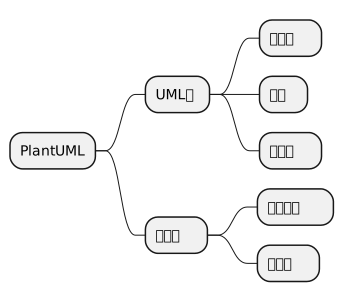
@startmindmap
+ 中心主题
++ 一级分支
+++ 二级分支
-- 左侧分支
--- 二级左侧
@endmindmap
运算符:+ 右侧, - 左侧, * 右侧多级, _ 左侧多级。
@startmindmap
* 中心
** 分支1
*** 子分支
@endmindmap
@startmindmap
- 中心
-- 分支
--- 子分支
@endmindmap
多行文本用 : 和 ; 包围。
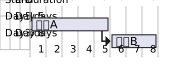
@startgantt
[任务A] lasts 5 days
[任务B] lasts 3 days
[任务B] starts at [任务A]'s end
@endgantt
[任务] lasts N days — 持续时间[任务] starts N days after [任务B]'s end — 相对开始[任务] ends at [任务B]'s end — 相对结束[任务] happens at 2024-01-15 — 绝对日期then — 连续任务[任务] as T — 短名称is xx% completed — 完成度[里程碑] happens at 2024-02-01 — 里程碑Project starts 2024-01-01 / projectscale monthly — 项目起点与尺度(实测当前版本 projectstart 语法会报错,用 Project starts)2024-01-01 to 2024-12-31 — 日期范围saturday are closed / sunday are closed — 关闭日printscale daily/weekly/monthly/quarterly/yearly — 尺度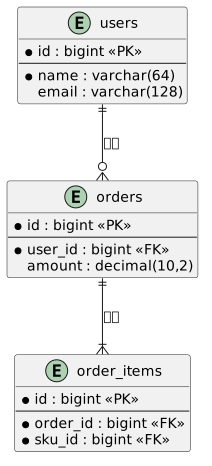
数据库设计首选。基于 Crow's Foot 记号,实体用 entity 定义。
@startuml
entity "用户" as user {
  * id : int <<PK>>
  --
  * name : varchar(64)
  email : varchar(128)
  created_at : datetime
}
entity "订单" as order {
  * id : bigint <<PK>>
  --
  * user_id : bigint <<FK>>
  amount : decimal(10,2)
  status : tinyint
}
@enduml
* 开头 = 必填字段;-- = 字段分隔线<<PK>> / <<FK>> / <<unique>> 构型标注键| 语法 | 含义 |
|---|---|
||--o{ | 一对多(左1 右0..n) |
||--|| | 一对一 |
}o--o{ | 多对多 |
||-ri-o{ | 零或一对多 |
组合口诀:第一段 \|\|=恰1、}o=多、|o=0或1;第二段同;中间 -- 实线 / .. 虚线。
@startuml
' 隐藏未使用的字段行,或用 !define 简化
entity users {
  * id : bigint <<PK>>
  --
  name : varchar(64)
}
entity orders {
  * id : bigint <<PK>>
  --
  * user_id : bigint <<FK>>
}
entity order_items {
  * id : bigint <<PK>>
  --
  * order_id : bigint <<FK>>
  * sku_id : bigint <<FK>>
}
users ||--o{ orders : "下单"
orders ||--|{ order_items : "包含"
@enduml
用 !include <C4/C4> 标准库画 C4 模型,适合系统架构文档。另有 C4_Context / C4_Container / C4_Component / C4_Dynamic / C4_Deployment 等子库。
@startuml
!include <C4/C4_Context>
title 电商系统 - 系统上下文

Person(customer, "客户", "平台买家")
System(eshop, "电商系统", "允许客户浏览购买商品")
System_Ext(payment, "支付网关", "第三方支付")

Rel(customer, eshop, "浏览/下单", "HTTPS")
Rel(eshop, payment, "支付回调", "JSON/HTTPS")
@enduml
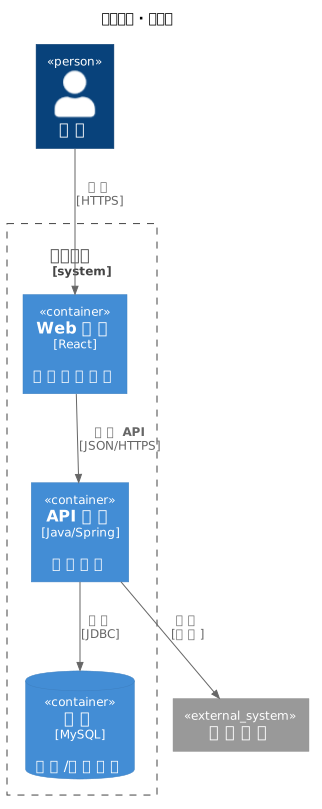
@startuml
!include <C4/C4_Container>
title 电商系统 - 容器图

Person(customer, "客户")
System_Boundary(c1, "电商系统") {
  Container(web, "Web 应用", "React", "浏览下单入口")
  Container(api, "API 服务", "Java/Spring", "业务逻辑")
  ContainerDb(db, "主库", "MySQL", "订单/商品数据")
  ContainerQueue(mq, "消息队列", "Kafka", "异步事件")
}
System_Ext(payment, "支付网关")

Rel(customer, web, "使用", "HTTPS")
Rel(web, api, "调用 API", "JSON/HTTPS")
Rel(api, db, "读写", "JDBC")
Rel(api, mq, "发布事件")
Rel(api, payment, "支付", "同步")
@enduml
常用元素:Person / System / System_Ext / Container / ContainerDb / ContainerQueue / Component;关系用 Rel(a, b, "标签", "技术"),虚线用 Rel_Back。
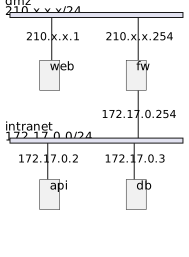
@startnwdiag
nwdiag {
  network dmz {
    address = "210.x.x.x/24"
    web [address = "210.x.x.1"];
    fw [address = "210.x.x.254"];
  }
  network intranet {
    address = "172.17.0.0/24"
    fw [address = "172.17.0.254"];
    api [address = "172.17.0.2"];
    db [address = "172.17.0.3"];
  }
}
@endnwdiag
⚠️ 必须用
@startnwdiag/@endnwdiag专用标签,用@startuml包裹会报错(提示 Please use @startnwdiag)。同一节点在多个 network 中重复出现 = 跨网段(多网卡/防火墙场景),如示例中的fw。
network 定义网段,address 可省略shape = "cloud"、icon 等与思维导图同源语法,* 层级递进;支持侧向分支与样式。
@startwbs
* 项目
** 阶段一:设计
*** 需求分析
*** 概要设计
** 阶段二:开发
*** 后端
**** API 开发
**** 数据库
*** 前端
@endwbs
* 右侧节点、- 左侧不常用于 WBS;** 加 <> 样式括号可着色:**<color:red>关键路径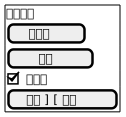
快速画表单/界面线框,适合需求文档。
@startsalt
{^
  登录窗口
  [用户名      ]
  [密码        ]
  [X] 记住我
  [  登录  ] [ 取消 ]
}
@endsalt
常用控件:[文本框]、()单选、[X]复选、{ ... }分组框、{# "标签" | 内容}标签页、[--]下拉、^下拉^、[&icon:图片];{^ ... }带标题分组。
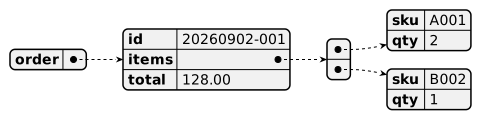
直接把数据结构渲染成图,适合接口文档/配置说明。
@startjson
{
  "order": {
    "id": "20260902-001",
    "items": [
      {"sku": "A001", "qty": 2},
      {"sku": "B002", "qty": 1}
    ],
    "total": 128.00
  }
}
@endjson
@startyaml
service:
  name: order-api
  replicas: 3
  resources:
    cpu: "500m"
    memory: 512Mi
@endyaml
PlantUML 内置了多套预设主题,用 !theme 指令即可一键切换整套配色/字体/形状,不用手动调 skinparam。
@startuml
!theme cyborg
class Foo
@enduml
!theme 通常放在 @startuml 之后、图内容之前。
| 主题 | 风格 |
|---|---|
plain | 简单黑底白字(默认风格对照) |
bluegray | 蓝灰 |
blueprint | 蓝图风格(白底蓝线,仿蓝图复印) |
amiga | Amiga Workbench 1.x(白字蓝底) |
mimeograph | 油印风格(灰底紫字) |
cyborg / superhero / united / minty / sandstone / sketchy / spacelab / materia / cerulean | Bootswatch 风格系列 |
hacker | Jekyll hacker 风格(终端感) |
crt-amber | 单色 CRT 琥珀色(橙字黑底) |
reddress-darkblue / reddress-lightblue | Red Dress 红裙风格(深/浅蓝) |
aws-orange | AWS 配色 |
cloudscape-design | Cloudscape 设计配色 |
carbon-gray | Carbon 设计灰阶 |
Sunlust | Solarized 配色 |
black-knight / metal / silver / lightgray | 深色/金属/灰色系 |
mars / toy / vibrant | future-architect/puml-themes 系列 |
mono | 单色 + 等宽字体 |
部分主题(如
cyborg、sketchy、reddress-*等)有多个变体,可在主题详情页查看。完整主题画廊与预览: https://the-lum.github.io/puml-themes-gallery/themes/
Sunlust)。!theme cyborg-outline 等(具体变体名参考画廊详情页)。<style> 进一步微调。plain,再按需切换。!theme:一键整套预设外观,优先使用。skinparam:细粒度参数覆盖(已废弃,仍可用),仅在主题基础上微调个别参数。<style>:CSS 式样(主题的底层实现),高级自定义推荐方式。PlantUML 不仅能画 UML,还支持大量非 UML 图表类型。当用户需要画结构/数据/界面/流程类图表时,优先考虑用 PlantUML 表达。完整列表见 https://plantuml.com/zh/。
WBS / Salt / ER / 网络图 / JSON / YAML / 定时图 → 均已有独立章节,直接看上方对应部分即可。下方补充其余非 UML 类型。
@startregex
A|B(CD)*E
@endregex
@startebnf
digit = "0" | "1" | "2" | "3" ;
@endebnf
@startuml
!include <archimate/Archimate>
Archimate_BusinessFunction(F1, "订单管理")
Archimate_ApplicationComponent(C1, "订单服务")
@enduml
Archimate 依赖标准库宏,公共服务器 1.2026.8beta1 上
Archimate_*调用会报Syntax Error? (Assumed diagram type: sequence),属版本问题。要出图请改用本地 PlantUML,或等服务器升版;这里用text保留写法参考。
注意:skinparam 已废弃,建议迁移到
<style>CSS 样式。
@startuml
skinparam backgroundColor transparent
skinparam monochrome true
skinparam shadowing false
skinparam defaultFontName Helvetica
skinparam classFontColor red
skinparam classFontSize 10
skinparam ArrowHeadColor none
skinparam componentStyle rectangle
@enduml
嵌套写法:
@startuml
skinparam class {
  FontColor red
  FontSize 10
  FontName Helvetica
}
@enduml
@startuml
!$var = "value"
!$i = 42
!$a ?= "default"
@enduml
@startuml
!if ($var == "value")
  ...
!else
  ...
!endif
@enduml
@startuml
!while ($i > 0)
  ...
!endwhile
@enduml
@startuml
!function $name($param)
  !return $param + "!"
!endfunction
@enduml
!include file.iuml
!include_many file.iuml
!include_once file.iuml
!includesub file.puml!SECTION
这几个指令要读外部文件,单独一段源码是渲染不出图的(会报文件不存在),所以用
text展示写法。实际用时放在@startuml之后。
%date(), %now(), %darken("red", 20), %chr(65), %intval("42"), %file_exists("path") 等。
支持标准颜色名(red, blue, green 等)和 RGB 码(#FF0000)。transparent 仅用于背景。
内联颜色样式:#color;line:color;line.[bold|dashed|dotted];text:color。
生成 .puml 后必须能出图才算闭环。按环境三选一:
在线服务器(无需本地 Java,推荐) 把 PlantUML 源码做 percent-encode 后拼到公共服务器地址即可直接出图:
https://www.plantuml.com/plantuml/png/?~<url-encoded-source>https://www.plantuml.com/plantuml/svg/?~<url-encoded-source>
<url-encoded-source> 即把整段 @startuml ... @enduml 做 URL 编码(空格→%20、@→%40、>→%3E 等)。?~ 形式对中小图(约 4000 字符内)最省事,浏览器打开即显示图;需要图片二进制时改用 deflate 压缩后的 /png/<encoded> 形式。
例:@startuml + Alice -> Bob : Hi + @enduml →
https://www.plantuml.com/plantuml/png/?~%40startuml%0AAlice%20-%3E%20Bob%20%3A%20Hi%0A%40enduml本地命令行(需 Java)
java -jar plantuml.jar -tsvg diagram.puml # -tpng 默认, 也可 -tpdf -tlatex
编辑器 / IDE
Alt+D 预览conf.user.json 里配 "plantuml": {"server": "https://www.plantuml.com/plantuml"}plantuml,不要写 puml:Typora / Obsidian 只识别 ```plantuml 才会渲染,写成 ```puml 会被当成普通代码块原样显示。.puml 只是源文件的扩展名,跟代码块标识无关——两者别混为一谈。批量重渲 + 校验(本仓库自带)
scripts/render_preview.py(Python 3 标准库,零依赖)会把 examples/*.puml 渲染到 assets/preview/,且在写盘前校验结果是不是真图:
python scripts/render_preview.py              # 全部重渲
python scripts/render_preview.py timing class # 只渲指定几个
python scripts/render_preview.py --check      # 只校验已有 svg
两个关键点:① 压缩形式 /svg/<encoded> 的编码表是 PlantUML 自定义 64 字符表(0-9A-Za-z-_),不是标准 base64,用 base64 替换 +/= 会拿到一张 "bad URL / HUFFMAN" 报错图;② 服务器报错时返回的也是一张合法 SVG,所以必须检查内容里有没有 Syntax Error / Assumed diagram 等标记,不能只看 HTTP 200。
渲染异常先查七点:① 是否用了正确的
@start*/@end*(非 UML 图如 nwdiag 必须用@startnwdiag);② 中文 / 特殊字符是否正常编码;③ 超长源码改用 deflate 压缩形式(去掉~,用服务器接受的压缩编码);④title里别用 ASCII 空格-空格(-),个别版本会误判为 sequence 图而报 Syntax Error,用·或下划线代替;⑤ 活动图里别写left to right direction/top to bottom direction,该指令只在类图 / 组件图 / 部署图可靠;⑥!theme/!include等!预处理指令不支持行尾注释,注释要单独写一行,否则整行会被当成参数;⑦ 别用...当占位内容(EBNF 等语法图会报 Unparsable expression),示例要给真实可解析的内容。若返回 HTTP 403error code: 1010或 HTTP 509 崩溃图,是公共服务器限流或临时故障,稍后重试即可,不是源码问题。
@startuml / @enduml。只写片段(如只有 class A)在 Typora / Obsidian 里会报 TypeError: Cannot read properties of undefined (reading 'startsWith')——渲染器要先解析 @start 才能判断图类型,取不到就崩。语法速查里的片段也要补全成能独立出图的完整源码。plantuml 而不是 puml。同上,只有 ```plantuml 会被识别。确实无法独立渲染的(如依赖外部文件的 !include 系列)改用 ```text,别硬塞进 plantuml 块。
语法正确只是及格线。图是给人读的——清晰、准确、可维护才是好图。以下原则让生成的图从「能渲」变成「好用」。
!include 把大图拆成子文件,或在文档里用多张小图取代一张巨图。A/B/C。participant "订单服务" as OrderSvc 比 participant A 好读十倍。' 开头单行注释不渲染,可在源码里标注「为什么这样画」「待确认」,方便协作者理解。package / rectangle / cloud / database 把同类项圈起来,读者一眼看出模块边界。left to right direction,横向展开在宽屏上更易读;时序图默认自上而下即可,不用改。
⚠️ 活动图不要加
direction。left to right direction/top to bottom direction在活动图里会让 PlantUML 1.2026.8beta1 报Syntax Error? (Assumed diagram type: class)。想给活动图分阶段,用partition而不是改方向。
!theme 或统一 skinparam,而不是逐元素上色。写入、调用、返回),别写整句长说明。hide unlinked / hide circle;用 -[hidden]-> 控制排版位置;!pragma layout smetana 调自动布局。title 里写 ASCII 空格-空格(-)—— 个别版本误判为 sequence 图语法错误(见渲染排查 ④)。-> 忽指调用忽指数据流,统一一种语义或加图例。-tsvg 矢量放大不糊,适合文档嵌入;PNG 适合快速分享。?~ 形式对约 4000 字符内最稳;更长改用 deflate 压缩编码(见渲染段)。.puml 放进仓库(与文档 / 代码同仓),CI 用 plantuml.jar 自动重渲染,避免文档过期。!theme + skinparam 片段(放进可被 !include 的 style.puml),保证视觉一致、改主题一处生效。详细「好 / 差对照」与可复制模板见
references/best-practices.md。