Install
openclaw skills install @hith3sh/spotify-audioSearch and manage Spotify playlists, tracks, albums, artists, and playback state via the Spotify Web API. Use this skill when users want to search for music, manage playlists, control playback, save tracks to library, or automate Spotify workflows.
openclaw skills install @hith3sh/spotify-audio
Search and manage Spotify content — playlists, tracks, albums, artists, playback, and library — from chat using the Spotify Web API.
This skill uses ClawLink for hosted connection flows and credentials so you do not need to configure Spotify API access yourself.
| Step 1: Install | Step 2: Pair Account | Step 3: Connect Spotify |
|---|---|---|
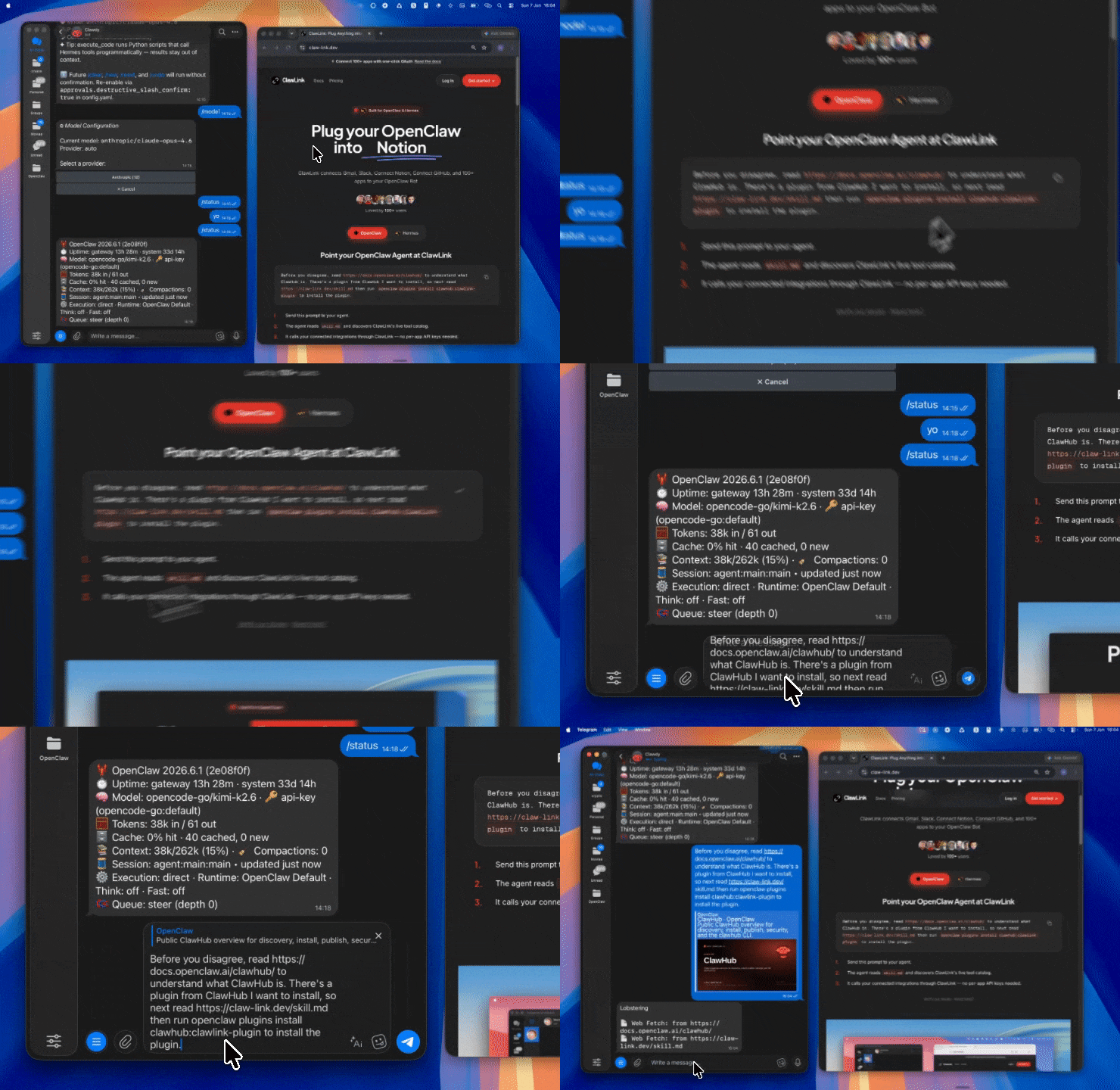 | 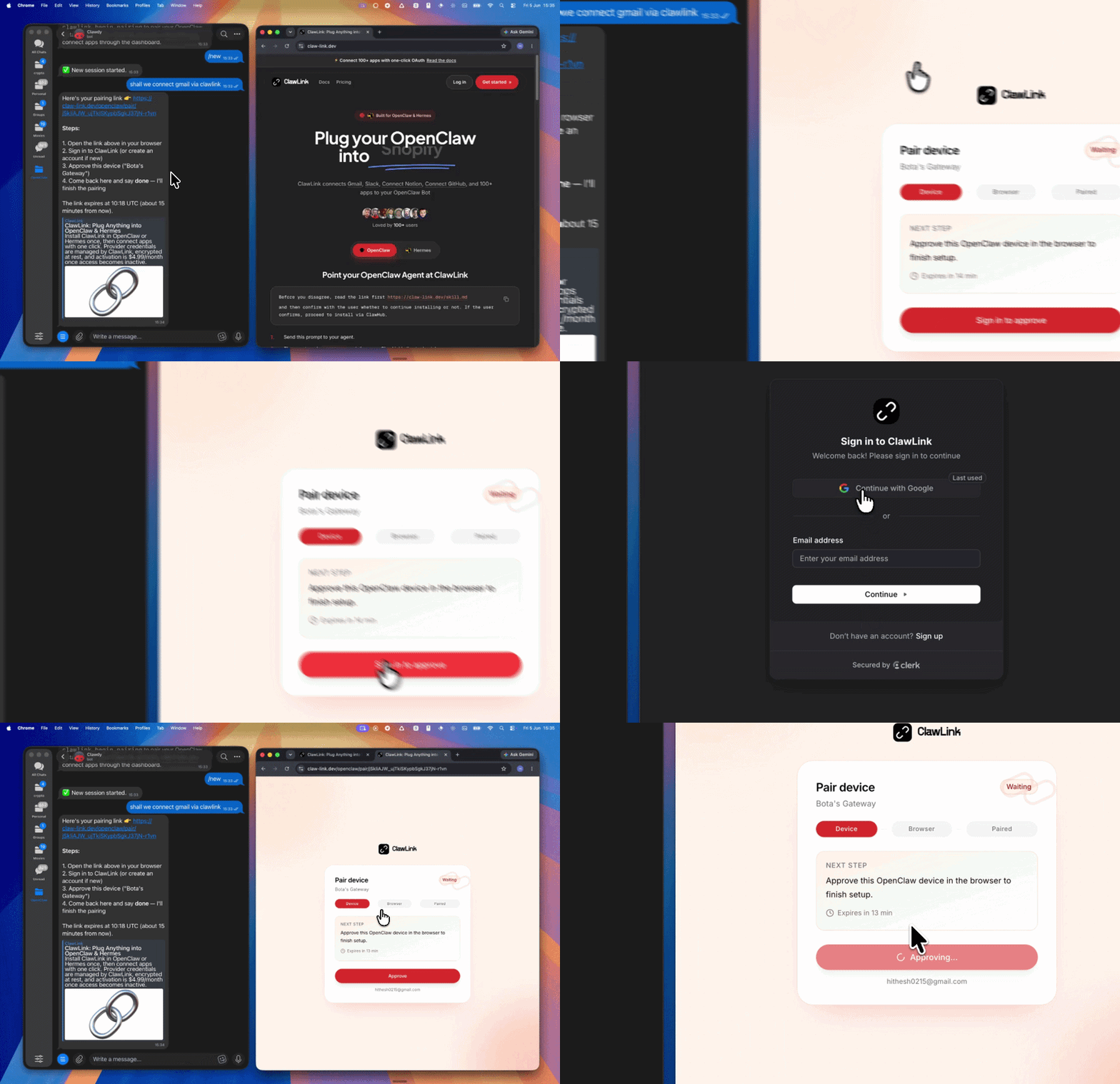 | App-specific connection GIF coming soon |
| Run the install command in OpenClaw | Sign in and approve the device | Open the dashboard and connect Spotify |
┌─────────────────┐     ┌──────────────┐     ┌──────────────────┐
│   OpenClaw      │────▶│   ClawLink   │────▶│  Spotify Web     │
│   (User Chat)   │     │   (OAuth)    │     │      API         │
└─────────────────┘     └──────────────┘     └──────────────────┘
         │                       │                       │
         │  1. Install Plugin    │                       │
         │  2. Pair Device       │                       │
         │  3. Connect Spotify   │                       │
         │                       │  4. Secure Token      │
         │                       │  5. Proxy Requests   │
         │                       │                       │
         ▼                       ▼                       ▼
   ┌──────────┐           ┌──────────┐           ┌──────────┐
   │  SKILL   │           │ Dashboard│           │  Spotify │
   │  File    │           │ Auth     │           │  Account │
   └──────────┘           └──────────┘           └──────────┘
Install the verified ClawLink plugin from ClawHub. After the user confirms, complete the full setup so ClawLink tools are visible in the next OpenClaw chat.
openclaw plugins install clawhub:clawlink-plugin
openclaw config set tools.alsoAllow '["clawlink-plugin"]' --strict-json
openclaw gateway restart
Then tell the user: "OpenClaw has been restarted. Send /new as a standalone message to start a fresh chat, then ask for Spotify again."
# Search for tracks
clawlink_call_tool --tool "spotify_search" --params '{"q": "never gonna give you up", "type": "track"}'

# Get current user's playlists
clawlink_call_tool --tool "spotify_get_current_user_playlists" --params '{}'

# Get track details
clawlink_call_tool --tool "spotify_get_track" --params '{"track_id": "TRACK_ID"}'
All Spotify tool calls are authenticated automatically by ClawLink using the user's connected Spotify account OAuth token.
No API token is required in chat. ClawLink stores the OAuth token securely and injects it into every Spotify Web API request on the user's behalf.
clawlink_begin_pairing if it is not configured yet.clawlink_list_integrations to verify the connection is active.clawlink_list_integrations
Response: Returns all connected integrations. Look for spotify in the list.
clawlink_list_tools --integration spotify
Response: Returns the live tool catalog for Spotify.
If Spotify tools are missing or the connection shows an error:
clawlink_list_integrations to verifyclawlink_list_tools --integration spotify| Tool | Description | Mode |
|---|---|---|
spotify_search | Search for tracks, albums, artists, playlists, or shows | Read |
spotify_search_tracks | Search specifically for tracks | Read |
spotify_search_artists | Search specifically for artists | Read |
spotify_search_albums | Search specifically for albums | Read |
spotify_search_playlists | Search specifically for playlists | Read |
| Tool | Description | Mode |
|---|---|---|
spotify_get_track | Get details for a single track | Read |
spotify_get_tracks | Get details for multiple tracks at once | Read |
spotify_get_audio_features | Get audio features (tempo, key, danceability, etc.) | Read |
spotify_get_audio_analysis | Get detailed audio analysis for a track | Read |
spotify_save_track | Save a track to the user's library | Write |
spotify_remove_saved_track | Remove a track from the user's library | Write |
spotify_check_saved_tracks | Check which tracks are saved in the library | Read |
| Tool | Description | Mode |
|---|---|---|
spotify_get_album | Get album details with tracks | Read |
spotify_get_album_tracks | Get tracks on an album | Read |
spotify_save_album | Save an album to the user's library | Write |
spotify_remove_saved_album | Remove an album from the user's library | Write |
spotify_check_saved_albums | Check which albums are saved | Read |
| Tool | Description | Mode |
|---|---|---|
spotify_get_artist | Get an artist's profile and follower count | Read |
spotify_get_artist_albums | Get albums by an artist | Read |
spotify_get_artist_top_tracks | Get an artist's top tracks | Read |
spotify_get_related_artists | Get artists related to this one | Read |
| Tool | Description | Mode |
|---|---|---|
spotify_get_current_user_playlists | Get the current user's playlists | Read |
spotify_get_playlist | Get a playlist's details and tracks | Read |
spotify_create_playlist | Create a new playlist for the user | Write |
spotify_update_playlist | Update a playlist's name, description, or visibility | Write |
spotify_delete_playlist | Delete a playlist | Write |
spotify_add_tracks_to_playlist | Add tracks to a playlist | Write |
spotify_remove_tracks_from_playlist | Remove tracks from a playlist | Write |
spotify_reorder_playlist_tracks | Reorder tracks within a playlist | Write |
spotify_get_playlist_cover_image | Get the playlist's cover image | Read |
spotify_upload_playlist_cover_image | Upload a custom cover image | Write |
| Tool | Description | Mode |
|---|---|---|
spotify_get_current_user | Get the current user's profile | Read |
spotify_get_user_profile | Get another user's public profile | Read |
spotify_follow_user | Follow a user | Write |
spotify_unfollow_user | Unfollow a user | Write |
spotify_follow_playlist | Follow a playlist | Write |
spotify_unfollow_playlist | Unfollow a playlist | Write |
| Tool | Description | Mode |
|---|---|---|
spotify_get_playback_state | Get the user's current playback state | Read |
spotify_start_playback | Start or resume playback | Write |
spotify_pause_playback | Pause playback | Write |
spotify_skip_to_next | Skip to the next track | Write |
spotify_skip_to_previous | Skip to the previous track | Write |
spotify_seek_to_position | Seek to a position in the current track | Write |
spotify_set_repeat_mode | Set the repeat mode (off, track, context) | Write |
spotify_set_volume | Set the playback volume | Write |
spotify_shuffle | Toggle shuffle on or off | Write |
spotify_transfer_playback | Transfer playback to another device | Write |
| Tool | Description | Mode |
|---|---|---|
spotify_get_recently_played | Get the user's recently played tracks | Read |
spotify_get_recently_played_episodes | Get recently played episodes (podcasts) | Read |
| Tool | Description | Mode |
|---|---|---|
spotify_get_new_releases | Get new album releases | Read |
spotify_get_featured_playlists | Get featured Spotify playlists | Read |
spotify_get_recommendations | Get track recommendations based on seeds | Read |
spotify_get_available_genre_seeds | Get available genre seeds for recommendations | Read |
spotify_get_categories | Get all Spotify categories | Read |
spotify_get_category_playlists | Get playlists for a specific category | Read |
clawlink_call_tool --tool "spotify_search" \
  --params '{
    "q": "bohemian rhapsody queen",
    "type": "track",
    "limit": 5
  }'
clawlink_call_tool --tool "spotify_get_playlist" \
  --params '{
    "playlist_id": "PLAYLIST_ID"
  }'
clawlink_call_tool --tool "spotify_create_playlist" \
  --params '{
    "name": "My OpenClaw Playlist",
    "description": "Created via OpenClaw AI assistant",
    "public": false
  }'
clawlink_call_tool --tool "spotify_add_tracks_to_playlist" \
  --params '{
    "playlist_id": "PLAYLIST_ID",
    "uris": ["spotify:track:TRACK_ID_1", "spotify:track:TRACK_ID_2"]
  }'
clawlink_call_tool --tool "spotify_get_audio_features" \
  --params '{
    "track_id": "TRACK_ID"
  }'
clawlink_call_tool --tool "spotify_get_new_releases" \
  --params '{
    "limit": 10,
    "country": "US"
  }'
clawlink_list_integrations to confirm Spotify is connected.clawlink_list_tools --integration spotify to see the live catalog.clawlink_search_tools with a short query and integration spotify.┌─────────────────────────────────────────────────────────────┐
│ READ OPERATIONS (Safe) │
│ search → get → list → browse │
│ │
│ Example: Search tracks → Get track details → Show info │
└─────────────────────────────────────────────────────────────┘
│
▼
┌─────────────────────────────────────────────────────────────┐
│ WRITE OPERATIONS (Require Confirmation) │
│ describe → preview → confirm → call │
│ │
│ Example: Preview playlist creation → User approves → Create│
└─────────────────────────────────────────────────────────────┘
clawlink_describe_tool first.whenToUse, askBefore, safeDefaults, examples, and followups to shape the call.clawlink_preview_tool first.clawlink_call_tool. Pass confirmation only after the preview matches the user's intent.spotify:track:3AhXNa5py1) or just the alphanumeric ID.limit parameter to control result count.| Status / Error | Meaning |
|---|---|
| Tool not found | The tool name does not exist in the current catalog. Verify with clawlink_list_tools --integration spotify. |
| Missing connection | Spotify is not connected. Direct the user to https://claw-link.dev/dashboard?add=spotify. |
NO_ACTIVE_DEVICE | No active Spotify device found to control playback. Open Spotify on a device first. |
PREMIUM_REQUIRED | Playback control requires Spotify Premium. |
INVALID_TRACK_ID | The track ID does not match any track in Spotify's catalog. |
INVALID_PLAYLIST_ID | The playlist ID does not exist or is not accessible. |
NOT_FOUND | The requested resource (track, album, artist) was not found. |
RATE_LIMITED | Too many requests — wait and retry. |
| Write rejected | User did not confirm a write action. Always confirm before executing writes. |
openclaw plugins list
/new as a standalone message to reload the catalog.openclaw config set tools.alsoAllow '["clawlink-plugin"]' --strict-json
openclaw gateway restart
/new again and retry.spotify_transfer_playback is needed first.Powered by ClawLink — an integration hub for OpenClaw