Install
openclaw skills install @hith3sh/servicenow-itServiceNow IT Service Management integration with API key authentication. Manage incidents, problems, change requests, tasks, CMDB records, service catalog items, and IT operations via the ServiceNow REST API.
openclaw skills install @hith3sh/servicenow-it
Connect to ServiceNow to manage IT Service Management operations including incidents, problems, change requests, tasks, CMDB records, service catalog items, and configuration management workflows.
This skill uses ClawLink for hosted connection flows and credentials so you do not need to configure ServiceNow API access yourself.
| Step 1: Install | Step 2: Pair Account | Step 3: Connect ServiceNow |
|---|---|---|
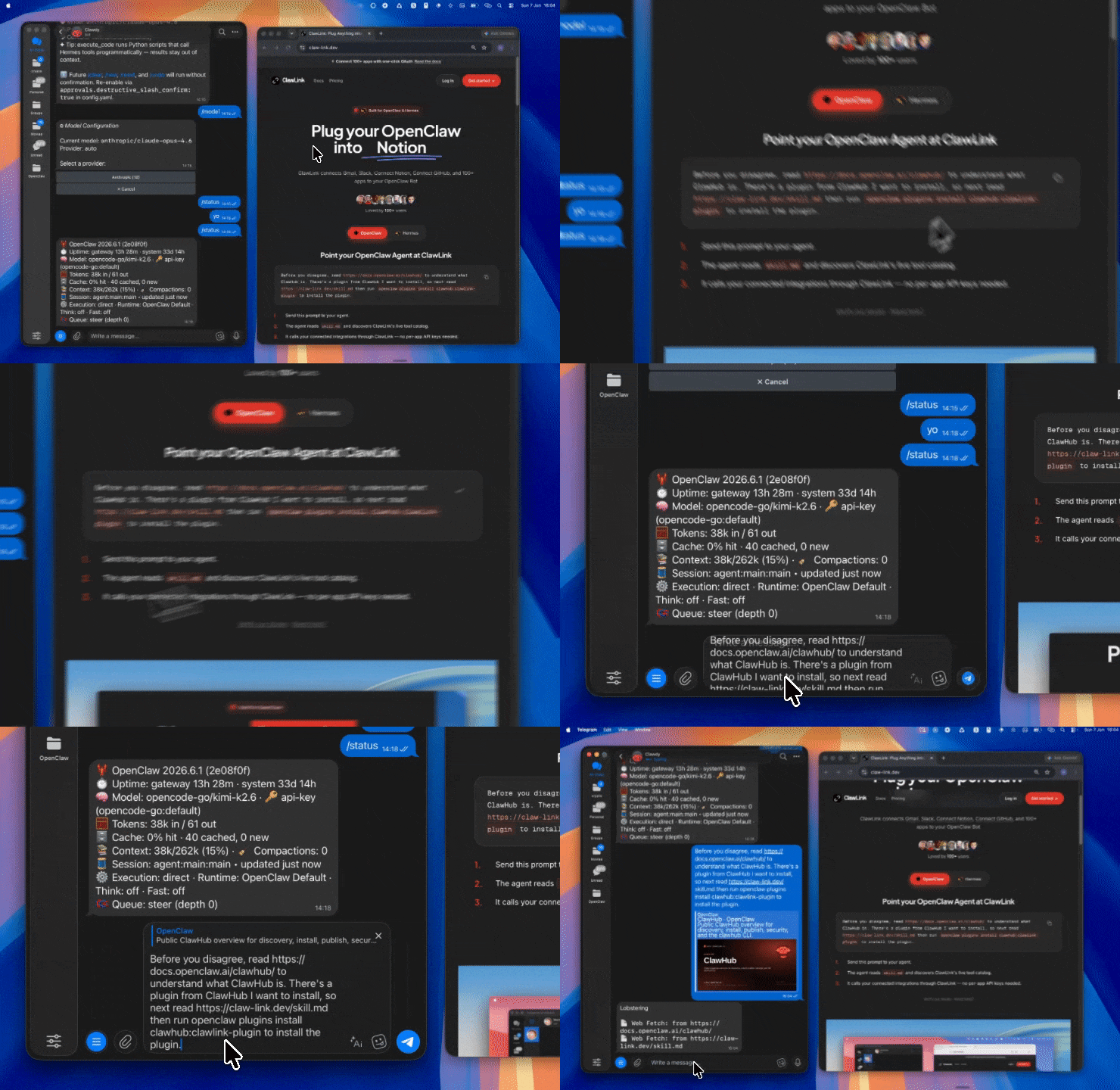 | 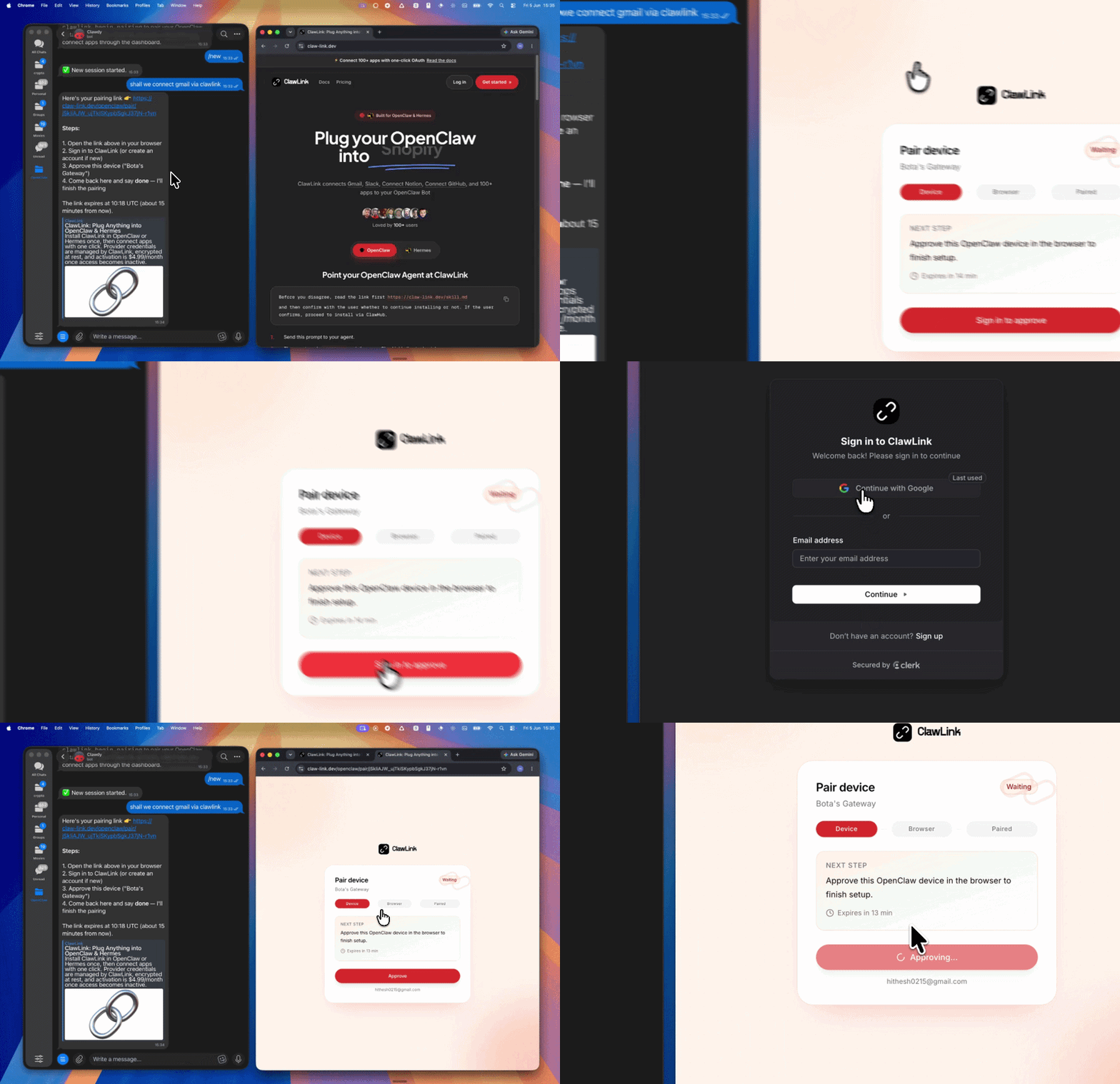 | App-specific connection GIF coming soon |
| Run the install command in OpenClaw | Sign in and approve the device | Open the dashboard and connect ServiceNow |
┌─────────────────┐     ┌──────────────┐     ┌──────────────────┐
│   OpenClaw      │────▶│   ClawLink   │────▶│  ServiceNow API  │
│   (User Chat)   │     │   (Proxy)    │     │  (ITSM, CMDB,    │
│                 │     │              │     │   Catalog)       │
└─────────────────┘     └──────────────┘     └──────────────────┘
         │                    │                      │
         │  1. Install Plugin │                      │
         │  2. Pair Device    │                      │
         │  3. Connect ServiceNow │                  │
         │                    │  4. API Key Proxy    │
         │                    │  5. Request Forward │
         │                    │                     │
         ▼                    ▼                     ▼
   ┌──────────┐        ┌──────────┐         ┌──────────┐
   │   SKILL  │        │ Dashboard│         │ServiceNow│
   │   File   │        │   Auth   │         │  Instance│
   └──────────┘        └──────────┘         └──────────┘
Install the verified ClawLink plugin from ClawHub. After the user confirms, complete the full setup so ClawLink tools are visible in the next OpenClaw chat.
openclaw plugins install clawhub:clawlink-plugin
openclaw config set tools.alsoAllow '["clawlink-plugin"]' --strict-json
openclaw gateway restart
Then tell the user: "OpenClaw has been restarted. Send /new as a standalone message to start a fresh chat, then ask for ServiceNow again."
# Get account verification status
clawlink_call_tool --tool "sendgrid_completed_steps"

# Create a new contact
clawlink_call_tool --tool "sendgrid_add_or_update_a_contact" --params '{"contacts": [{"email": "alice@example.com", "first_name": "Alice", "last_name": "Smith"}]}'

# Create a transactional template
clawlink_call_tool --tool "sendgrid_create_a_transactional_template" --params '{"name": "Welcome Email Template"}'
All ServiceNow tool calls are authenticated automatically by ClawLink using your ServiceNow API credentials stored securely in the dashboard.
No API key is required in chat. ClawLink injects your credentials into every ServiceNow REST API request on your behalf.
clawlink_begin_pairing if it is not configured yet.clawlink_list_integrations to verify the connection is active.clawlink_list_integrations
Response: Returns all connected integrations. Look for servicenow in the list.
clawlink_list_tools --integration servicenow
Response: Returns the live tool catalog for ServiceNow.
If ServiceNow tools are missing or the connection shows an error:
clawlink_list_integrations to verifyclawlink_list_tools --integration servicenow| Tool | Description | Mode |
|---|---|---|
servicenow_create_incident | Create a new incident record (service outage, system failure, user-reported issue) | Write |
servicenow_create_incident1 | Create a new incident record with incident-specific fields (urgency, impact, severity, state) | Write |
servicenow_create_table_incident | Create a new incident in the ServiceNow incident table using the Table API | Write |
| Tool | Description | Mode |
|---|---|---|
servicenow_create_a_record | Create a new record in a specified ServiceNow table (incident, problem, change_request, task, sys_user) | Write |
| Tool | Description | Mode |
|---|---|---|
servicenow_create_sn_chg_rest_change | Create a new change request via the Change Management REST API | Write |
servicenow_create_sn_chg_rest_change_normal | Create a normal change request (standard CAB approval workflow) | Write |
servicenow_create_sn_chg_rest_change_standard | Create a standard change request from a pre-approved template | Write |
servicenow_create_sn_chg_rest_change_emergency | Create an emergency change request (bypasses standard approval) | Write |
servicenow_create_sn_chg_rest_change_conflict | Start the conflict checking process for a change request | Write |
servicenow_cancel_change_conflict_check | Cancel an active conflict checking process for a change request | Write |
servicenow_create_sn_chg_rest_change_ci | Associate configuration items (CIs) with a change request | Write |
servicenow_create_sn_chg_rest_change_task | Create a new task for a change request | Write |
| Tool | Description | Mode |
|---|---|---|
servicenow_create_cmdb_instance | Create a single Configuration Item (CI) in the CMDB | Write |
servicenow_create_update_cmd_ci | Create or update CIs using the Identification and Reconciliation Engine (IRE) | Write |
servicenow_create_cmdb_instance_relation | Create inbound/outbound relations for a CI in the CMDB | Write |
servicenow_create_cmdb_ingest | Bulk-import records into a ServiceNow Import Set staging table | Write |
servicenow_create_identifyreconcile_enhanced | Bulk-insert or update CIs with automatic identification and relationship creation | Write |
servicenow_create_identifyreconcile_query | Query the Identify and Reconcile API to determine INSERT vs UPDATE for a CI | Read |
servicenow_create_identifyreconcile_queryenhanced | Perform identification and reconciliation of CIs (may create/modify CIs) | Write |
servicenow_create_cmdb_app_service | Create or update an application service in the CMDB | Write |
servicenow_create_cmdb_ci_linux_server | Create a new Linux server CI in the CMDB | Write |
servicenow_create_ci_lifecycle_mgmt_operators | Register a new operator for CI Lifecycle Management | Write |
servicenow_create_ci_lifecycle_mgmt_statuses | Set operational state for one or more CIs | Write |
servicenow_create_cilifecyclemgmt_action | Add or execute a CI lifecycle action for a Configuration Item | Write |
| Tool | Description | Mode |
|---|---|---|
servicenow_create_servic_catalog_items_add_to_cart | Add a catalog item to the current user's shopping cart | Write |
servicenow_create_service_catalog_cart_checkout | Check out the shopping cart and submit the order (irreversible) | Write |
servicenow_create_service_catalog_cart_submit_order | Submit the shopping cart and create a service catalog request | Write |
servicenow_create_servicecatalog_items_order_now | Order a catalog item immediately without cart checkout | Write |
servicenow_create_servicecatalog_items_checkout_guide | Checkout an order guide with variable values | Write |
servicenow_create_servic_catalog_items_submit_producer | Submit a Service Catalog item using the submit_producer endpoint | Write |
| Tool | Description | Mode |
|---|---|---|
servicenow_create_interaction | Create a new interaction record linked to incidents, problems, or cases | Write |
servicenow_create_interaction_close | Close an existing interaction record | Write |
| Tool | Description | Mode |
|---|---|---|
servicenow_attach_file_to_record | Attach a file to a specified record (incident, problem, change request) | Write |
servicenow_create_attachment_upload | Upload a file as multipart/form-data attachment to a record | Write |
servicenow_delete_attachment_by_id | Permanently delete an attachment by its sys_id | Write |
servicenow_delete_attachment_by_id_v1 | Permanently delete an attachment via the v1 API endpoint | Write |
| Tool | Description | Mode |
|---|---|---|
servicenow_create_import | Insert data into a staging table and trigger the transform map | Write |
servicenow_create_servicenow_import_insertmultiple | Insert multiple records into a staging table and trigger transform | Write |
| Tool | Description | Mode |
|---|---|---|
servicenow_create_data_classification_classify | Assign data classification labels to records (Public, Internal, Confidential) | Write |
servicenow_create_data_classification_clear | Remove all data classifications from a record | Write |
| Tool | Description | Mode |
|---|---|---|
servicenow_create_push_installation | Register a device token for push notifications from ServiceNow | Write |
servicenow_create_push_remove_installation | Deactivate a device from receiving push notifications | Write |
| Tool | Description | Mode |
|---|---|---|
servicenow_create_sn_ind_tsm_sdwan_troubleticket | Create a new SD-WAN or network-related trouble ticket | Write |
| Tool | Description | Mode |
|---|---|---|
servicenow_create_sn_tmf_service_category | Create a new service category in the TMF Service Catalog | Write |
| Tool | Description | Mode |
|---|---|---|
servicenow_create_table | Insert a new record into a specified ServiceNow table | Write |
servicenow_delete_a_record | Permanently delete a specific record from a ServiceNow table | Write |
clawlink_call_tool --tool "servicenow_create_incident" \
  --params '{
    "short_description": "Server unreachable",
    "description": "Production server is not responding to ping",
    "impact": 2,
    "urgency": 2,
    "category": "network"
  }'
clawlink_call_tool --tool "servicenow_create_sn_chg_rest_change_normal" \
  --params '{
    "short_description": "Deploy application update",
    "description": "Scheduled deployment of v2.3.0 to production",
    "category": "software",
    "type": "standard",
    "priority": 3
  }'
clawlink_call_tool --tool "servicenow_create_servic_catalog_items_add_to_cart" \
  --params '{"sys_id": "CATALOG_ITEM_SYS_ID", "quantity": 1}'
clawlink_call_tool --tool "servicenow_create_cmdb_ci_linux_server" \
  --params '{
    "hostname": "web-server-01",
    "ip_address": "192.168.1.10",
    "os": "Ubuntu 22.04",
    "status": "operational"
  }'
clawlink_call_tool --tool "servicenow_create_attachment_upload" \
  --params '{
    "table_name": "incident",
    "table_sys_id": "INCIDENT_SYS_ID",
    "file_name": "screenshot.png"
  }'
clawlink_list_integrations to confirm ServiceNow is connected.clawlink_list_tools --integration servicenow to see the live catalog.clawlink_search_tools with a short query and integration servicenow.┌─────────────────────────────────────────────────────────────┐
│ READ OPERATIONS (Safe) │
│ list → get → describe → call │
│ │
│ Example: List incidents → Get details → Show results │
└─────────────────────────────────────────────────────────────┘
│
▼
┌─────────────────────────────────────────────────────────────┐
│ WRITE OPERATIONS (Require Confirmation) │
│ describe → preview → confirm → call │
│ │
│ Example: Describe tool → Preview changes → User approves │
│ → Execute create │
└─────────────────────────────────────────────────────────────┘
clawlink_describe_tool first.whenToUse, askBefore, safeDefaults, examples, and followups to shape the call.clawlink_preview_tool first.clawlink_call_tool. Pass confirmation only after the preview matches the user's intent.incident, change_request, sys_user, cmdb_ci).servicenow_create_table require a table parameter; records via dedicated tools use the specific table (e.g., servicenow_create_incident targets the incident table).servicenow_get_change_conflict to retrieve results once complete.| Status / Error | Meaning |
|---|---|
| Tool not found | The tool name does not exist in the current catalog. Verify with clawlink_list_tools --integration servicenow. |
| Missing connection | ServiceNow is not connected. Direct the user to https://claw-link.dev/dashboard?add=servicenow. |
404 Not Found | The record or table does not exist in the ServiceNow instance. |
403 Forbidden | The credentials lack permissions for this table or operation. |
400 Bad Request | Invalid parameters — check the tool schema with clawlink_describe_tool. |
409 Conflict | A record with the same identifier already exists (idempotent tools may still succeed). |
| Write rejected | User did not confirm a write action. Always confirm before executing writes. |
openclaw plugins list
/new as a standalone message to reload the catalog.openclaw config set tools.alsoAllow '["clawlink-plugin"]' --strict-json
openclaw gateway restart
/new again and retry.servicenow.clawlink_describe_tool to verify parameter names and types before calling.clawlink_preview_tool first.Powered by ClawLink — an integration hub for OpenClaw