Install
openclaw skills install @hith3sh/intercom-supportManage Intercom workspaces for customer support. Handle conversations, contacts, companies, tickets, and help center content. Automate replies, assign conversations to teams, manage articles, and track team performance.
openclaw skills install @hith3sh/intercom-support
Manage a Intercom workspace for customer support operations. Handle conversations, manage contacts and companies, create and update tickets, organize help center articles, and automate support workflows.
This skill uses ClawLink for hosted connection flows and credentials so you do not need to configure Intercom API access yourself.
| Step 1: Install | Step 2: Pair Account | Step 3: Connect Intercom |
|---|---|---|
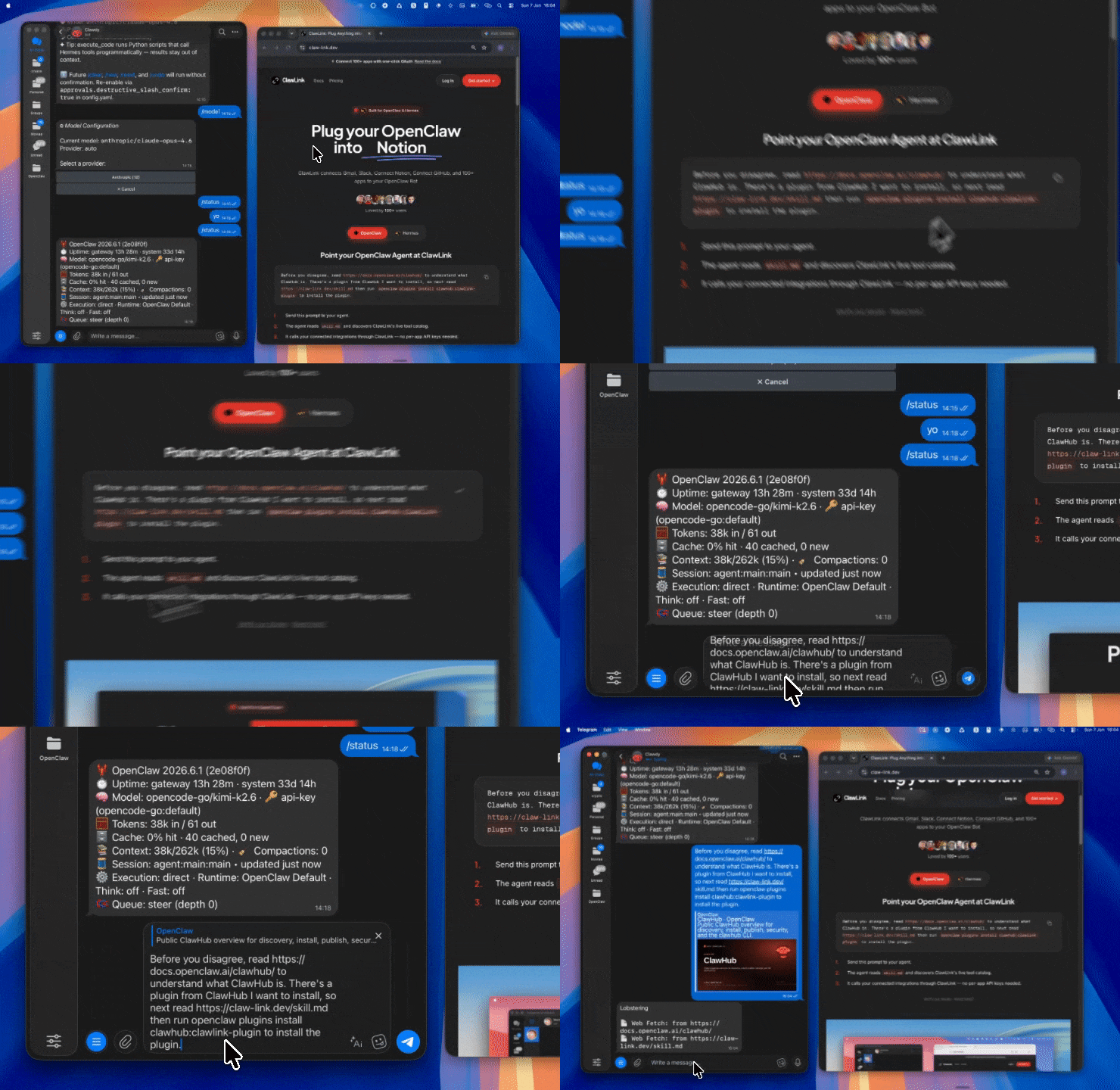 | 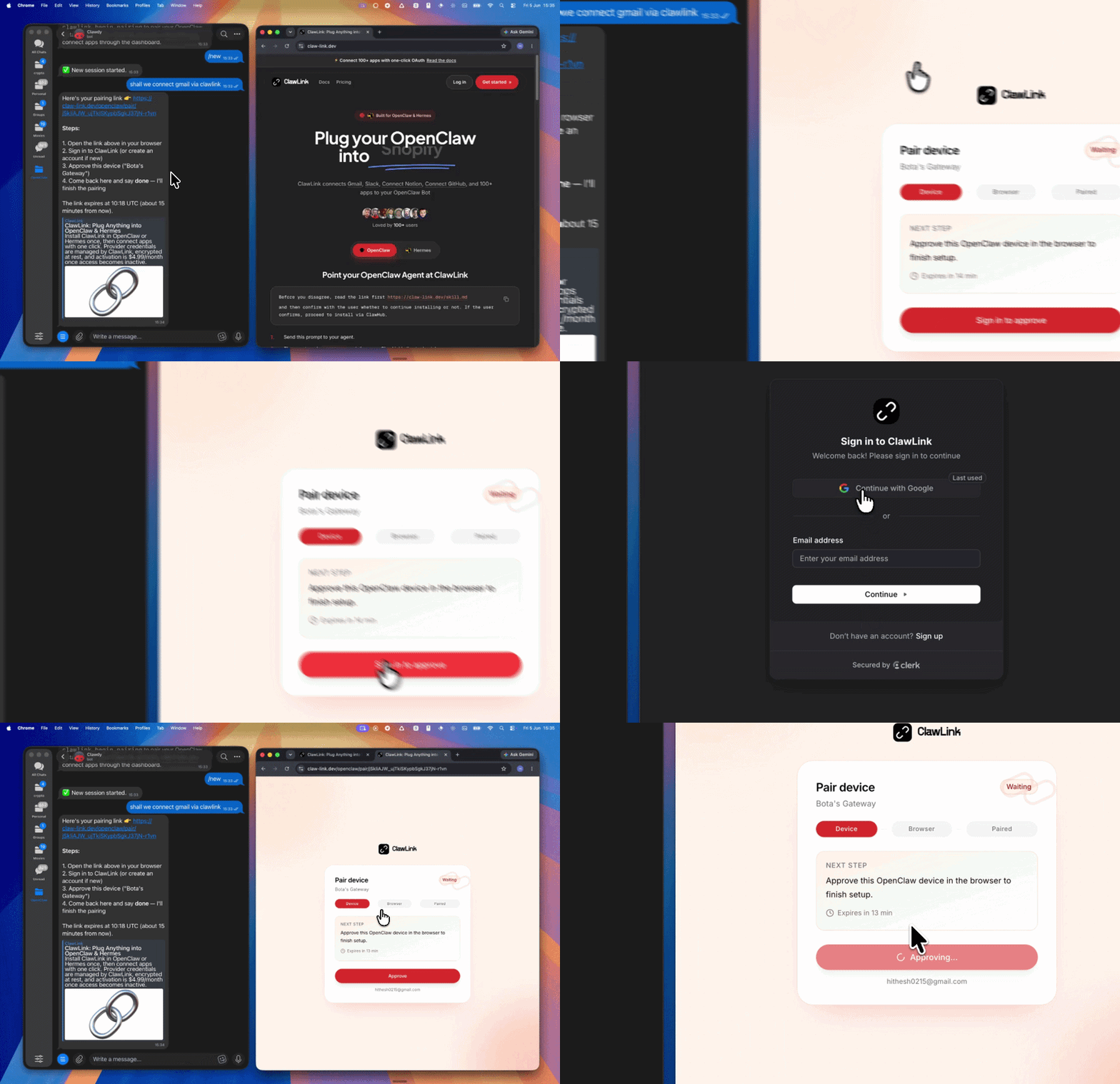 | App-specific connection GIF coming soon |
┌─────────────────┐     ┌──────────────┐     ┌──────────────────┐
│   OpenClaw      │────▶│   ClawLink   │────▶│  Intercom API    │
│   (User Chat)   │     │   (OAuth)    │     │   (v2.17)       │
└─────────────────┘     └──────────────┘     └──────────────────┘
         │                       │                       │
         │  1. Install Plugin  │                       │
         │  2. Pair Device   │                       │
         │  3. Connect Intercom│                       │
         │                   │  4. Secure Token      │
         │                   │  5. Proxy Requests    │
         │                   │                       │
         ▼                   ▼                       ▼
   ┌──────────┐      ┌──────────┐           ┌──────────┐
   │  SKILL   │      │ Dashboard│           │ Intercom │
   │  File    │      │ Auth     │           │ Workspace│
   └──────────┘      └──────────┘           └──────────┘
Install the verified ClawLink plugin from ClawHub. After the user confirms, complete the full setup so ClawLink tools are visible in the next OpenClaw chat.
openclaw plugins install clawhub:clawlink-plugin
openclaw config set tools.alsoAllow '["clawlink-plugin"]' --strict-json
openclaw gateway restart
Then tell the user: "OpenClaw has been restarted. Send /new as a standalone message to start a fresh chat, then ask for Intercom again."
# List open conversations
clawlink_call_tool --tool "intercom_list_conversations" --params '{}'

# Get a contact by email
clawlink_call_tool --tool "intercom_search_contacts" --params '{"query": {"field": "email", "operator": "=", "value": "user@example.com"}}'

# Get workspace admins
clawlink_call_tool --tool "intercom_list_all_admins" --params '{}'
All Intercom tool calls are authenticated automatically by ClawLink using the user's connected Intercom workspace.
No API key is required in chat. ClawLink stores the OAuth token securely and injects it into every Intercom API request on the user's behalf.
clawlink_begin_pairing if it is not configured yet.clawlink_list_integrations to verify the connection is active.clawlink_list_integrations
Response: Returns all connected integrations. Look for intercom in the list.
clawlink_list_tools --integration intercom
Response: Returns the live tool catalog for Intercom.
If Intercom tools are missing or the connection shows an error:
clawlink_list_integrations to verifyclawlink_list_tools --integration intercom| Tool | Description | Mode |
|---|---|---|
intercom_list_conversations | List all conversations with pagination support | Read |
intercom_get_conversation | Get full conversation details with all messages and parts | Read |
intercom_search_conversations | Search conversations using query filters | Read |
intercom_create_conversation | Create a new conversation with user or contact | Write |
intercom_reply_to_conversation | Send a reply to an existing conversation | Write |
intercom_close_conversation | Close a conversation marking it as resolved | Write |
intercom_reopen_conversation | Reopen a closed conversation | Write |
intercom_assign_conversation | Assign a conversation to an admin or team | Write |
intercom_attach_contact_to_conversation | Add a participant to an existing conversation | Write |
| Tool | Description | Mode |
|---|---|---|
intercom_list_contacts | List all contacts (users and leads) with pagination | Read |
intercom_get_a_contact | Get details of a single contact | Read |
intercom_search_contacts | Search contacts using query filters | Read |
intercom_show_contact_by_external_id | Get contact by external ID from your system | Read |
intercom_create_contact | Create a new contact (user or lead) | Write |
intercom_update_contact | Update an existing contact's information | Write |
intercom_update_a_contact | Update an existing contact | Write |
intercom_archive_contact | Archive a contact | Write |
intercom_unarchive_contact | Restore an archived contact | Write |
intercom_block_contact | Block a contact and archive their conversations | Write |
intercom_delete_contact | Permanently delete a contact | Write |
intercom_merge_a_lead_and_a_user | Merge a lead into a user contact | Write |
intercom_list_tags_attached_to_a_contact | List all tags attached to a specific contact | Read |
intercom_add_tag_to_contact | Add a tag to a contact | Write |
intercom_remove_tag_from_a_contact | Remove a tag from a contact | Write |
intercom_add_subscription_to_a_contact | Add a subscription type to a contact | Write |
intercom_remove_subscription_from_a_contact | Remove a subscription from a contact | Write |
intercom_list_subscriptions_for_a_contact | List all subscription types for a contact | Read |
intercom_list_attached_companies_for_contact | List companies associated with a contact | Read |
intercom_list_attached_segments_for_contact | List segments for a contact | Read |
intercom_attach_contact_to_company | Associate a contact with a company | Write |
intercom_detach_contact_from_company | Remove company association from a contact | Write |
intercom_list_all_notes | List all notes for a contact | Read |
intercom_create_a_note | Add a note to a contact | Write |
intercom_retrieve_visitor_with_user_id | Get visitor details by user ID | Read |
intercom_delete_a_visitor | Permanently delete a visitor | Write |
| Tool | Description | Mode |
|---|---|---|
intercom_list_all_companies | List all companies sorted by last request | Read |
intercom_retrieve_a_company_by_id | Get a single company by ID | Read |
intercom_retrieve_companies | Get company by company_id or name, or filter by tag/segment | Read |
intercom_scroll_over_all_companies | Iterate over all companies using scroll API | Read |
intercom_list_attached_contacts | List contacts belonging to a company | Read |
intercom_list_attached_segments_for_companies | List segments for a company | Read |
intercom_list_company_notes | List all notes associated with a company | Read |
intercom_create_or_update_a_company | Create or update a company by company_id | Write |
intercom_update_a_company | Update a company's details | Write |
intercom_delete_a_company | Permanently delete a company | Write |
| Tool | Description | Mode |
|---|---|---|
intercom_list_tags | List all tags in the workspace | Read |
intercom_find_tag | Get details of a specific tag by ID | Read |
intercom_create_tag | Create or update a tag and optionally tag/untag contacts | Write |
intercom_update_tag | Update a tag's name by ID | Write |
intercom_delete_a_tag_delete_tag | Permanently delete a tag from the workspace | Write |
intercom_attach_tag_to_conversation | Add a tag to a conversation | Write |
intercom_detach_tag_from_conversation | Remove a tag from a conversation | Write |
intercom_attach_tag_to_ticket | Add a tag to a ticket | Write |
intercom_detach_tag_from_ticket | Remove a tag from a ticket | Write |
| Tool | Description | Mode |
|---|---|---|
intercom_list_all_articles | List all articles sorted by last updated | Read |
intercom_retrieve_an_article | Get article details by ID | Read |
intercom_create_an_article | Create a new help center article | Write |
intercom_update_an_article | Update an article's content and settings | Write |
intercom_delete_an_article | Permanently delete an article | Write |
intercom_search_for_articles | Search articles by query | Read |
| Tool | Description | Mode |
|---|---|---|
intercom_list_all_collections | List all help center collections | Read |
intercom_retrieve_a_collection | Get collection details by ID | Read |
intercom_create_a_collection | Create a new collection in the help center | Write |
intercom_update_a_collection | Update a collection's settings | Write |
intercom_delete_a_collection | Permanently delete a collection | Write |
intercom_list_help_center_sections | List all help center sections | Read |
intercom_create_help_center_section | Create a new section within a collection | Write |
| Tool | Description | Mode |
|---|---|---|
intercom_list_all_help_centers | List all Help Centers | Read |
intercom_retrieve_a_help_center | Get Help Center details by ID | Read |
| Tool | Description | Mode |
|---|---|---|
intercom_list_internal_articles | List all internal articles | Read |
intercom_retrieve_internal_article | Get internal article details by ID | Read |
intercom_create_internal_article | Create a new internal article | Write |
intercom_update_internal_article | Update an internal article's content | Write |
intercom_delete_internal_article | Permanently delete an internal article | Write |
intercom_search_internal_articles | Search internal articles with optional folder filter | Read |
| Tool | Description | Mode |
|---|---|---|
intercom_list_external_pages | List all external pages from Fin Content Library | Read |
intercom_get_external_page | Get external page details by ID | Read |
intercom_create_external_page | Create or update an external page in Fin Content Library | Write |
intercom_update_external_page | Update an existing external page | Write |
intercom_delete_external_page | Remove an external page from content library | Write |
intercom_list_content_import_sources | List all content import sources | Read |
intercom_get_content_import_source | Get content import source details | Read |
intercom_create_content_import_source | Create a new content import source for Fin | Write |
intercom_update_content_import_source | Update an existing content import source | Write |
intercom_delete_content_import_source | Delete a content import source and its pages | Write |
| Tool | Description | Mode |
|---|---|---|
intercom_list_news_items | List all news items from the workspace | Read |
| Tool | Description | Mode |
|---|---|---|
intercom_search_tickets | Search tickets by attribute filters | Read |
intercom_get_ticket | Get ticket details by ID | Read |
intercom_create_ticket | Create a new support ticket | Write |
intercom_update_ticket | Update an existing ticket's attributes and state | Write |
intercom_delete_ticket | Permanently delete a ticket | Write |
intercom_reply_ticket | Reply to a ticket with message or note | Write |
intercom_enqueue_create_ticket | Enqueue ticket creation for async processing | Write |
| Tool | Description | Mode |
|---|---|---|
intercom_list_ticket_types | List all configured ticket types | Read |
intercom_get_ticket_type | Get ticket type details by ID | Read |
intercom_create_ticket_type | Create a new ticket type with specific fields | Write |
intercom_update_ticket_type | Update a ticket type's name, description, or icon | Write |
intercom_create_ticket_type_attribute | Add a custom attribute to a ticket type | Write |
intercom_update_ticket_type_attribute | Update a ticket type attribute's properties | Write |
intercom_list_ticket_states | List all ticket states including archived ones | Read |
| Tool | Description | Mode |
|---|---|---|
intercom_list_all_admins | List all admins in the workspace | Read |
intercom_retrieve_an_admin | Get admin details by ID | Read |
intercom_identify_an_admin | Get currently authenticated admin | Read |
intercom_list_all_activity_logs | Get activity logs for all admins | Read |
intercom_set_admin_to_away | Set an admin to away status | Write |
intercom_set_an_admin_to_away | Set an admin to away for the inbox | Write |
intercom_list_teams | List all teams in the workspace | Read |
intercom_retrieve_team | Get team details by ID | Read |
intercom_list_away_status_reasons | Get all away status reasons including deleted ones | Read |
| Tool | Description | Mode |
|---|---|---|
intercom_list_all_macros | List all macros (saved replies) in workspace | Read |
intercom_retrieve_a_macro | Get macro details by ID | Read |
| Tool | Description | Mode |
|---|---|---|
intercom_list_segments | List all segments defined in the workspace | Read |
intercom_retrieve_a_segment | Get segment details by ID | Read |
| Tool | Description | Mode |
|---|---|---|
intercom_list_data_attributes | List all data attributes for contacts and companies | Read |
intercom_create_data_attribute | Create a custom data attribute | Write |
intercom_update_data_attribute | Update a data attribute's description or archive status | Write |
intercom_list_data_events | List events for a specific contact (last 90 days) | Read |
intercom_create_data_event | Submit a data event to track user activity | Write |
intercom_data_event_summaries | Bulk update event counts for a user | Write |
intercom_get_counts | Get summary counts for entities in the workspace | Read |
| Tool | Description | Mode |
|---|---|---|
intercom_create_data_export | Initiate async export of message content | Write |
intercom_download_data_export | Download completed data export as gzipped CSV | Read |
intercom_cancel_data_export | Cancel an active data export job | Write |
intercom_retrieve_a_job_status | Check status of a data export job | Read |
| Tool | Description | Mode |
|---|---|---|
intercom_get_custom_object_instance_by_external_id | Get custom object instance by external ID | Read |
intercom_jobs_status | Check status of asynchronous job execution | Read |
| Tool | Description | Mode |
|---|---|---|
intercom_list_calls | List all phone calls with pagination | Read |
intercom_list_calls_with_transcripts | Get calls with transcripts by conversation IDs | Read |
intercom_show_call | Get call details by ID | Read |
intercom_show_call_transcript | Get transcript text from a call | Read |
intercom_register_fin_voice_call | Register a Fin Voice call for AI-powered analysis | Write |
| Tool | Description | Mode |
|---|---|---|
intercom_list_subscription_types | List all subscription types in the workspace | Read |
| Tool | Description | Mode |
|---|---|---|
intercom_customize_signup_form | Customize the appearance of a list's signup form | Write |
clawlink_call_tool --tool "intercom_list_conversations" \
  --params '{}'
clawlink_call_tool --tool "intercom_search_contacts" \
  --params '{"query": {"field": "email", "operator": "=", "value": "user@example.com"}}'
clawlink_call_tool --tool "intercom_create_contact" \
  --params '{"email": "newuser@example.com", "role": "user", "name": "New User"}'
clawlink_call_tool --tool "intercom_reply_to_conversation" \
  --params '{"conversation_id": "CONVERSATION_ID", "message_type": "comment", "body": "Thank you for reaching out! We will get back to you shortly."}'
clawlink_call_tool --tool "intercom_create_an_article" \
  --params '{"title": "How to reset your password", "body": "<p>Follow these steps to reset your password...</p>", "state": "draft"}'
clawlink_list_integrations to confirm Intercom is connected.clawlink_list_tools --integration intercom to see the live catalog.clawlink_search_tools with a short query and integration intercom.┌─────────────────────────────────────────────────────────────┐
│ READ OPERATIONS (Safe) │
│ list → get → search → describe → call │
│ │
│ Example: List conversations → Get details → Show results │
└─────────────────────────────────────────────────────────────┘
│
▼
┌─────────────────────────────────────────────────────────────┐
│ WRITE OPERATIONS (Require Confirmation) │
│ list → get → describe → preview → confirm → call │
│ │
│ Example: Preview reply → User approves → Execute │
└─────────────────────────────────────────────────────────────┘
clawlink_describe_tool first.whenToUse, askBefore, safeDefaults, examples, and followups to shape the call.clawlink_preview_tool first.clawlink_call_tool. Pass confirmation only after the preview matches the user's intent.conversation_parts are paginated — walk all cursors for complete transcripts.title, subject, source.body, conversation_parts.body, and statistics can be null in responses.conversation_parts with null body or author.first_admin_reply_at may be null despite actual replies — use last_admin_reply_at for SLA calculations.conversation_parts are short-lived — download promptly.state field and open boolean can diverge — re-fetch to verify state before assign/reply/close actions.intercom_list_data_events.| Status / Error | Meaning |
|---|---|
| Tool not found | The tool name does not exist in the current catalog. Verify with clawlink_list_tools --integration intercom. |
| Missing connection | Intercom is not connected. Direct the user to https://claw-link.dev/dashboard?add=intercom. |
| Permission error | The authenticated admin lacks permission for this operation. Check admin roles in Intercom. |
| Conversation not found | The conversation ID does not exist or is not accessible. |
| Contact not found | The contact email or ID does not exist in the workspace. |
| Write rejected | User did not confirm a write action. Always confirm before executing writes. |
| 429 Rate limit | Too many requests. Wait before retrying. |
openclaw plugins list
/new as a standalone message to reload the catalog.openclaw config set tools.alsoAllow '["clawlink-plugin"]' --strict-json
openclaw gateway restart
/new again and retry.intercom_get_conversation first.INTERCOM_REPLY_TO_CONVERSATION with INTERCOM_CLOSE_CONVERSATION on the same conversation.Powered by ClawLink — an integration hub for OpenClaw