

Install
openclaw skills install @hith3sh/dropbox-filesBrowse, search, upload, download, and manage files and folders in Dropbox — powered by ClawLink.
openclaw skills install @hith3sh/dropbox-files
Work with Dropbox from chat — browse, search, upload, download, and manage files and folders.
Powered by ClawLink, an integration hub for OpenClaw that handles hosted connection flows and credentials so you don't need to configure Dropbox API access yourself.
| Step 1: Install | Step 2: Pair Account | Step 3: Connect Dropbox |
|---|---|---|
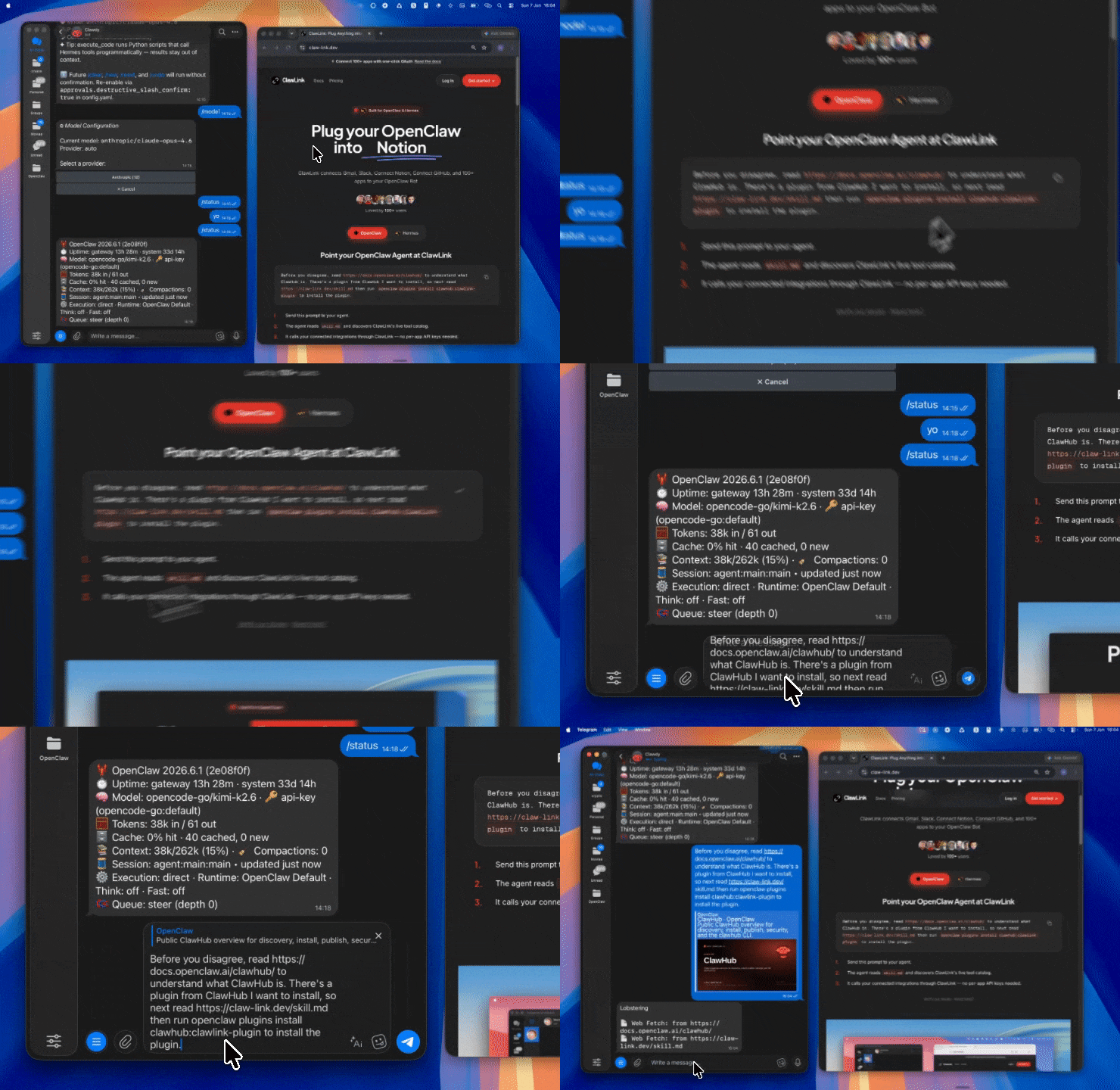 | 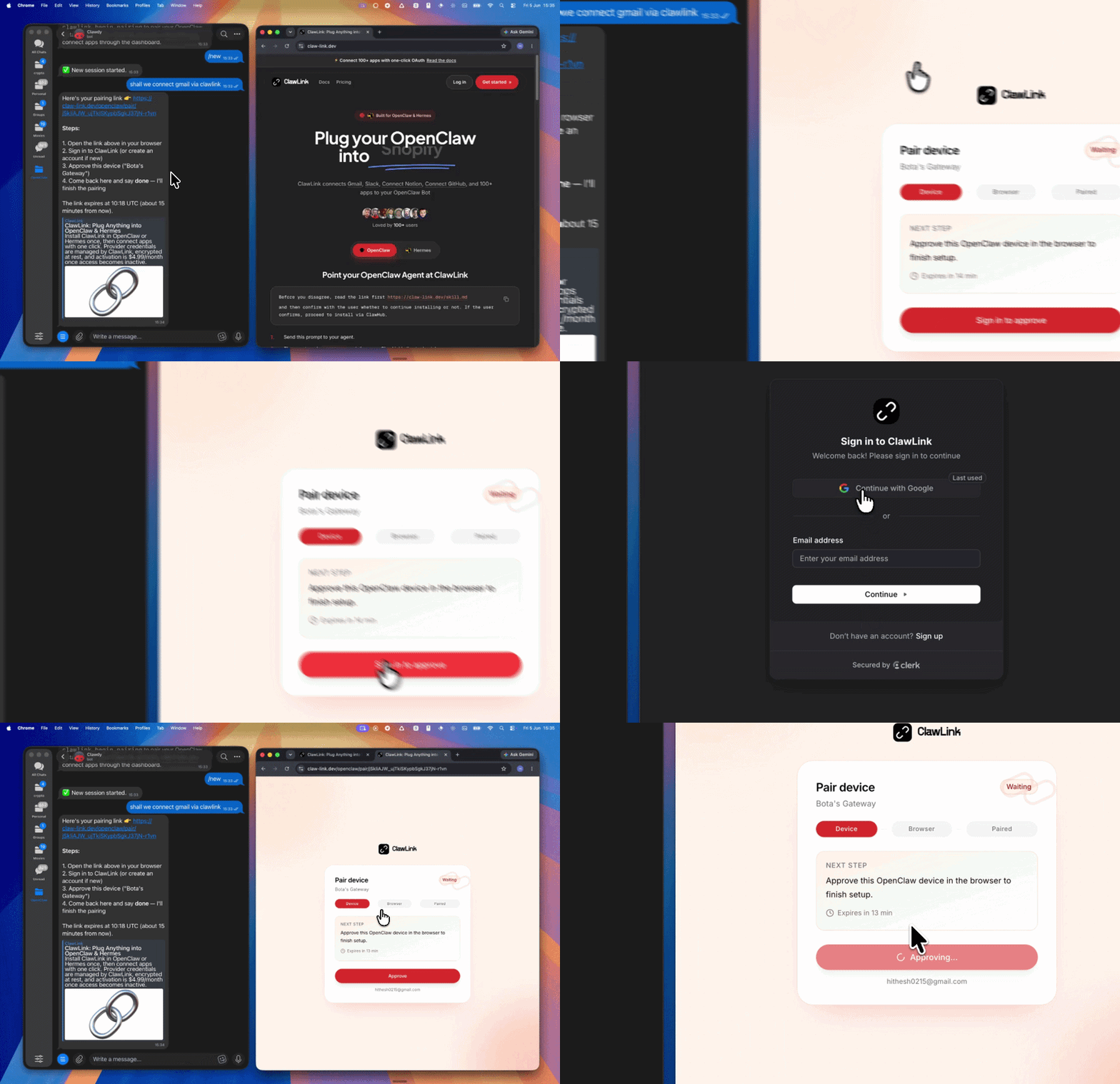 | App-specific connection GIF coming soon |
| Run the install command in OpenClaw | Sign in and approve the device | Open the dashboard and connect Dropbox |
User → ClawLink OAuth → Dropbox account
         ↓
    OpenClaw tools
    (via ClawLink)
Step 1 — Install the ClawLink plugin:
openclaw plugins install clawhub:clawlink-plugin
Start a fresh chat after installing.
Step 2 — Pair ClawLink:
clawlink_begin_pairingStep 3 — Connect Dropbox: Open claw-link.dev/dashboard?add=dropbox, complete the OAuth flow, then confirm.
App-specific connection GIF coming soon
Step 4 — Verify and discover:
// 1. Verify Dropbox is connected
clawlink_list_integrations()

// 2. List available tools
clawlink_list_tools({ integration: "dropbox" })

// 3. Search tools if needed
clawlink_search_tools({ query: "upload", integration: "dropbox" })
┌─────────────────────────────────────────────────────────┐
│                    OpenClaw (you)                       │
├─────────────────────────────────────────────────────────┤
│  ClawLink Plugin  →  clawlink_* tools                   │
├─────────────────────────────────────────────────────────┤
│                    ClawLink Cloud                       │
│         (credentials, connection state, routing)        │
├─────────────────────────────────────────────────────────┤
│             Dropbox API (user's account)                │
└─────────────────────────────────────────────────────────┘
| Tool | Description | Risk |
|---|---|---|
dropbox_check_user | Test API connection and validate access token | safe |
dropbox_get_about_me | Get current user's account info (email, name, type) | safe |
dropbox_get_account | Get account info by account ID | safe |
dropbox_get_account_batch | Get multiple accounts at once (max 300) | safe |
dropbox_get_space_usage | Get storage usage and quota info | safe |
dropbox_get_user_features | Get enabled features (paper_as_files, file_locking, etc.) | safe |
dropbox_get_openid_config | Get Dropbox OpenID Connect discovery document | safe |
dropbox_get_jwks | Get public keys for JWT verification | safe |
| Tool | Description | Risk |
|---|---|---|
dropbox_list_files_in_folder | List files and folders in a directory | safe |
dropbox_list_folder_continue | Paginate through folder contents with cursor | safe |
dropbox_get_metadata | Get metadata for a file or folder by path | safe |
dropbox_get_metadata_alpha | Get metadata with advanced property filtering | safe |
dropbox_list_file_revisions | Get revision history for a file | safe |
dropbox_files_search | Search files and folders by name or content | safe |
dropbox_search_continue | Fetch next page of search results | safe |
dropbox_search_file_or_folder | Search for a specific file or folder | safe |
dropbox_list_paper_docs | List all Paper docs | safe |
dropbox_list_paper_docs_continue | Paginate through Paper docs | safe |
| Tool | Description | Risk |
|---|---|---|
dropbox_read_file | Download file content (base64-encoded binary) | safe |
dropbox_get_file_preview | Get file preview (PDF as PDF, spreadsheets as HTML) | safe |
dropbox_get_thumbnail | Get image thumbnail | safe |
dropbox_get_thumbnail_batch | Get thumbnails for multiple images (max 25) | safe |
dropbox_get_thumbnail_v2 | Get image thumbnail (supports shared links) | safe |
dropbox_download_zip | Download folder as zip (max 20GB, 10000 entries) | safe |
dropbox_export_file | Export non-downloadable files (Paper, Google Docs) to Markdown/HTML | safe |
dropbox_get_temporary_link | Get expiring download link (expires in hours) | safe |
| Tool | Description | Risk |
|---|---|---|
dropbox_alpha_upload_file | Upload file up to 150 MiB (alpha endpoint) | confirm |
dropbox_append_upload_session | Append data to upload session (max 150 MiB/request) | confirm |
dropbox_append_upload_session_batch | Append to multiple upload sessions at once | confirm |
dropbox_finish_upload_session | Finish upload session and save to path | confirm |
dropbox_finish_upload_session_batch | Finish multiple upload sessions at once | confirm |
dropbox_get_temporary_upload_link | Get one-time expiring upload link (valid 4 hours) | confirm |
dropbox_save_url | Save file directly from a public URL (async, up to 15 min) | confirm |
| Tool | Description | Risk |
|---|---|---|
dropbox_copy_file_or_folder | Copy file or folder to a new location | confirm |
dropbox_copy_batch | Copy multiple files/folders at once | confirm |
dropbox_move_file_or_folder | Move file or folder | confirm |
dropbox_move_batch | Move multiple files/folders at once | confirm |
dropbox_delete_file | Permanently delete file or folder | high_impact |
dropbox_delete_batch | Delete multiple files/folders at once | high_impact |
dropbox_restore_file | Restore file to a specific revision | confirm |
dropbox_create_folder | Create new folder at path | confirm |
dropbox_create_folder_batch | Create multiple folders at once | confirm |
| Tool | Description | Risk |
|---|---|---|
dropbox_create_shared_link | Create permanent shared link | confirm |
dropbox_list_shared_links | List existing shared links (filter by path) | safe |
dropbox_modify_shared_link_settings | Change visibility, access, expiration, password | confirm |
dropbox_revoke_shared_link | Revoke a shared link | high_impact |
dropbox_get_shared_link_file | Download file from shared link | safe |
dropbox_get_shared_link_metadata | Resolve shared link URL to metadata | safe |
| Tool | Description | Risk |
|---|---|---|
dropbox_list_shared_folders | List all accessible shared folders | safe |
dropbox_list_folders_continue | Paginate through shared folders | safe |
dropbox_get_shared_folder_metadata | Get shared folder details by ID | safe |
dropbox_list_folder_members | List members of a shared folder | safe |
dropbox_list_folder_members_continue | Paginate through folder members | safe |
dropbox_mount_folder | Mount a shared folder to access it | confirm |
dropbox_list_mountable_folders | List mountable (unmounted) shared folders | safe |
dropbox_list_mountable_folders_continue | Paginate through mountable folders | safe |
dropbox_remove_folder_member | Remove member from shared folder | high_impact |
dropbox_add_folder_member_action | Add member to shared folder with access level | confirm |
| Tool | Description | Risk |
|---|---|---|
dropbox_get_shared_file_metadata | Get shared file metadata | safe |
dropbox_get_file_metadata_batch | Get metadata for multiple shared files | safe |
dropbox_list_file_members | List members with access to a shared file | safe |
dropbox_list_file_members_batch | List members for multiple shared files | safe |
dropbox_add_file_member | Add member to shared file | confirm |
dropbox_remove_file_member | Remove member from shared file | high_impact |
| Tool | Description | Risk |
|---|---|---|
dropbox_add_file_properties | Add custom properties from a property template | confirm |
dropbox_overwrite_file_properties | Overwrite property groups on a file | confirm |
dropbox_remove_file_properties | Remove property groups from a file | high_impact |
dropbox_list_user_templates | Get available custom property templates | safe |
dropbox_add_file_tags | Add a tag to a file or folder | confirm |
dropbox_get_file_tags | Get tags assigned to files/folders | safe |
dropbox_remove_file_tag | Remove a tag from a file or folder | high_impact |
| Tool | Description | Risk |
|---|---|---|
dropbox_create_file_request | Create a file request (upload link) | confirm |
dropbox_get_file_request | Get file request details by ID | safe |
dropbox_list_file_requests | List all file requests | safe |
dropbox_list_file_requests_continue | Paginate through file requests | safe |
dropbox_delete_file_requests | Delete a batch of closed file requests | high_impact |
dropbox_delete_all_closed_file_requests | Delete all closed file requests | high_impact |
dropbox_count_file_requests | Count total file requests | safe |
| Tool | Description | Risk |
|---|---|---|
dropbox_get_copy_reference | Get a copy reference for a file/folder | safe |
dropbox_save_copy_reference | Save a copy reference to user's Dropbox | confirm |
| Tool | Description | Risk |
|---|---|---|
dropbox_check_copy_batch | Check async copy batch job status | safe |
dropbox_check_delete_batch | Check async delete batch job status | safe |
dropbox_check_folder_batch | Check async folder creation job status | safe |
dropbox_check_job_status | Check async sharing job status | safe |
dropbox_check_move_batch | Check async move batch job status | safe |
dropbox_check_remove_member | Check async remove folder member job status | safe |
dropbox_check_save_url_status | Check save_url job status | safe |
dropbox_check_share_job_status | Check async folder sharing job status | safe |
dropbox_check_upload_batch | Check async upload batch job status | safe |
| Tool | Description | Risk |
|---|---|---|
dropbox_delete_manual_contacts_batch | Delete manually added contacts | high_impact |
| Tool | Description | Risk |
|---|---|---|
dropbox_get_file_lock_batch | Get lock metadata for multiple files | safe |
| Tool | Description | Risk |
|---|---|---|
dropbox_create_paper_document | Create Paper doc from HTML/Markdown | confirm |
dropbox_create_paper_folder | Create Paper folder | confirm |
// List files in a folder
const files = await clawlink_call_tool({
  tool: "dropbox_list_files_in_folder",
  parameters: { path: "/Documents" }
});

// Search for files
const searchResults = await clawlink_call_tool({
  tool: "dropbox_files_search",
  parameters: {
    query: "report",
    path: "/Documents"
  }
});

// Get file metadata
const meta = await clawlink_call_tool({
  tool: "dropbox_get_metadata",
  parameters: { path: "/Documents/report.pdf" }
});
// Upload a file directly
const upload = await clawlink_call_tool({
  tool: "dropbox_alpha_upload_file",
  parameters: {
    path: "/Documents/new-file.txt",
    contents: base64EncodedContent
  }
});

// Or get a temporary upload link for larger files
const uploadLink = await clawlink_call_tool({
  tool: "dropbox_get_temporary_upload_link",
  parameters: {}
});
// Create a shared link
const sharedLink = await clawlink_call_tool({
  tool: "dropbox_create_shared_link",
  parameters: {
    path: "/Documents/report.pdf",
    settings: {
      requested_visibility: "public"
    }
  }
});

// List existing shared links
const links = await clawlink_call_tool({
  tool: "dropbox_list_shared_links",
  parameters: { path: "/Documents/report.pdf" }
});

// Add a member to a shared file
await clawlink_call_tool({
  tool: "dropbox_add_file_member",
  parameters: {
    path: "/Documents/report.pdf",
    members: [{ email: "colleague@example.com" }],
    access_level: "viewer"
  }
});
// List shared folders
const sharedFolders = await clawlink_call_tool({
  tool: "dropbox_list_shared_folders",
  parameters: {}
});

// Mount a shared folder
await clawlink_call_tool({
  tool: "dropbox_mount_folder",
  parameters: { shared_folder_id: "123456789" }
});

// List members of a shared folder
const members = await clawlink_call_tool({
  tool: "dropbox_list_folder_members",
  parameters: { shared_folder_id: "123456789" }
});
| Error pattern | Likely cause | Resolution |
|---|---|---|
path_not_found | File/folder doesn't exist at that path | Verify path with dropbox_list_files_in_folder |
too_many_entries | Zip download exceeds 10,000 entries or 20GB | Download in smaller batches |
access_denied | No permission for that path | Check if file is in a shared folder user has access to |
shared_link_already_exists | Link already exists for that path | Use dropbox_list_shared_links to retrieve existing link |
app_folder_permission_incompatible | Operation not supported for app folder | Some operations require full Dropbox access |
file_locked | File is locked by another user | Use dropbox_get_file_lock_batch to check lock status |
files.content.read scope is required for dropbox_read_fileTools not showing up after install:
clawlink_list_integrations to confirm ClawLink is paired"Path not found" on file that exists:
dropbox_list_shared_folders and mount if neededUpload fails for large files:
upload_session/start → append → finish)dropbox_get_temporary_upload_link for delayed uploadPowered by ClawLink — your OpenClaw integration hub for Dropbox.