
Project Sidebar for OpenClaw
A project-first session sidebar for the OpenClaw Control UI.
Why I built it
I built Project Sidebar to make it easier to work with my own agents in OpenClaw. I use them a lot for software development, but not everything I do with them belongs to a codebase. When I switch back to a project, I want to see which conversations are still active, who I was working with, and what they delegated, without piecing it together from the global session list.
So I made a view that starts with project → conversations with agents → delegated subagents. It lets me pick up the right conversation without changing the rest of OpenClaw: chat, composer and transcript stay native. It fits the way I work, and I'm sharing it in case it's useful to someone with a similar workflow.
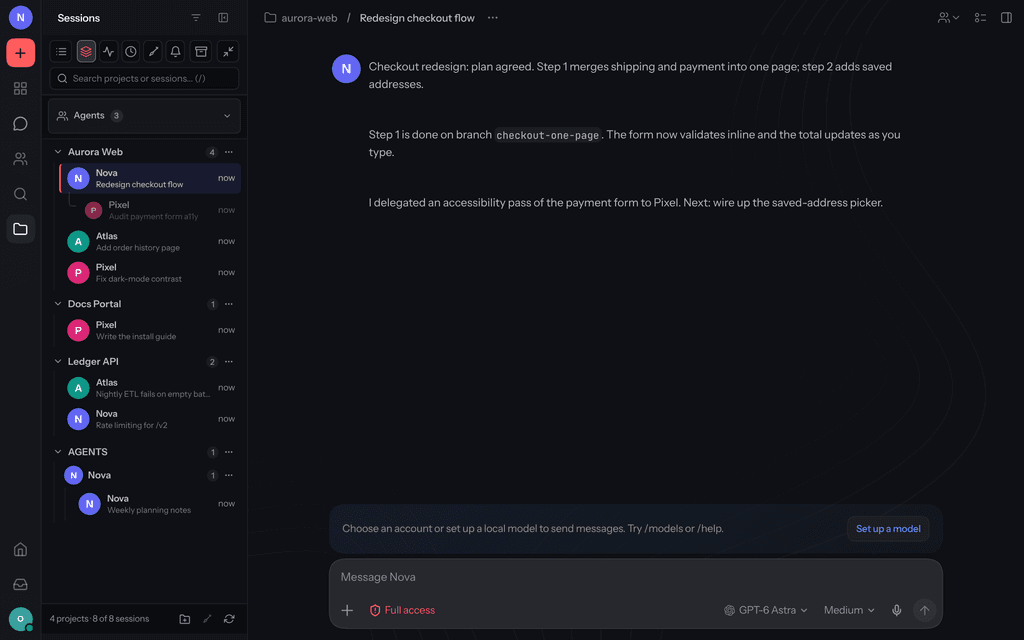
Captured in the real OpenClaw Control UI (2026.11.10), with fictional projects, agents and sessions.
Features
- Projects first. Sessions use their registered project or the best available repository, worktree or workspace metadata. Project names are labels, not grouping keys. Conversations without a project can still be reached under Agents.
- Live activity. Running sessions, unread markers and per-project counters update from the host's own session feed.
- Delegation trees. Subagents nest under the session that spawned them and can be collapsed.
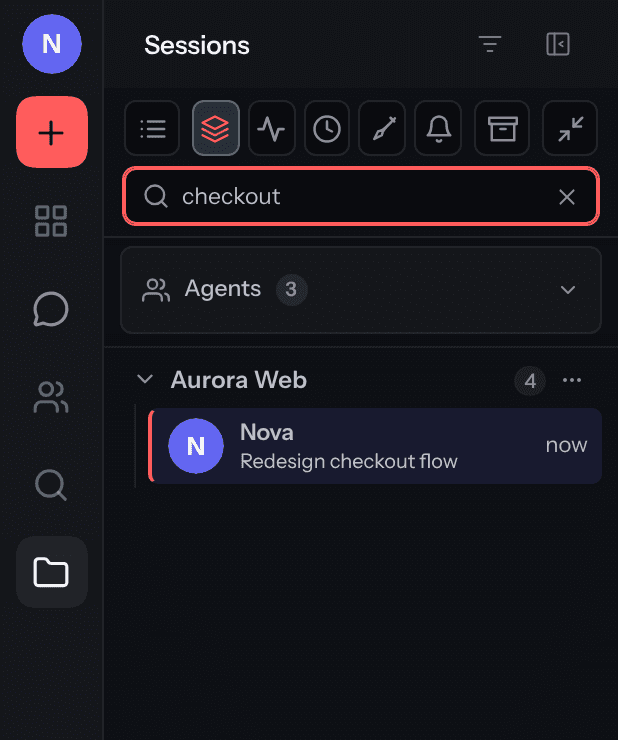
- Search and filters. Search titles, agents and last-message text; filter by active, older, unread or internal tasks; filter by agent from the agent rail.
- Archived and snoozed sessions are hidden by default, except for the open conversation. A toggle shows them dimmed; they do not count as active or unread.
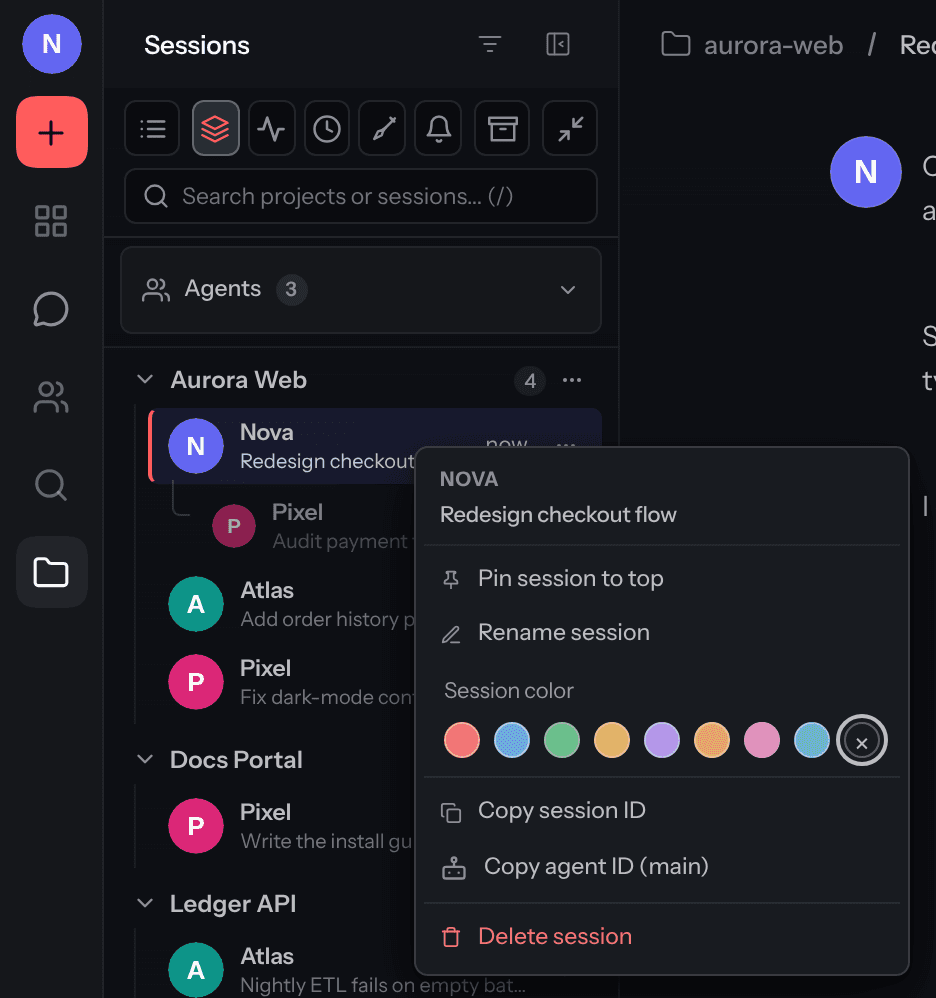
- Actions. Start a session with a chosen agent, rename, pin, colour or copy IDs. Deleting a session and its transcript, including through Clean up for finished subagent sessions, requires
operator.adminand confirmation. If the confirmed session cannot be verified, it is not deleted. - Project registry. Register and unregister projects from the footer or a project's menu with
operator.admin. - English and Spanish UI (follows the host locale).
- Optional. The plugin's list fetching and rendering stop when the project view is off-screen. The Projects button stays available.
| Search in Projects | Session actions |
|---|---|
 |  |
The Projects button
On a fresh browser profile, OpenClaw starts with its native list. The plugin pins Projects to the sidebar rail once; if you unpin it, it stays unpinned. On the tested 2026.11.10 desktop layout, the two buttons behave as follows:
| Sidebar | Showing | Click Projects | Click Sessions |
|---|---|---|---|
| closed | any | opens on the project view | opens on the native list |
| open | native list | switches to the project view | closes (host behaviour, untouched) |
| open | project view | closes | switches to the native list, stays open |
The choice is remembered in the browser. On mobile (drawer layout) Projects switches to the project view and closes the drawer when it is already showing.
OpenClaw 2026.12.1-beta.1 changes the host's behaviour: a repeated Sessions click keeps an open sidebar open. The plugin detects this after the first click (the Sessions button stays aria-pressed), notes it once in the browser console and from then on keeps the project view open instead of closing it. It never sends keyboard shortcuts or calls private host toggles.
If the host's rail markup cannot be found, the button falls back to a small bridge page that toggles the view and goes back (see limitations). You can also pick the view under Plugins → Customize UI.
Requirements and compatibility
- OpenClaw >= 2026.10.5 is the declared minimum. The plugin is built against 2026.11.10. Browser smoke tests in disposable Gateways cover these versions, not every release in the range:
- 2026.11.10 (stable): the matrix above.
- 2026.12.1-beta.1: the keep-open behaviour described above.
- 2026.10.5 (the floor): this release has no Sessions rail, so Projects uses the bridge page. Native UI from user-installed plugins is off by default there: enable Settings → Labs → Custom plugin UI (
gateway.controlUi.experimental.customPlugins: true).
- Node.js 22.18+ can run the unit tests. For the full setup, use Node.js 24.16+ on the 24.x line as in CI. The pinned OpenClaw CLI also declares support for 26.1+.
The Control UI plugin APIs are experimental: other versions need re-validation.
Installation
Build it locally, then install from the folder or from a packed artifact. The commands below are the real openclaw plugins subcommands (openclaw plugins --help).
git clone https://github.com/cheycron/openclaw-project-sidebar.git
cd openclaw-project-sidebar
npm ci --include=dev
npm run build                      # type-checks, then runs `openclaw plugins build`
npm run validate                    # optional sanity check using the pinned CLI

# Option A: install from this folder (use --link to keep using your working copy)
openclaw plugins install .
# Option B: pack an exact artifact, then install it
openclaw plugins pack --out project-sidebar.tgz
openclaw plugins install ./project-sidebar.tgz

openclaw plugins enable project-sidebar     # if it is not enabled yet
openclaw plugins reload project-sidebar     # on a running gateway
install may ask you to accept the plugin's declared capabilities (--accept-capabilities). After updating the plugin, use Plugins → Customize UI → Reload plugin UI (or reload the page) to pick up the new UI bundle.
To switch back without uninstalling, click Sessions or choose Plugins → Customize UI → Built-in. To remove the plugin, run openclaw plugins uninstall project-sidebar.
Configuration
There is one optional setting, projectAliases: fallback display names keyed by project ID. They are used when no registry name is available, for example when projects.list fails.
{
  "plugins": {
    "entries": {
      "project-sidebar": {
        "config": {
          "projectAliases": {
            "acme-web": "Acme: Website",
            "data-pipeline": "Data Pipeline"
          }
        }
      }
    }
  }
}
Rules: up to 256 entries; IDs are 1–128 ASCII letters, digits or ._- (starting with a letter or digit); labels are 1–160 characters without control characters. A name from the registry always wins, and an alias never creates, registers or merges a project. The labels are readable by any authenticated operator.read client, so do not put secrets in them.
Honest limitations
- Experimental APIs. The Control UI plugin API is experimental. A new OpenClaw release can break the plugin or change how it looks.
- The rail button uses a DOM bridge. The public SDK exposes neither the sidebar's open/closed state nor a way to toggle it, so the Projects button reads the host's rail markup (
[data-navigation-view],aria-pressed) and clicks the host's own Sessions button. That markup is not public and may change with any update. When it is not found the plugin warns once and degrades to the bridge page: clicking Projects navigates to a tiny page that toggles the view and goes back. - Customize UI → Built-in. The host does not tell the plugin when you choose Built-in there, so the saved preference can say "project view" until you next use the Projects button.
- Test coverage. I use it on my own setup. The browser smoke tests use a small fictional dataset; other deployment setups and heavy concurrency are not part of that coverage. Mobile checks use a phone-sized browser viewport, not a real device.
- Permission changes with the same flags. Disconnecting or losing
operator.readclears cached rows; other observable permission changes trigger a fresh read. The SDK does not expose a connection identity, so reload after switching accounts, especially when both have the same permissions. If OpenClaw still mounts the view withoutoperator.read, it displays a notice instead of sessions. - Transient errors. The project catalogue retries transient Gateway errors twice (honouring
retryAfterMsup to 5 s). Permanent errors are shown in the toolbar and not retried until you press refresh or the connection changes. - Large histories. There is no virtualisation. Load more re-queries the whole loaded prefix in blocks of 1000.
- Support. This is a personal project. Feedback is welcome, but I don't promise fixes or timelines.
Documentation
- Architecture: modules, data flow, lifecycle, isolation from the native view and the rail bridge.
- Decisions: short records of the main design choices.
- Development: setup, scripts, tests, screenshots and trying it on a local gateway.
- Changelog
Development
npm ci --include=dev
npm run typecheck                   # source and test typecheck
npm test                            # unit tests
npm run build
npm run screenshots                  # regenerate docs/images in a disposable Control UI
node scripts/smoke-gateway.mjs      # browser smoke against a throwaway loopback Gateway
To capture an existing package without building, set SCREENSHOT_ARCHIVE to its tarball. See docs/development.md for browser setup and output options.
License
MIT, see LICENSE.