

Install
openclaw skills install @jonathanjing/openclaw-dashboardOpenClaw operations dashboard for sessions, usage and cost, cron runs, gateway health, DGX Spark work, Local API Hub, and opt-in meeting Copilot. Use when installing, operating, auditing, or extending the dashboard backend, frontend tabs, security model, or OpenClaw-aligned design.
openclaw skills install @jonathanjing/openclaw-dashboardThe published screenshots use deterministic ?preview=1 sample data, never local host or workspace data.
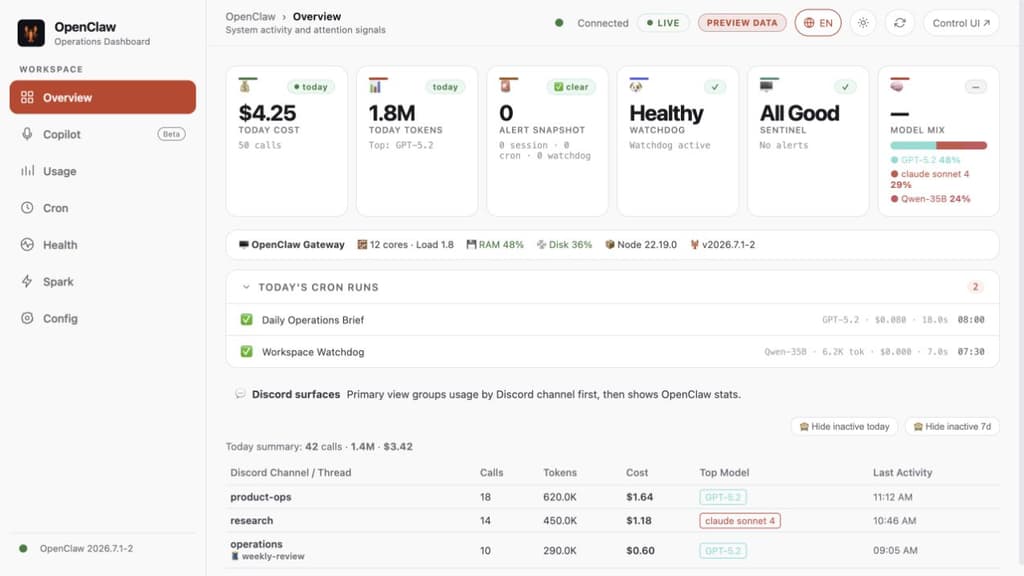
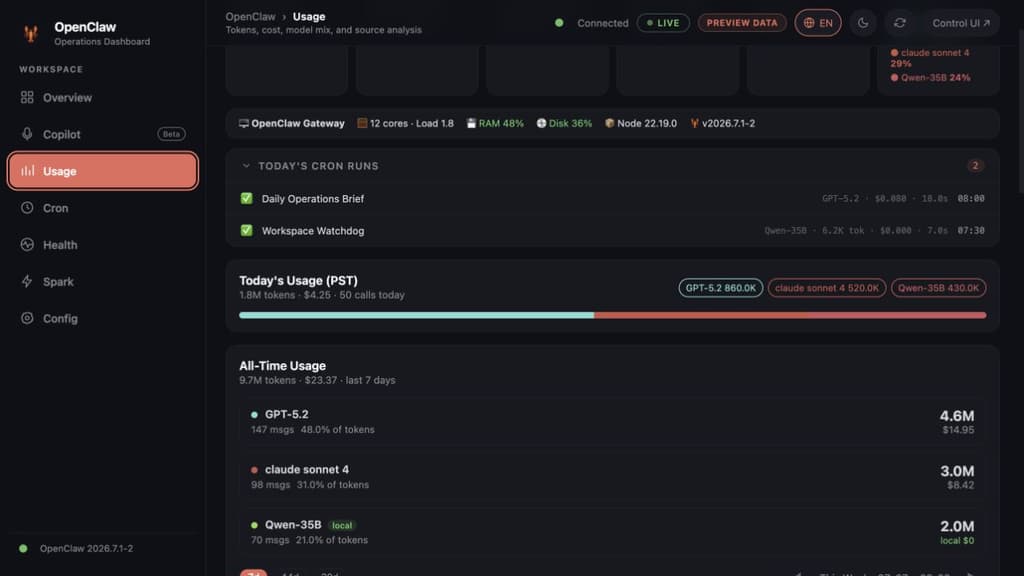

Tell OpenClaw: "Install the openclaw-dashboard skill." The agent will handle the installation and configuration automatically.
openclaw skills install @jonathanjing/openclaw-dashboard
Keep this repository public-safe and easy to run. Prioritize:
The dashboard uses a modular backend + tab-based frontend architecture.
Backend entry point: backend/server.js
Business logic: backend/providers/ — one file per data domain
Frontend: frontend/tabs/ + frontend/shared/ — one JS file per tab
Runtime data: stored in ~/.openclaw/dashboard/ (outside skill dir, not Git-tracked)
| Provider | Routes | Responsibility |
|---|---|---|
sessions.js | /ops/sessions, /api/sessions | Session stats + model |
ledger.js | /ops/ledger/*, /api/cost/* | SQLite token/cost data |
cron.js | /ops/cron, /ops/cron-costs, /cron/today | Cron jobs + run history + cost breakdown |
watchdog.js | /ops/watchdog | Watchdog state + timeline |
spark.js | /ops/dgx-status, /api/spark/* | DGX Spark inference node |
system.js | /ops/system | Host metrics (CPU/RAM/disk) |
local-api-hub.js | /ops/local-api-hub/* | Unified local control-plane status |
spark-tasks.js | /api/spark/tasks/* | DGX task history and PR Hunter output |
copilot.js | /api/copilot/status, /api/copilot/ws | Opt-in realtime transcript/RAG/insights |
ground-truth.js | /api/ground-truth/*, /ops/models | Model registry + colors |
tasks.js | /tasks, /tasks/:id, /logs | Read-only task/history views |
config.js | /ops/config, /files, /skills | Read-only config, file, and skill views |
ops-legacy.js | /ops/channels, /ops/alltime, /ops/audit, /memory | Read-only compatibility views |
| Tab | File | Key functions |
|---|---|---|
| Overview | tabs/overview.js | loadSessions(), loadTasks() |
| Cost | tabs/cost.js | loadOpsChannels(), loadOpsAlltime() |
| Cron | tabs/cron.js | loadCronEnhanced(), loadCronCosts(), loadCronRuns() |
| Health | tabs/health.js | renderAgentMonitor(), loadSystemInfo(), renderWatchdogStatus() |
| Spark | tabs/spark-monitor.js | loadSparkMonitor(), task history, GPU activity |
| Copilot | tabs/copilot.js | capability check, microphone stream, transcript/RAG/insights |
| Config | tabs/config.js | loadConfig(), loadSkills(), loadFileList() |
| Shared | shared/api.js | Auth, apiFetch(), watchdog renderers, toast, markdown |
| Shared | shared/ui-utils.js | timeSince(), task state |
| Shared | shared/boot.js | Init, week nav, chart renderers, confirm dialog |
Use this skill for:
backend/providers/frontend/tabs/ or frontend/shared/api.js and ui-utils.js. Shared utilities belong in api.js (loaded first). ui-utils.js only holds timeSince() and task state.window scope. Keep shared helpers in shared/ files.~/.openclaw/dashboard/, not skill root. Path is set in backend/lib/config.js via OPENCLAW_DASHBOARD_TASKS env or default./ops/models returns { registry: {...object...}, colors, displayNames, models } — registry must be an object keyed by alias, not an array./ops/cron-costs returns { summary, jobs, dailyTrend, review, rows } — all five keys required for Cron tab to render correctly.hideStale query param on /ops/sessions filters sessions with no activity for 7+ days.OPENCLAW_ENABLE_COPILOT=1, an API key, authenticated WebSocket upgrade, and safe dependency failure states.Host header.=, catch percent-decoding errors, and encode cookie values when setting them.start.sh and scripts/test-dashboard.js in both Git and package.json#files.data-tab contracts stable when changing navigation or visual structure.OPENCLAW_AUTH_TOKEN; do not start the dashboard without authentication.process.env.* and safe defaults based on HOME.your_token_here, /path/to/...).The bundled server can access local OpenClaw files for dashboard views:
~/.openclaw/...OPENCLAW_WORKSPACE~/.openclaw/dashboard/tasks.json~/.openclaw/dashboard/attachments/High-sensitivity features are disabled by default and require explicit env flags:
OPENCLAW_ENABLE_CONFIG_ENDPOINT=1 to expose /ops/configOPENCLAW_ENABLE_COPILOT=1 plus ALIBABA_CLOUD_API_KEY to enable meeting CopilotNetwork security:
ds) or Authorization: Bearer header.DASHBOARD_COOKIE_SECURE=1 only when the dashboard origin uses HTTPS.OPENCLAW_CONTROL_UI_URL to the complete runtime URL when Gateway TLS or gateway.controlUi.basePath is enabled.DASHBOARD_CORS_ORIGINS (comma-separated) for external origins.npm test, git diff --check, and npm pack --dry-run --json.Before final response, scan for:
token=, OPENCLAW_AUTH_TOKEN, OPENCLAW_HOOK_TOKENAPI_KEY, SECRET, PASSWORD, COOKIE/Users/, C:\\, machine names, personal emailsIf found: replace with env-based values or placeholders, and mention what was sanitized.
backend/providers/*.js — server behavior and API routesfrontend/tabs/*.js — tab-specific UI logicfrontend/shared/api.js — auth, fetch, shared renderersbackend/lib/config.js — path and env configurationREADME.md — quick start and operator docsenv.example.txt — ClawHub-compatible public-safe environment templateenv.example — compatibility mirror for Git/npm workflows